

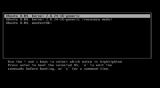
Booting

Encyclopedia
In computing
Computing
Computing is usually defined as the activity of using and improving computer hardware and software. It is the computer-specific part of information technology...
, booting (also known as booting up) is a process that begins when a user turns on a computer system and prepares the computer to perform its normal operations. On modern computers, this typically involves loading and starting an operating system
Operating system
An operating system is a set of programs that manage computer hardware resources and provide common services for application software. The operating system is the most important type of system software in a computer system...
. The boot sequence is the initial set of operations that the computer performs when power is switched on. A boot loader is a computer program
Computer program
A computer program is a sequence of instructions written to perform a specified task with a computer. A computer requires programs to function, typically executing the program's instructions in a central processor. The program has an executable form that the computer can use directly to execute...
that typically loads the main operating system or runtime environment for the computer.
Since the IBM 701
IBM 701
The IBM 701, known as the Defense Calculator while in development, was announced to the public on April 29, 1952, and was IBM’s first commercial scientific computer...
in the 1950s, booting has been used to load programs and operating systems into the main memory
Computer memory
In computing, memory refers to the physical devices used to store programs or data on a temporary or permanent basis for use in a computer or other digital electronic device. The term primary memory is used for the information in physical systems which are fast In computing, memory refers to the...
of stored-program computer
Stored-program computer
A stored-program computer is one which stores program instructions in electronic memory. Often the definition is extended with the requirement that the treatment of programs and data in memory be interchangeable or uniform....
s, including mainframe computer
Mainframe computer
Mainframes are powerful computers used primarily by corporate and governmental organizations for critical applications, bulk data processing such as census, industry and consumer statistics, enterprise resource planning, and financial transaction processing.The term originally referred to the...
s, minicomputer
Minicomputer
A minicomputer is a class of multi-user computers that lies in the middle range of the computing spectrum, in between the largest multi-user systems and the smallest single-user systems...
s, microcomputers, personal computer
Personal computer
A personal computer is any general-purpose computer whose size, capabilities, and original sales price make it useful for individuals, and which is intended to be operated directly by an end-user with no intervening computer operator...
s, and consumer electronics
Consumer electronics
Consumer electronics are electronic equipment intended for everyday use, most often in entertainment, communications and office productivity. Radio broadcasting in the early 20th century brought the first major consumer product, the broadcast receiver...
devices). Some simpler embedded systems do not require a boot sequence to begin functioning and may run programs stored in read-only memory
Read-only memory
Read-only memory is a class of storage medium used in computers and other electronic devices. Data stored in ROM cannot be modified, or can be modified only slowly or with difficulty, so it is mainly used to distribute firmware .In its strictest sense, ROM refers only...
(ROM) when turned on. There are numerous examples of single and multi-stage boot sequences that begin with the execution of boot program(s) stored in boot ROMs. During the booting process, the binary code
Binary code
A binary code is a way of representing text or computer processor instructions by the use of the binary number system's two-binary digits 0 and 1. This is accomplished by assigning a bit string to each particular symbol or instruction...
of an operating system or runtime environment may be loaded from nonvolatile
Non-volatile memory
Non-volatile memory, nonvolatile memory, NVM or non-volatile storage, in the most basic sense, is computer memory that can retain the stored information even when not powered. Examples of non-volatile memory include read-only memory, flash memory, ferroelectric RAM, most types of magnetic computer...
secondary storage (such as a hard disk drive) into volatile, or random-access memory
Random-access memory
Random access memory is a form of computer data storage. Today, it takes the form of integrated circuits that allow stored data to be accessed in any order with a worst case performance of constant time. Strictly speaking, modern types of DRAM are therefore not random access, as data is read in...
(RAM) and then executed. The booting concept is also known as "Initial Program Load" for IBM
IBM
International Business Machines Corporation or IBM is an American multinational technology and consulting corporation headquartered in Armonk, New York, United States. IBM manufactures and sells computer hardware and software, and it offers infrastructure, hosting and consulting services in areas...
mainframe computers.
The computer word boot is short for bootstrap
Bootstrapping
Bootstrapping or booting refers to a group of metaphors that share a common meaning: a self-sustaining process that proceeds without external help....
(itself short for bootstrap load). The term bootstrap derives from the idiom to pull oneself up by one's bootstraps. The term refers to the paradox that a computer cannot run without first loading software but must be running before any software can be loaded.
History
In computers of the 1950s, pressing a bootstrap button caused a hardwired program to read a bootstrap program from a punched cardPunched card
A punched card, punch card, IBM card, or Hollerith card is a piece of stiff paper that contains digital information represented by the presence or absence of holes in predefined positions...
in a card reader
Punched card reader
A punched card reader or just card reader is a computer input device used to read data from punched cards. A card punch is a output device that punches holes in cards under computer control...
, a magnetic tape
Magnetic tape data storage
Magnetic tape data storage uses digital recording on to magnetic tape to store digital information. Modern magnetic tape is most commonly packaged in cartridges and cassettes. The device that performs actual writing or reading of data is a tape drive...
in a tape drive
Tape drive
A tape drive is a data storage device that reads and performs digital recording, writes data on a magnetic tape. Magnetic tape data storage is typically used for offline, archival data storage. Tape media generally has a favorable unit cost and long archival stability.A tape drive provides...
, a magnetic drum
Drum memory
Drum memory is a magnetic data storage device and was an early form of computer memory widely used in the 1950s and into the 1960s, invented by Gustav Tauschek in 1932 in Austria....
unit or magnetic disk
Disk storage
Disk storage or disc storage is a general category of storage mechanisms, in which data are digitally recorded by various electronic, magnetic, optical, or mechanical methods on a surface layer deposited of one or more planar, round and rotating disks...
drive, and then execute the loaded boot program, which loaded a larger system of programs from that medium into memory without further help from the human operator. The term "boot" has been used in this sense since at least 1958. For example, the IBM 701
IBM 701
The IBM 701, known as the Defense Calculator while in development, was announced to the public on April 29, 1952, and was IBM’s first commercial scientific computer...
computer (1952–1956) had a "load" button that initiated reading of the first 36-bit word from a punched card, magnetic tape, or magnetic drum unit. The left 18-bit half-word was then executed as an instruction, which usually read additional words into memory. Similarly, the IBM 1401
IBM 1401
The IBM 1401 was a variable wordlength decimal computer that was announced by IBM on October 5, 1959. The first member of the highly successful IBM 1400 series, it was aimed at replacing electromechanical unit record equipment for processing data stored on punched cards...
system (c. 1958) used a card reader to load a program from a punched card. The 80 characters stored in the punched card were read into memory locations 001 to 080, then the computer would branch to memory location 001 to read its first stored instruction. This instruction was always the same: move the information in these first 80 memory locations to an assembly area where the information in punched cards 2, 3, 4, and so on, could be combined to form the stored program. Once this information was moved to the assembly area, the machine would branch to an instruction in location 080 (read a card) and the next card would be read and its information processed. Essentially, the process was one where each subsequent card was "bootstrapped" into memory by the previous punched card.
The CDC 6600
CDC 6600
The CDC 6600 was a mainframe computer from Control Data Corporation, first delivered in 1964. It is generally considered to be the first successful supercomputer, outperforming its fastest predecessor, IBM 7030 Stretch, by about three times...
(c. 1964) had a dead start panel with 144 toggle switches; the dead start switch entered 12 words from the toggle switches to the memory of peripheral processor (PP) 0 and initiated the load sequence. PP 0 loaded the necessary code into its own memory and then initialized the other PPs.
The GE 645
GE-600 series
The GE-600 series was a family of 36-bit mainframe computers originating in the 1960s, built by General Electric . When GE left the mainframe business the line was sold to Honeywell, who built similar systems into the 1990s as the division moved to Groupe Bull and then NEC.-Architecture:The 600...
(c. 1965) had a "BOOT" button. It is possible that the contraction from "bootstrap" to "boot" was motivated by an inclination to label the button with fewer, larger characters, or the contraction may follow the familiar habit of contracting words to make them easier to say, and to create insider jargon.
Some machines, like the Atari ST
Atari ST
The Atari ST is a home/personal computer that was released by Atari Corporation in 1985 and commercially available from that summer into the early 1990s. The "ST" officially stands for "Sixteen/Thirty-two", which referred to the Motorola 68000's 16-bit external bus and 32-bit internals...
microcomputer
Microcomputer
A microcomputer is a computer with a microprocessor as its central processing unit. They are physically small compared to mainframe and minicomputers...
, were "instant-on", with the operating system executing from a ROM
Read-only memory
Read-only memory is a class of storage medium used in computers and other electronic devices. Data stored in ROM cannot be modified, or can be modified only slowly or with difficulty, so it is mainly used to distribute firmware .In its strictest sense, ROM refers only...
. Retrieval of the OS from secondary or tertiary store was thus eliminated as one of the characteristic operations for bootstrapping. To allow system customizations, accessories, and other support software to be loaded automatically, the Atari's floppy drive was read for additional components during the boot process. There was a timeout delay that provided time to manually insert a floppy as the system searched for the extra components. This could be avoided by inserting a blank disk.
The Multics
Multics
Multics was an influential early time-sharing operating system. The project was started in 1964 in Cambridge, Massachusetts...
operating system (c. 1967) had a boot command.
In the Unix
Unix
Unix is a multitasking, multi-user computer operating system originally developed in 1969 by a group of AT&T employees at Bell Labs, including Ken Thompson, Dennis Ritchie, Brian Kernighan, Douglas McIlroy, and Joe Ossanna...
operating system, the earliest reference for "boot" is probably in The Unix Programmer's Manual, first edition 1971.11.03.
Boot loader
A computer's central processor can only execute program code found in read-only memoryRead-only memory
Read-only memory is a class of storage medium used in computers and other electronic devices. Data stored in ROM cannot be modified, or can be modified only slowly or with difficulty, so it is mainly used to distribute firmware .In its strictest sense, ROM refers only...
(ROM), random access memory (RAM), or (for computers of the 1950s through 1970s) switches on an operator's front panel
Front panel
A front panel was used on early electronic computers to display and allow the alteration of the state of the machine's internal registers and memory. The front panel usually consisted of arrays of indicator lamps, toggle switches, and push buttons mounted on a sheet metal face plate...
. Modern operating systems, application code, and data are stored on nonvolatile data storage devices, such as hard drives, CDs, DVD
DVD
A DVD is an optical disc storage media format, invented and developed by Philips, Sony, Toshiba, and Panasonic in 1995. DVDs offer higher storage capacity than Compact Discs while having the same dimensions....
s, flash memory cards
Memory card
A memory card or flash card is an electronic flash memory data storage device used for storing digital information. They are commonly used in many electronic devices, including digital cameras, mobile phones, laptop computers, MP3 players, and video game consoles...
(like SD cards), USB flash drive
USB flash drive
A flash drive is a data storage device that consists of flash memory with an integrated Universal Serial Bus interface. flash drives are typically removable and rewritable, and physically much smaller than a floppy disk. Most weigh less than 30 g...
s, and floppy disk
Floppy disk
A floppy disk is a disk storage medium composed of a disk of thin and flexible magnetic storage medium, sealed in a rectangular plastic carrier lined with fabric that removes dust particles...
s. When a computer is first powered on, it usually does not have an operating system in ROM or RAM. The computer must execute a relatively small program stored in ROM, along with the bare minimum of data needed to access the nonvolatile devices from which the operating system programs and data may be loaded into RAM.
The small program that starts this sequence is known as a bootstrap loader, bootstrap or boot loader. This small program's only job is to load other data and programs which are then executed from RAM. Often, multiple-stage boot loaders are used, during which several programs of increasing complexity load one after the other in a process of chain loading
Chain loading
Chain loading is a method used by computer programs to replace the currently executing program with a new program, using a common data area to pass information from the current program to the new program. It occurs in several areas of computing.Chain loading is similar to the use of overlays...
.
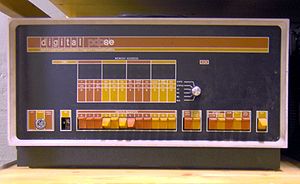
IBM 650
The IBM 650 was one of IBM’s early computers, and the world’s first mass-produced computer. It was announced in 1953, and over 2000 systems were produced between the first shipment in 1954 and its final manufacture in 1962...
, DEC
Digital Equipment Corporation
Digital Equipment Corporation was a major American company in the computer industry and a leading vendor of computer systems, software and peripherals from the 1960s to the 1990s...
PDP-5 through PDP-8
PDP-8
The 12-bit PDP-8 was the first successful commercial minicomputer, produced by Digital Equipment Corporation in the 1960s. DEC introduced it on 22 March 1965, and sold more than 50,000 systems, the most of any computer up to that date. It was the first widely sold computer in the DEC PDP series of...
, early models of the PDP-11
PDP-11
The PDP-11 was a series of 16-bit minicomputers sold by Digital Equipment Corporation from 1970 into the 1990s, one of a succession of products in the PDP series. The PDP-11 replaced the PDP-8 in many real-time applications, although both product lines lived in parallel for more than 10 years...
, and early microcomputers such as the Altair 8800
Altair 8800
The MITS Altair 8800 was a microcomputer design from 1975 based on the Intel 8080 CPU and sold by mail order through advertisements in Popular Electronics, Radio-Electronics and other hobbyist magazines. The designers hoped to sell only a few hundred build-it-yourself kits to hobbyists, and were...
) had a row of dials or toggle switches on the front panel that allowed the operator to manually enter the boot instructions into memory before transferring control to the CPU
Central processing unit
The central processing unit is the portion of a computer system that carries out the instructions of a computer program, to perform the basic arithmetical, logical, and input/output operations of the system. The CPU plays a role somewhat analogous to the brain in the computer. The term has been in...
. They could also be used to pass instructions directly to the CPU. Interestingly, the PDP-1 had a hardware built-in loader, such that an operator only needed to push the "load" switch and the paper tape reader would read a program directly into core memory. The boot loader would then read in either the second-stage boot loader (called Binary Loader of paper tape with checksum
Checksum
A checksum or hash sum is a fixed-size datum computed from an arbitrary block of digital data for the purpose of detecting accidental errors that may have been introduced during its transmission or storage. The integrity of the data can be checked at any later time by recomputing the checksum and...
) or the operating system from an outside storage medium such as paper tape, punched card, or a disk drive.
Pseudocode
Pseudocode
In computer science and numerical computation, pseudocode is a compact and informal high-level description of the operating principle of a computer program or other algorithm. It uses the structural conventions of a programming language, but is intended for human reading rather than machine reading...
for the bootloader might be as simple as the following eight instructions:
- Set the P register to 9
- Check paper tape reader ready
- If not ready, jump to 2
- Read a byte from paper tape reader to accumulator
- If end of tape, jump to 9
- Store accumulator to address in P register
- Increment the P register
- Jump to 2
A related example is based on a loader for a 1970's Nicolet Instrument Corporation minicomputer. Note that the bytes of the second-stage loader are read from paper tape in reverse order.
- Set the P register to 106
- Check paper tape reader ready
- If not ready, jump to 2
- Read a byte from paper tape reader to accumulator
- Store accumulator to address in P register
- Decrement the P register
- Jump to 2
The length of the second stage loader is such that the final byte overwrites location 7. After the instruction in location 6 executes, location 7 starts the second stage loader executing. The second stage loader then waits for the much longer tape containing the operating system to be placed in the tape reader. The difference between the boot loader and second stage loader is the addition of checking code to trap paper tape read errors, a frequent occurrence with the hardware of the time, which in this case was an Teletype Model 33 ASR.
Some computer systems, upon receiving a boot signal from a human operator or a peripheral device, may load a very small number of fixed instructions into memory at a specific location, initialize at least one CPU, and then point the CPU to the instructions and start their execution. These instructions typically start an input operation from some peripheral device (which may be switch-selectable by the operator). Other systems may send hardware commands directly to peripheral devices or I/O controllers that cause an extremely simple input operation (such as "read sector zero of the system device into memory starting at location 1000") to be carried out, effectively loading a small number of bootload instructions into memory; a completion signal from the I/O device may then be used to start execution of the instructions by the CPU.
Smaller computers often use less flexible but more automatic bootload mechanisms to ensure that the computer starts quickly and with a predetermined software configuration. In many desktop computers, for example, the bootstrapping process begins with the CPU executing software contained in ROM (for example, the BIOS
BIOS
In IBM PC compatible computers, the basic input/output system , also known as the System BIOS or ROM BIOS , is a de facto standard defining a firmware interface....
of an IBM PC
IBM PC
The IBM Personal Computer, commonly known as the IBM PC, is the original version and progenitor of the IBM PC compatible hardware platform. It is IBM model number 5150, and was introduced on August 12, 1981...
) at a predefined address (some CPUs, including the Intel x86 series
Intel 8086
The 8086 is a 16-bit microprocessor chip designed by Intel between early 1976 and mid-1978, when it was released. The 8086 gave rise to the x86 architecture of Intel's future processors...
are designed to execute this software after reset without outside help). This software contains rudimentary functionality to search for devices eligible to participate in booting, and load a small program from a special section (most commonly the boot sector
Boot sector
A boot sector or boot block is a region of a hard disk, floppy disk, optical disc, or other data storage device that contains machine code to be loaded into random-access memory by a computer system's built-in firmware...
) of the most promising device.
Boot loaders may face peculiar constraints, especially in size; for instance, on the IBM PC and compatibles, the first stage of boot loaders located on hard drives must fit into the first 446 bytes (or 440 bytes if Windows NT or above has to be supported because NT put 6 byte disk-signature starting from offset 440) of the Master Boot Record, in order to leave room for the 64-byte partition table
Partition table
The term partition table is most commonly associated with partition table but it may be used generically to refer to other "formats" that divide a disk drive into partitions, such as: GUID Partition Table, Apple partition map, or BSD disklabel.An alternative term to generically refer to partition...
and the 2-byte 0xAA55 'signature', which the BIOS requires for a proper boot loader.
Some operating systems, most notably pre-1995 Macintosh systems from Apple, are so closely interwoven with their hardware that it is impossible to natively boot an operating system other than the standard one. This is the opposite extreme of the bootload using switches mentioned above; it is highly inflexible but relatively error-proof and foolproof as long as all hardware is working normally. A common solution in such situations is to design a bootloader that works as a program belonging to the standard OS that hijacks the system and loads the alternative OS. This technique was used by Apple for its A/UX
A/UX
A/UX was Apple Computer’s implementation of the Unix operating system for some of their Macintosh computers. The later versions of A/UX ran on the Macintosh II, Quadra and Centris series of machines as well as the SE/30. A/UX was first released in 1988, with the final version released in 1995...
Unix implementation and copied by various freeware operating systems and BeOS Personal Edition 5
BeOS
BeOS is an operating system for personal computers which began development by Be Inc. in 1991. It was first written to run on BeBox hardware. BeOS was optimized for digital media work and was written to take advantage of modern hardware facilities such as symmetric multiprocessing by utilizing...
.
The Atari ST
Atari ST
The Atari ST is a home/personal computer that was released by Atari Corporation in 1985 and commercially available from that summer into the early 1990s. The "ST" officially stands for "Sixteen/Thirty-two", which referred to the Motorola 68000's 16-bit external bus and 32-bit internals...
also had its operating system in ROM, but by inserting the Spectre GCR
Spectre GCR
The Spectre GCR was a hardware add-on to the Atari ST computers that plugged into the cartridge port. Designed by David Small and sold through his company Gadgets by Small, it essentially turned the Atari ST into an Apple Macintosh computer...
cartridge with the Macintosh system ROM in the game slot and turning the Atari on, it could "natively boot" the Macintosh operating system rather than Atari's own TOS
Atari TOS
TOS is the operating system of the Atari ST range of computers. This range includes the 520 and 1040ST, their STF/M/FM and STE variants and the Mega ST/STE. Later, 32-bit machines were developed using a new version of TOS, called MultiTOS, which allowed multitasking...
system. The Atari ST
Atari ST
The Atari ST is a home/personal computer that was released by Atari Corporation in 1985 and commercially available from that summer into the early 1990s. The "ST" officially stands for "Sixteen/Thirty-two", which referred to the Motorola 68000's 16-bit external bus and 32-bit internals...
hardware was designed so the cartridge slot could provide native program execution for gaming purposes as a holdover from Atari's legacy making electronic games.
Common primary boot loaders include:
- BIOSBIOSIn IBM PC compatible computers, the basic input/output system , also known as the System BIOS or ROM BIOS , is a de facto standard defining a firmware interface....
- EFIExtensible Firmware InterfaceThe Unified Extensible Firmware Interface is a specification that defines a software interface between an operating system and platform firmware...
- OpenBIOSOpenBIOSOpenBIOS is a project aiming to provide free and open source implementations of Open Firmware. It is also the name of such an implementation.Most of the implementations provided by OpenBIOS rely on an additional lower-level firmware for hardware initialization, such as coreboot or Das U-Boot.- Open...
- OpenBoot
- SLOF
Second-stage boot loader
Second-stage boot loaders, such as GRUBGNU GRUB
GNU GRUB is a boot loader package from the GNU Project. GRUB is the reference implementation of the Multiboot Specification, which provides a user the choice to boot one of multiple operating systems installed on a computer or select a specific kernel configuration available on a particular...
, BOOTMGR, Syslinux
SYSLINUX
The SYSLINUX Project is a suite of lightweight IBM PC MBR bootloaders for starting up computers with the Linux kernel. It is the work of H. Peter Anvin, and consists of several separate systems, the best-known of which is ISOLINUX.-List:...
, LILO or NTLDR
NTLDR
NTLDR is the boot loader for all releases of Windows NT operating system up to and including Windows XP and Windows Server 2003. NTLDR is typically run from the primary hard disk drive, but it can also run from portable storage devices such as a CD-ROM, USB flash drive, or floppy disk...
, are most often not themselves an operating system, but are able to load the operating system properly and transfer execution to it. The operating system will initialize itself, and may load device driver
Device driver
In computing, a device driver or software driver is a computer program allowing higher-level computer programs to interact with a hardware device....
s that are needed for the normal operation of the OS. After that it starts loading normal system programs.
Many bootloaders (like GRUB, BOOTMGR, LILO, and NTLDR) can be configured to give the user multiple booting choices. These choices can include different operating systems (for dual or multi-booting
Dual boot
Multi-boot or Multi-booting is the act of installing multiple operating systems on a computer, and being able to choose which one to boot when starting the computer. The term dual-booting refers to the common configuration of exactly two operating systems...
from different partitions or drives), different versions of the same operating system (in case a new version has unexpected problems), different operating system loading options (e.g., booting into a rescue or safe mode
Safe Mode
Safe mode is a diagnostic mode of a computer operating system . It can also refer to a mode of operation by application software. Safe mode is intended to fix most, if not all problems within an operating system...
), and some standalone programs that can function without an operating system, such as memory testers (e.g., memtest86+) or even games (see List of PC Booter games). Usually a default choice is preselected with a time delay during which a user can press a key to change the choice; after this delay the default choice is automatically run so normal booting can occur without interaction.
The boot process can be considered complete when the computer is ready to interact with the user, or the operating system is capable of running system programs or application programs. Typical modern personal computers boot in about one minute, of which about 15 seconds are taken by a power-on self test (POST) and a preliminary boot loader, and the rest by loading the operating system and other software. Time spent after the operating system loading can be considerably shortened to as little as 3 seconds by bringing the system up with all cores at once
Symmetric multiprocessing
In computing, symmetric multiprocessing involves a multiprocessor computer hardware architecture where two or more identical processors are connected to a single shared main memory and are controlled by a single OS instance. Most common multiprocessor systems today use an SMP architecture...
, as with coreboot. Large servers may take several minutes to boot and start all their services.
Many embedded system
Embedded system
An embedded system is a computer system designed for specific control functions within a larger system. often with real-time computing constraints. It is embedded as part of a complete device often including hardware and mechanical parts. By contrast, a general-purpose computer, such as a personal...
s must boot immediately. For example, waiting a minute for a digital television
Television set
A television set is a device that combines a tuner, display, and speakers for the purpose of viewing television. Television sets became a popular consumer product after the Second World War, using vacuum tubes and cathode ray tube displays...
or GPS satellites
Global Positioning System
The Global Positioning System is a space-based global navigation satellite system that provides location and time information in all weather, anywhere on or near the Earth, where there is an unobstructed line of sight to four or more GPS satellites...
to start is generally unacceptable. Therefore such devices have software systems in ROM or flash memory
Flash memory
Flash memory is a non-volatile computer storage chip that can be electrically erased and reprogrammed. It was developed from EEPROM and must be erased in fairly large blocks before these can be rewritten with new data...
so the device can begin functioning immediately. For these types of embedded system little or no loading is necessary, since the loading can be precomputed and stored on the ROM when the device is made.
Large and complex systems may have boot procedures that proceed in multiple phases, each phase loading a more complex version of itself, until finally the operating system and other software are loaded and ready to execute. Because operating systems are designed as if they never start or stop, bootload processes sometimes load the operating system, configure themselves as a mere process within that system, and then irrevocably transfer control to the operating system. The bootload process then terminates normally as any other process would, and the user need not have any awareness of the bootload.
Network booting
Most computers are also capable of booting over a computer networkComputer network
A computer network, often simply referred to as a network, is a collection of hardware components and computers interconnected by communication channels that allow sharing of resources and information....
. In this scenario, the operating system is stored on the disk of a server
Server (computing)
In the context of client-server architecture, a server is a computer program running to serve the requests of other programs, the "clients". Thus, the "server" performs some computational task on behalf of "clients"...
, and certain parts of it are transferred to the client using a simple protocol such as the Trivial File Transfer Protocol
Trivial File Transfer Protocol
Trivial File Transfer Protocol is a file transfer protocol known for its simplicity. It is generally used forautomated transfer of configuration or boot files between machines in a local environment....
. After these parts have been transferred, the operating system then takes over control of the booting process.
Boot devices (IBM PC)
The boot device is the device from which the operating system is loaded. A modern PC BIOSBIOS
In IBM PC compatible computers, the basic input/output system , also known as the System BIOS or ROM BIOS , is a de facto standard defining a firmware interface....
supports booting from various devices, typically a local hard disk drive (or one of several partitions
Disk partitioning
Disk partitioning is the act of dividing a hard disk drive into multiple logical storage units referred to as partitions, to treat one physical disk drive as if it were multiple disks. Partitions are also termed "slices" for operating systems based on BSD, Solaris or GNU Hurd...
on such a disk), an optical disc drive, a USB
Universal Serial Bus
USB is an industry standard developed in the mid-1990s that defines the cables, connectors and protocols used in a bus for connection, communication and power supply between computers and electronic devices....
device (flash drive, hard disk drive, optical disc drive, etc.), a flash memory card such as an SD card in a multi-media card slot
Memory card reader
A memory card reader is a device, typically having a USB interface, for accessing the data on a memory card such as a CompactFlash , Secure Digital or MultiMediaCard...
, or a network interface card (using PXE
Preboot Execution Environment
The Preboot eXecution Environment is an environment to boot computers using a network interface independently of data storage devices or installed operating systems.PXE was introduced as part of the Wired for Management framework by Intel and is described in the specification The Preboot...
). Older, less common bootable devices include floppy disk drives, SCSI
SCSI
Small Computer System Interface is a set of standards for physically connecting and transferring data between computers and peripheral devices. The SCSI standards define commands, protocols, and electrical and optical interfaces. SCSI is most commonly used for hard disks and tape drives, but it...
devices, Zip drive
Zip drive
The Zip drive is a medium-capacity removable disk storage system that was introduced by Iomega in late 1994. Originally, Zip disks launched with capacities of 100 MB, but later versions increased this to first 250 MB and then 750 MB....
s, and LS-120 drives.
Typically, the BIOS will allow the user to configure a boot order. If the boot order is set to "first, the DVD drive; second, the hard disk drive", then the BIOS will try to boot from the DVD drive, and if this fails (e.g. because there is no DVD in the drive), it will try to boot from the local hard drive.
For example, on a PC with Windows XP
Windows XP
Windows XP is an operating system produced by Microsoft for use on personal computers, including home and business desktops, laptops and media centers. First released to computer manufacturers on August 24, 2001, it is the second most popular version of Windows, based on installed user base...
installed on the hard drive, the user could set the boot order to the one given above, and then insert a Linux
Linux
Linux is a Unix-like computer operating system assembled under the model of free and open source software development and distribution. The defining component of any Linux system is the Linux kernel, an operating system kernel first released October 5, 1991 by Linus Torvalds...
Live CD
Live CD
A live CD, live DVD, or live disc is a CD or DVD containing a bootable computer operating system. Live CDs are unique in that they have the ability to run a complete, modern operating system on a computer lacking mutable secondary storage, such as a hard disk drive...
in order to try out Linux
Linux
Linux is a Unix-like computer operating system assembled under the model of free and open source software development and distribution. The defining component of any Linux system is the Linux kernel, an operating system kernel first released October 5, 1991 by Linus Torvalds...
without having to install an operating system onto the hard drive. This is an example of dual booting ‒ the user choosing which operating system to start after the computer has performed its POST. In this example of dual booting, the user chooses by inserting or removing the CD from the computer, but it is more common to choose which operating system to boot by selecting from a menu using the computer keyboard. (Typically
F11 or ESC)Boot sequence on standard PC (IBM-PC compatible)
Upon starting, a personal computer's x86 CPU runs the instruction located at the memory location CS:IP F000:FFF0 of the BIOSBIOS
In IBM PC compatible computers, the basic input/output system , also known as the System BIOS or ROM BIOS , is a de facto standard defining a firmware interface....
, which wraps to linear address 0xFFFF0, the BIOS entry inside the ROM. This memory location is close to the end of the of system memory accessible in real mode
Real mode
Real mode, also called real address mode, is an operating mode of 80286 and later x86-compatible CPUs. Real mode is characterized by a 20 bit segmented memory address space and unlimited direct software access to all memory, I/O addresses and peripheral hardware...
. It typically contains a jump instruction that transfers execution to the location of the BIOS start-up program. This program runs a power-on self test (POST) to check and initialize required devices. The BIOS goes through a pre-configured list of non-volatile storage devices
Non-volatile memory
Non-volatile memory, nonvolatile memory, NVM or non-volatile storage, in the most basic sense, is computer memory that can retain the stored information even when not powered. Examples of non-volatile memory include read-only memory, flash memory, ferroelectric RAM, most types of magnetic computer...
("boot device sequence") until it finds one that is bootable. A bootable device is defined as one that can be read from, and the last two bytes of the first sector contain the word 0xAA55 (also known as the boot signature).
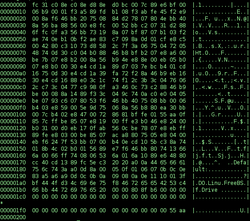
Master boot record
A master boot record is a type of boot sector popularized by the IBM Personal Computer. It consists of a sequence of 512 bytes located at the first sector of a data storage device such as a hard disk...
(MBR) and is often not operating system specific. The conventional MBR code checks the MBR's partition table for a partition set as bootable (the one with active flag set). If an active partition is found, the MBR code loads the boot sector code from that partition and executes it. The boot sector is often operating-system-specific; however, in most operating systems its main function is to load and execute the operating system kernel, which continues startup. If there is no active partition, or the active partition's boot sector is invalid, the MBR may load a secondary boot loader which will select a partition (often via user input) and load its boot sector, which usually loads the corresponding operating system kernel.
Some systems (particularly newer Macintoshes and new editions of Microsoft Windows
Microsoft Windows
Microsoft Windows is a series of operating systems produced by Microsoft.Microsoft introduced an operating environment named Windows on November 20, 1985 as an add-on to MS-DOS in response to the growing interest in graphical user interfaces . Microsoft Windows came to dominate the world's personal...
) use Intel's proprietary EFI
Extensible Firmware Interface
The Unified Extensible Firmware Interface is a specification that defines a software interface between an operating system and platform firmware...
. Also coreboot allows a computer to boot without having an over-complicated firmware/BIOS constantly running in system management mode
System Management Mode
System Management Mode is an operating mode in which all normal execution is suspended, and special separate software is executed in high-privilege mode. It was first released with the Intel 386SL...
. The legacy 16-bit BIOS interfaces are required by certain x86 operating systems, such as Windows 3.1/95/98. However most boot loaders have 16-bit support for these legacy BIOS systems.
Most PCs, if a BIOS
BIOS
In IBM PC compatible computers, the basic input/output system , also known as the System BIOS or ROM BIOS , is a de facto standard defining a firmware interface....
chip is present, will show a screen detailing the BIOS chip manufacturer, copyright
Copyright
Copyright is a legal concept, enacted by most governments, giving the creator of an original work exclusive rights to it, usually for a limited time...
held by the chip's manufacturer and the ID of the chip at startup. At the same time, it also shows the amount of computer memory available and other pieces of information about the computer.
Other kinds of boot sequences
Some other processors have other kinds of boot modes.There are alternative techniques for booting CPUs and microcontrollers:
- Some modern CPUs and microcontrollers (for example, TITexas InstrumentsTexas Instruments Inc. , widely known as TI, is an American company based in Dallas, Texas, United States, which develops and commercializes semiconductor and computer technology...
OMAPOMAPOMAP developed by Texas Instruments is a category of proprietary system on chips for portable and mobile multimedia applications. OMAP devices generally include a general-purpose ARM architecture processor core plus one or more specialized co-processors...
) or sometimes even DSPs may have boot ROM with boot code integrated directly into their silicon, so such a processor could perform quite a sophisticated boot sequence on its own and load boot programs from various sources like NAND flash, SD or MMC card and so on. It is hard to hardwire all the required logic for handling such devices, so an integrated boot ROM is used instead in such scenarios. Boot ROM usage enables more flexible boot sequences than hardwired logic could provide. For example, the boot ROM could try to perform boot from multiple boot sources. Also, a boot ROM is often able to load a boot loader or diagnostic program via serial interfaces like UART, SPISerial Peripheral Interface BusThe Serial Peripheral Interface Bus or SPI bus is a synchronous serial data link standard named by Motorola that operates in full duplex mode. Devices communicate in master/slave mode where the master device initiates the data frame. Multiple slave devices are allowed with individual slave select ...
, USB and so on. This feature is often used for system recovery purposes when for some reasons usual boot software in non-volatile memory got erased. This technique could also be used for initial non-volatile memory programming when there is clean non-volatile memory installed and hence no software available in the system yet. - It is also possible to take control of a system by using a hardware debug interface such as JTAGJTAGJoint Test Action Group is the common name for what was later standardized as the IEEE 1149.1 Standard Test Access Port and Boundary-Scan Architecture. It was initially devised for testing printed circuit boards using boundary scan and is still widely used for this application.Today JTAG is also...
. Such an interface may be used to write the boot loader program into bootable non-volatile memory (e.g. flash) by instructing the processor core to perform the necessary actions to program non-volatile memory. Alternatively, the debug interface may be used to upload some diagnostic or boot code into RAM, and then to start the processor core and instruct it to execute the uploaded code. This allows, for example, the recovery of embedded systems where no software remains on any supported boot device, and where the processor does not have any integrated boot ROM. JTAG is a standard and popular interface; many CPUs, microcontrollers and other devices are manufactured with JTAG interfaces (as of 2009). - Some microcontrollers provide special hardware interfaces which can't be used to take arbitrary control of a system or directly run code, but instead they allow the insertion of boot code into bootable non-volatile memory (like flash memory) via simple protocols. Then at the manufacturing phase, such interfaces are used to inject boot code (and possibly other code) into non-volatile memory. After system reset, the microcontroller begins to execute code programmed into its non-volatile memory, just like usual processors are using ROMs for booting. Most notably this technique is used by Atmel AVRAtmel AVRThe AVR is a modified Harvard architecture 8-bit RISC single chip microcontroller which was developed by Atmel in 1996. The AVR was one of the first microcontroller families to use on-chip flash memory for program storage, as opposed to one-time programmable ROM, EPROM, or EEPROM used by other...
microcontrollers, and by others as well. In many cases such interfaces are implemented by hardwired logic. In other cases such interfaces could be created by software running in integrated on-chip boot ROM from GPIOGPIOGeneral Purpose Input/Output is a generic pin on a chip whose behavior can be controlled through software....
pins.
Most digital signal processor
Digital signal processor
A digital signal processor is a specialized microprocessor with an architecture optimized for the fast operational needs of digital signal processing.-Typical characteristics:...
s have the following boot modes:
- Serial mode boot
- Parallel mode boot, such as the host port interface (HPI boot)
In case of DSPs there is often a second microprocessor or microcontroller present in the system design, and this is responsible for overall system behavior, interrupt handling, dealing with external events, user interface, etc. while the DSP is dedicated to signal processing tasks only. In such systems the DSP could be booted by another processor which is sometimes referred as the host processor (giving name to a Host Port). Such a processor is also sometimes referred as the master, since it usually boots first from its own memories and then controls overall system behavior, including booting of the DSP, and then further controlling the DSP's behavior. The DSP often lacks its own boot memories and relies on the host processor to supply the required code instead. The most notable systems with such a design are cell phones, modems, audio and video players and so on, where a DSP and a CPU/microcontroller are co-existing.
Many FPGA chips load their configuration from an external serial EEPROM
EEPROM
EEPROM stands for Electrically Erasable Programmable Read-Only Memory and is a type of non-volatile memory used in computers and other electronic devices to store small amounts of data that must be saved when power is removed, e.g., calibration...
("configuration ROM") on power-up.
IBM Initial Program Load
In current IBM mainframeIBM mainframe
IBM mainframes are large computer systems produced by IBM from 1952 to the present. During the 1960s and 1970s, the term mainframe computer was almost synonymous with IBM products due to their marketshare...
systems, the boot process is known as Initial Program Load (IPL).
This term was coined by IBM for the design of the System/360
System/360
The IBM System/360 was a mainframe computer system family first announced by IBM on April 7, 1964, and sold between 1964 and 1978. It was the first family of computers designed to cover the complete range of applications, from small to large, both commercial and scientific...
(ca, 1965) and continues to be used in those environments today. In the System/360 processors, an IPL is initiated by the computer operator by selecting the three hexadecimal digit device address (CUU; C=I/O Channel address, UU=Control Unit and device addressSome control units attached only 8 devices; some attached more than 16.) followed by pressing the LOAD button. On System/370
System/370
The IBM System/370 was a model range of IBM mainframes announced on June 30, 1970 as the successors to the System/360 family. The series maintained backward compatibility with the S/360, allowing an easy migration path for customers; this, plus improved performance, were the dominant themes of the...
and some later systems, the functions of the switches and the LOAD button are simulated using selectable areas on the screen of a graphics console, often an IBM 2250
IBM 2250
The IBM 2250 Graphics Display Unit was announced as part of System/360 in 1964. Unlike most modern computer displays, which show images in raster format, the IBM 2250 used vector graphics. A display list of line segments on a 1024 by 1024 grid was stored in the computer's memory and repainted on...
-like device or an IBM 3270
IBM 3270
The IBM 3270 is a class of block oriented terminals made by IBM since 1972 normally used to communicate with IBM mainframes. As such, it was the successor to the IBM 2260 display terminal. Due to the text colour on the original models, these terminals are informally known as green screen terminals...
-like device. For example, on the System/370 Model 158, the keyboard sequence 0-7-X (zero, seven and X, in that order) results in an IPL from the device address which was keyed into the input area. Amdahl 470V/6 and related CPUs supported four hexadecimal digits on those CPUs which had the optional second channel unit installed, for a total of 32 channels. Later, IBM would also support more than 16 channels.
The IPL function in the System/360 and its successors, and its compatibles such as Amdahl's, reads 24 bytes from an operator-specified device into memory starting at location zero. The second and third groups of eight bytes are treated as Channel Command Words (CCWs) to continue loading the startup program (the first CCW is always simulated by the CPU and consists of a READ IPL command, 0x02, with command chaining and suppress incorrect length implied). When the I/O channel commands are complete, the first group of eight bytes is then loaded into the Program Status Word (PSW) and the startup program begins execution at the designated location. The IPL device is usually a disk drive, but exactly the same procedure is also used to IPL from other input-type devices, such as tape drive
Tape drive
A tape drive is a data storage device that reads and performs digital recording, writes data on a magnetic tape. Magnetic tape data storage is typically used for offline, archival data storage. Tape media generally has a favorable unit cost and long archival stability.A tape drive provides...
s, or even card reader
Card reader
A card reader is a data input device that reads data from a card-shaped storage medium. Historically, paper or cardboard punched cards were used throughout the first several decades of the computer industry to store information and programs for computer system, and were read by punched card readers...
s, in a device-independent manner, allowing, for example, the installation of an operating system on a brand-new computer from an OS initial distribution magnetic tape (for disk controllers, the 0x02 command also causes the selected device to seek to cylinder 0x0000, head 0x0000, and to search for record 0x01, thereby also simulating a stand-alone seek command, 0x07, and a search ID equal command, 0x31; seeks and searches are not simulated by tape and card controllers).
The disk, tape or card deck must contain a special program to load the actual operating system into memory, and for this specific purpose "IPL Text" is placed on the disk by the stand-alone DASDI (Direct Access Storage Device Initialization) program or an equivalent program running under an operating system, e.g., ICKDSF, but IPL-able tapes and card decks are distributed with this "IPL Text" already present.
Burroughs Bootstrap From Tape
A noteworthy variation of this is found on the Burroughs B1700 where there is neither a bootstrap ROM nor a hardwired IPL operation. Instead, after the system is reset it reads and executes opcodes sequentially from a tape drive mounted on the front panel; this sets up a boot loader in RAM which is then executed. However, since this makes few assumptions about the system it can equally well be used to load diagnostic (Maintenance Test Routine) tapes which display an intelligible code on the front panelFront panel
A front panel was used on early electronic computers to display and allow the alteration of the state of the machine's internal registers and memory. The front panel usually consisted of arrays of indicator lamps, toggle switches, and push buttons mounted on a sheet metal face plate...
even in cases of gross CPU failure.
Quick boot
Several devices are available that enable the user to "quick-boot" to a usually Linux-powered OS for various simple tasks such as Internet access (such as SplashtopSplashtop
Splashtop is a remote desktop software solution that allows users to connect to and control their computer from a mobile computing device, such as an iPad, iPhone, webOS, or Android device...
and Latitude ON
Latitude ON
Latitude ON is an instant on computer system made by Dell. It is a combination of software and hardware developed by Dell and used in some of their Latitude laptops. The system is based on a dedicated ARM processor that runs a custom version of a Linux OS...
).
See also
- Boot diskBoot diskA boot disk is a removable digital data storage medium from which a computer can load and run an operating system or utility program. The computer must have a built-in program which will load and execute a program from a boot disk meeting certain standards.Boot disks are used for:* Operating...
- Bootkit
- Comparison of boot loadersComparison of boot loadersThe following tables compare general and technical information for a number of available boot loaders.-Features:- External links :* * Let you boot legacy PCs from CD-ROM and USB without BIOS support...
- Das U-BootDas U-BootDas U-Boot is an open source, primary boot loader used in embedded devices. It is available for a number of different computer architectures, including PPC, ARM, MIPS, AVR32, x86, 68k, Nios, and MicroBlaze.- Supported File Systems :...
- Linux startup processLinux startup processThe Linux startup process is the process of Linux-operating system initialization. It is in many ways similar to the BSD and other Unix style boot processes, from which it derives.-Overview of typical process:...
- Live CDLive CDA live CD, live DVD, or live disc is a CD or DVD containing a bootable computer operating system. Live CDs are unique in that they have the ability to run a complete, modern operating system on a computer lacking mutable secondary storage, such as a hard disk drive...
- Live USBLive USBA live USB is a USB flash drive or a USB external hard disk drive containing a full operating system that can be booted. Live USBs are closely related to live CDs, but sometimes have the ability to persistently save settings and permanently install software packages back onto the USB device...
- MicrorebootMicrorebootMicrorebooting is a technique used to recover from failures in crash-only software systems. Instead of rebooting the whole system, only subsets of fine-grain components are restarted...
- Multi boot
- Network bootingNetwork bootingNetwork booting is the process of booting a computer from a network rather than a local drive. This method of booting can be used by routers, diskless workstations and centrally managed computers such as public computers at libraries and schools...
- PC booterPC booterA PC booter, or booter, is a type of software for home computer era personal computers that was loaded and executed in the bootup of the computer, from a bootable floppy disk, rather than as a regular program; a booter thus bypassed any operating system that might be installed on the hard disk of...
- Rebooting (computing)Rebooting (computing)In computing, rebooting is the process by which a running computer system is restarted.Reboots can be either "hard", whereby the power to the system is physically turned off, or "soft" where the system restarts without the need to interrupt the power or trigger a reset line.- Hard reboot :A hard...
- RedBootRedBootRedBoot is an open source application that uses the eCos real-time operating system Hardware Abstraction Layer to provide bootstrap firmware for embedded systems...
- Windows NT Startup ProcessWindows NT Startup ProcessThe Windows NT startup process is the process by which Windows NT 4.0, Windows 2000, Windows XP and Windows Server 2003 operating systems initialize...
- Windows Vista startup processWindows Vista Startup ProcessThe startup process of Windows Vista, Windows Server 2008, Windows 7 and Windows Server 2008 R2 is different from any previous versions of Windows. For Windows Vista, the boot sector loads the Windows Boot Manager , which first looks for an active partition, then accesses the Boot Configuration...
- Windows To GoWindows To GoWindows To Go is a feature in Windows 8 that allows the entire system to run from USB mass storage devices such as flash drives and external hard drives....
Further reading
- How Computers Boot Up
- Practical bootloader tutorial for ATmega microcontrollers
- Booting with Grub at OSDEV Community
- Tutorial on writing hello world bootloader
- x86 BootStrap Programming Tutorial
- Bootstrapping FreeBSD
- The Linux boot process unveiled
- Mac OS X Boot Process
- The DOS and DOS/Windows boot processes
- Windows Mobile 5.0 Soft Reset
- Pocket PC devices hard reset and soft reset
- Cell phone, Tablet and Pocket PC devices hard reset and soft reset
- Understanding Multibooting