

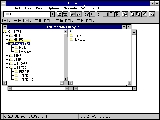
File manager

Encyclopedia
A file manager or file browser is a computer program
that provides a user interface
to work with file system
s. The most common operations performed on files or groups of files are: create, open, edit, view
, print
, play
, rename, move, copy
, delete
, search/find, and modify file attribute
s, properties and file permissions. Files are typically displayed in a hierarchy
. Some file managers contain features inspired by web browser
s, including forward and back navigational buttons.
Some file managers provide network
connectivity via protocols
, such as FTP
, NFS, SMB
or WebDAV
. This is achieved by allowing the user to browse for a file server
(connecting and accessing the server's file system like a local file system) or by providing its own full client implementations for file server protocols.
A directory editor was written for EXEC 8
at the University of Maryland, and was available to other users at that time. The term was used by other developers, including Jay Lepreau, who wrote the dired program in 1980,
which ran on BSD. This was in turn inspired by an older program with the same name running on TOPS-20
. Dired inspired other programs, including dired
, the editor script (for emacs
and similar editors), and ded.
.
This is a variant of fulist, which originated before late 1978, according to comments by its author, Theo Alkema.
The flist program provided a list of files in the user's minidisk, and allowed sorting by any file attribute. The file attributes could be passed to scripts or function-key definitions, making it simple to use flist as part of CMS EXEC
, EXEC 2
or xedit
scripts.
This program ran only on IBM VM/SP CMS, but was the inspiration for other programs, including filelist (a script run via the Xedit
editor), and programs running on other operating systems, including a program also called flist, which ran on OpenVMS
, and fulist (from the name of the corresponding internal IBM program), which runs on Unix.
and John Socha
's famous Norton Commander
for DOS
. The concept is more than twentyfive years old—PathMinder was released in 1984, and Norton Commander version 1.0 was released in 1986. Despite the age of this concept, file managers based on Norton Commander are actively developed, and dozens of implementations exist for DOS, Unix and Microsoft Windows. Nikolai Bezroukov
publishes his own set of criteria for a standard (version 1.2 dated June 1997).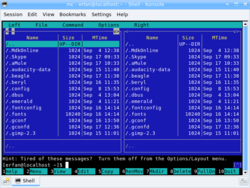
).
The following features describe the class of orthodox file managers.
Other common features include:
) made it possible to manipulate more than one active and passive directory at a time.
. The Windows Explorer
is a classic representative of the type, using a "navigational" metaphor to represent filesystem locations. Since the advent of GUIs, it has become the dominant type of file manager for desktop computers, due to its use in the Microsoft Windows
operating system.
Typically, it has two panes, with the filesystem tree in the left pane and the contents of the current directory in the right pane. For Mac OS X, one view in the Finder
is an example of a navigational file manager.
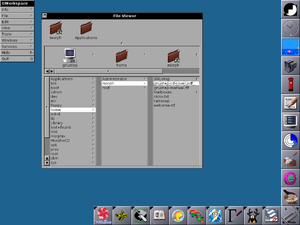
The interface in a navigational file manager often resembles a web browser
, complete with back and forward buttons, and often reload buttons. Most also contain an address bar into which the file or directory path (or URI
) can be typed.
Most navigational file managers have two panes, the left pane being a tree view of the filesystem. This means that unlike orthodox file managers, the two panes are asymmetrical in their content and use.
Selecting a directory in the Navigation pane on the left designates it as the current directory, displaying its contents in the Contents pane on the right. However, expanding (+) or collapsing (-) a portion of the tree without selecting a directory will not alter the contents of the right pane. The exception to this behavior applies when collapsing a parent of the current directory, in which case the selection is refocused on the collapsed parent directory, thus altering the list in the Contents pane.
The process of moving from one location to another need not open a new window. Several instances of the file manager can be opened simultaneously and communicate with each other via drag-and-drop
and clipboard
operations, so it is possible to view several directories simultaneously and perform cut-and paste operations between instances.
File operations are based on drag-and-drop and editor metaphors: users can select and copy files or directories onto the clipboard and then paste them in a different place in the filesystem or even in a different instance of the file manager.
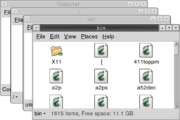 Spatial file managers use a spatial metaphor
to represent files
and directories
as if they were actual physical objects. A spatial file manager imitates the way people interact with physical objects.
Some ideas behind the concept of a spatial file manager are:
As in navigational file managers, when a directory is opened, the icon
representing the directory changes—perhaps from an image showing a closed drawer to an opened one, perhaps the directory's icon turns into a silhouette filled with a pattern—and a new window is opened to represent that directory.
Dysfunctional spatial file managers:
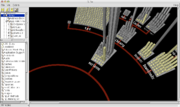 Some projects have attempted to implement a three-dimensional
method of displaying files and directory structures. Three-dimensional file browsing has not yet become popular; the exact implementation tends to differ between projects, and there are no common standards to follow.
, Ajax
, Perl
, ASP
or another server-side language
. When installed on a local server or on a remote server, they allow files and directories located there to be managed and edited, using a web browser, without the need for FTP Access.
More advanced, and usually commercially-distributed, web-based file management scripts allow the administrator of the file manager to configure secure, individual user accounts, each with individual account permissions. Authorized users have access to documents stored on the server or in their individual user directories anytime, from anywhere, via a web browser.
A web-based file manager can serve as an organization's digital repository. For example, documents, digital media, publishing layouts, and presentations can be stored, managed, and shared between customers, suppliers, and remote workers, or just internally.
Web-based file managers are becoming increasingly popular due to the rise in popularity of dynamic web content management system
s (CMS) and the need for non-technical website moderators to manage media on their websites powered by these platforms.
, during a scene where Lex desperately tries to find an executable file, while a Velociraptor tries to force its way into the command center. The 3D file manager, fsn
(mentioned above), was built on top of a Unix system (Silicon Graphics, Inc's
IRIX
).
Computer program
A computer program is a sequence of instructions written to perform a specified task with a computer. A computer requires programs to function, typically executing the program's instructions in a central processor. The program has an executable form that the computer can use directly to execute...
that provides a user interface
User interface
The user interface, in the industrial design field of human–machine interaction, is the space where interaction between humans and machines occurs. The goal of interaction between a human and a machine at the user interface is effective operation and control of the machine, and feedback from the...
to work with file system
File system
A file system is a means to organize data expected to be retained after a program terminates by providing procedures to store, retrieve and update data, as well as manage the available space on the device which contain it. A file system organizes data in an efficient manner and is tuned to the...
s. The most common operations performed on files or groups of files are: create, open, edit, view
File viewer
A file viewer is application software that presents the data stored in a computer file in a human-friendly form. The file contents are generally displayed on the screen, or they may be printed...
Computer printer
In computing, a printer is a peripheral which produces a text or graphics of documents stored in electronic form, usually on physical print media such as paper or transparencies. Many printers are primarily used as local peripherals, and are attached by a printer cable or, in most new printers, a...
, play
Streaming media
Streaming media is multimedia that is constantly received by and presented to an end-user while being delivered by a streaming provider.The term "presented" is used in this article in a general sense that includes audio or video playback. The name refers to the delivery method of the medium rather...
, rename, move, copy
File copying
In the realm of computer file management, file copying is the creation of a new file which has the same content as an existing file.All computer operating systems include file copying provisions in the user interface, like the command, "cp" in Unix and "copy" in MS-DOS; operating systems with a...
, delete
File deletion
File deletion is a way of removing a file from a computer's file system.The reasons for deleting files are#Freeing the disk space#Removing duplicate or unnecessary data to avoid confusion#Making sensitive information unavailable to others...
, search/find, and modify file attribute
File attribute
A file attribute is metadata that describes or is associated with a computer file. For example, an operating system often keeps track of the date a file was created and last modified, as well as the file's size and extension . File permissions are also kept track of...
s, properties and file permissions. Files are typically displayed in a hierarchy
Hierarchy
A hierarchy is an arrangement of items in which the items are represented as being "above," "below," or "at the same level as" one another...
. Some file managers contain features inspired by web browser
Web browser
A web browser is a software application for retrieving, presenting, and traversing information resources on the World Wide Web. An information resource is identified by a Uniform Resource Identifier and may be a web page, image, video, or other piece of content...
s, including forward and back navigational buttons.
Some file managers provide network
Computer network
A computer network, often simply referred to as a network, is a collection of hardware components and computers interconnected by communication channels that allow sharing of resources and information....
connectivity via protocols
Communications protocol
A communications protocol is a system of digital message formats and rules for exchanging those messages in or between computing systems and in telecommunications...
, such as FTP
File Transfer Protocol
File Transfer Protocol is a standard network protocol used to transfer files from one host to another host over a TCP-based network, such as the Internet. FTP is built on a client-server architecture and utilizes separate control and data connections between the client and server...
, NFS, SMB
Server Message Block
In computer networking, Server Message Block , also known as Common Internet File System operates as an application-layer network protocol mainly used to provide shared access to files, printers, serial ports, and miscellaneous communications between nodes on a network. It also provides an...
or WebDAV
WebDAV
Web-based Distributed Authoring and Versioning is a set of methods based on the Hypertext Transfer Protocol that facilitates collaboration between users in editing and managing documents and files stored on World Wide Web servers...
. This is achieved by allowing the user to browse for a file server
File server
In computing, a file server is a computer attached to a network that has the primary purpose of providing a location for shared disk access, i.e. shared storage of computer files that can be accessed by the workstations that are attached to the computer network...
(connecting and accessing the server's file system like a local file system) or by providing its own full client implementations for file server protocols.
Directory editors
A term that predates the usage of file manager is directory editor, which dates back at least to 1978.A directory editor was written for EXEC 8
EXEC 8
EXEC 8 was UNIVAC's operating system developed for the UNIVAC 1108 in 1964. It combined the best features of the earlier operating systems: EXEC I and EXEC II . EXEC 8 was one of the first commercially successful multiprocessing operating systems...
at the University of Maryland, and was available to other users at that time. The term was used by other developers, including Jay Lepreau, who wrote the dired program in 1980,
which ran on BSD. This was in turn inspired by an older program with the same name running on TOPS-20
TOPS-20
The TOPS-20 operating system by Digital Equipment Corporation was the second proprietary OS for the PDP-10 mainframe computer. TOPS-20 began in 1969 as the TENEX operating system of Bolt, Beranek and Newman...
. Dired inspired other programs, including dired
Dired
Dired is a visual directory editor, a computer program for editing file system directories. Dired runs on any Emacs platform. Its commands are generally more modal than most Emacs commands because Dired is a specialized major mode on its own...
, the editor script (for emacs
Emacs
Emacs is a class of text editors, usually characterized by their extensibility. GNU Emacs has over 1,000 commands. It also allows the user to combine these commands into macros to automate work.Development began in the mid-1970s and continues actively...
and similar editors), and ded.
File-list file manager
File-list file managers are lesser known and older than orthodox file managers.flist
One such file manager is flist, which was first used in 1981 on the Conversational Monitor SystemConversational Monitor System
The Conversational Monitor System is a relatively simple interactive computing single-user operating system.* CMS is part of IBM's VM family, which runs on IBM mainframe computers...
.
This is a variant of fulist, which originated before late 1978, according to comments by its author, Theo Alkema.
The flist program provided a list of files in the user's minidisk, and allowed sorting by any file attribute. The file attributes could be passed to scripts or function-key definitions, making it simple to use flist as part of CMS EXEC
CMS EXEC
CMS EXEC, or EXEC, is an interpreted, command procedure control, computer programming language used by the CMS EXEC Processor supplied with the IBM Virtual Machine/Conversational Monitor System operating system....
, EXEC 2
EXEC 2
EXEC 2 is an interpreted, command procedure control, computer programming language used by the EXEC 2 Processor supplied with the IBM Virtual Machine/Conversational Monitor System operating system....
or xedit
Xedit
xedit or XEDIT may refer to:* xedit, a text editor for the X Window System on Linux and UNIX* XEDIT, a visual text editor for the VM/CMS operating system...
scripts.
This program ran only on IBM VM/SP CMS, but was the inspiration for other programs, including filelist (a script run via the Xedit
Xedit
xedit or XEDIT may refer to:* xedit, a text editor for the X Window System on Linux and UNIX* XEDIT, a visual text editor for the VM/CMS operating system...
editor), and programs running on other operating systems, including a program also called flist, which ran on OpenVMS
OpenVMS
OpenVMS , previously known as VAX-11/VMS, VAX/VMS or VMS, is a computer server operating system that runs on VAX, Alpha and Itanium-based families of computers. Contrary to what its name suggests, OpenVMS is not open source software; however, the source listings are available for purchase...
, and fulist (from the name of the corresponding internal IBM program), which runs on Unix.
Orthodox file managers
Orthodox file managers or command-based file managers have three windows (two panels and one command line window). Orthodox file managers are one of the older families of file managers. Developers create applications that duplicate and extend the interface that was introduced by PathMinderPathMinder
PathMinder is file manager software, or DOS shell originally designed for use under Microsoft's MS-DOS disk operating system. Published by Westlake Data Corporation of Austin, Texas, and designed by Albert Nurick and Brittain Fraley, it was first released on 30 September 1984 and became fairly...
and John Socha
John Socha
John Socha-Leialoha is a software developer best known for creating Norton Commander, the first orthodox file manager. The original Norton Commander was written for DOS...
's famous Norton Commander
Norton Commander
Norton Commander was a prototypical orthodox file manager , written by John Socha and released by Peter Norton Computing . NC is a file manager which provides a text user interface on top of DOS. It was officially produced by Symantec between 1986 and 1998...
for DOS
DOS
DOS, short for "Disk Operating System", is an acronym for several closely related operating systems that dominated the IBM PC compatible market between 1981 and 1995, or until about 2000 if one includes the partially DOS-based Microsoft Windows versions 95, 98, and Millennium Edition.Related...
. The concept is more than twentyfive years old—PathMinder was released in 1984, and Norton Commander version 1.0 was released in 1986. Despite the age of this concept, file managers based on Norton Commander are actively developed, and dozens of implementations exist for DOS, Unix and Microsoft Windows. Nikolai Bezroukov
Nikolai Bezroukov
Nikolai Bezroukov is a Senior Internet Security Analyst at BASF Corporation, Professor of Computer Science at Farleigh Dickinson University and webmaster of Open Source Software University, a volunteer technical site for the United Nations Sustainable Development Networking Programme that helps...
publishes his own set of criteria for a standard (version 1.2 dated June 1997).
Features
An orthodox file manager typically has three windows. Two of the windows are called panels and are positioned symmetrically at the top of the screen. The third is the command line, which is essentially a minimized command (shell) window that can be expanded to full screen. Only one of the panels is active at a given time. The active panel contains the "file cursor". Panels are resizable and can be hidden. Files in the active panel serve as the source of file operations performed by the manager. For example, files can be copied or moved from the active panel to the location represented in the passive panel. This scheme is most effective for systems in which the keyboard is the primary or sole input device. The active panel shows information about the current working directory and the files that it contains. The passive (inactive) panel shows the content of the same or another directory (the default target for file operations). Users may customize the display of columns that show relevant file information. The active panel and passive panel can be switched (often by pressing the tab keyTab key
Tab key on a keyboard is used to advance the cursor to the next tab stop.- Origin :The word tab derives from the word tabulate, which means "to arrange data in a tabular, or table, form"...
).
The following features describe the class of orthodox file managers.
- They present the user with a two-panel directory view with a command line below. Either panel may be selected to be active; the other then becomes passive. The active panel becomes the working area for delete and rename operations, while the passive panel serves as a target for copy and move operations. Panels may be shrunk, exposing the terminal window hidden behind them. Normally, only the last line of the terminal window (the command line) is visible.
- They provide close integration with an underlying OSOperating systemAn operating system is a set of programs that manage computer hardware resources and provide common services for application software. The operating system is the most important type of system software in a computer system...
shell via command line, using the associated terminal window that permits viewing the results of executing shell commands entered on the command line (e.g., via Ctrl-O shortcut in Norton Commander). - They provide the user with extensive keyboard shortcuts.
- The file manager frees the user from having to use the mouse.
- Users can create their own file associations and scripts that are invoked for certain file types and organize these scripts into a hierarchical tree (e.g., as a user script library or user menu).
- Users can extend the functionality of the manager via so-called User menu or Start menu and extensions menu. Norton Commander introduced the concept of user-defined file associations that is now used in all modern file managers.
Other common features include:
- Information on the "active" and "passive" panels may be used for constructing commands on the command line. Examples include current file, path to left panel, path to right panel, etc.
- They provide a built-in viewer for (at least) the most basic file types.
- They have a built-in editor. In many cases, the editor can extract certain elements of the panels into the text being edited.
- Many support virtual file systems (VFSVirtual file systemA virtual file system or virtual filesystem switch is an abstraction layer on top of a more concrete file system. The purpose of a VFS is to allow client applications to access different types of concrete file systems in a uniform way...
) such as viewing compressed archives, or working with files via an FTP connection. - They often have the word commander in the name.
- Path: shows the source/destination location of the directory in use
- Information about directory size, disk usage and disk name (usually at the bottom of the panels)
- Panel with information about file name, extension, date and time of creation, last modification, and permissions (attributes).
- Info panel with the number of files in directory, and the sum of the sizes of selected files.
- Tabbed interface (usually GUI file managers)
- Function keys: F1–F10 have all the same functions under all orthodox file managers. Examples: F5 always copies file(s) from the active to the inactive panel, while F6 moves the file.
Tabbed panels
The introduction of tabbed panels in some file managers (for example Total CommanderTotal Commander
Total Commander is an Orthodox File Manager software for Windows, Windows CE, and Windows Mobile. Some features include a built-in FTP client, file compare, archive file navigation, and a versatile multi-rename tool with regular expression support....
) made it possible to manipulate more than one active and passive directory at a time.
Portability
Orthodox file managers are among the most portable file managers. Examples are available on almost any platform, with both command-line interface and graphical user interface. This is unusual among command line managers in that something purporting to be a standard for the interface is published. They are also actively supported by developers. This makes it possible to do the same work on different platforms without much relearning of the interface.Dual-pane managers
Sometimes they are called dual-pane managers, a term that is typically used for programs such as the Windows File Explorer (see below). But they have three panes including a command line pane below (or hidden behind) two symmetric panes. Furthermore, most of these programs allow using just one of the two larger panes with the second hidden.Examples
Notable examples include:
|
FreeCommander FreeCommander is a freeware Orthodox File Manager for Windows . Some features include a built-in FTP client, archive file navigation, folder comparison and synchronization, and a multi-file renaming tool.... GNOME Commander GNOME Commander is a 'two pane' graphical file manager for GNOME. It is built using the GTK+ toolkit and GnomeVFS. GNOME Commander aims to fulfil the demands of more advanced users who like to focus on file management, their work through special applications and running smart commands.- Features :*... Krusader Krusader is an advanced orthodox file manager for KDE and other desktops in the *nix world, similar to GNOME Commander or Midnight Commander , or Total Commander... Midnight Commander GNU Midnight Commander is a free cross-platform orthodox file manager and a clone of Norton Commander originally created by Miguel de Icaza.Midnight Commander is licensed under the terms of the GNU General Public License.-Design:... MuCommander muCommander is a cross-platform file manager that will run on any operating system supporting Java. It features a Norton Commander style interface to allow easy manipulation of files with many keyboard shortcuts. Pre-compiled builds are available for Mac OS X, Windows, Linux, Solaris, *BSD, etc.In... Norton Commander Norton Commander was a prototypical orthodox file manager , written by John Socha and released by Peter Norton Computing . NC is a file manager which provides a text user interface on top of DOS. It was officially produced by Symantec between 1986 and 1998... PathMinder PathMinder is file manager software, or DOS shell originally designed for use under Microsoft's MS-DOS disk operating system. Published by Westlake Data Corporation of Austin, Texas, and designed by Albert Nurick and Brittain Fraley, it was first released on 30 September 1984 and became fairly... |
SE-Explorer SE-Explorer is a freeware portable file manager for Windows which can be used as alternative to Windows Explorer. It is sharply different from FAR Manager and Norton Commander because it is GUI based application with tabbed interface which made it possible to manipulate more than one directory or... SpeedCommander SpeedCommander is a shareware Orthodox File Manager for Windows. Its predominant marketplace is Germany.From the start of the project SpeedCommander has fully integrated unicode support... Total Commander Total Commander is an Orthodox File Manager software for Windows, Windows CE, and Windows Mobile. Some features include a built-in FTP client, file compare, archive file navigation, and a versatile multi-rename tool with regular expression support.... Volkov Commander Volkov Commander is an orthodox file manager for DOS, in the close tradition of Norton Commander. The Volkov Commander was completely written in assembly language, and is thus very small and fast.... WinSCP WinSCP is a free and open source SFTP, SCP, and FTP client for Microsoft Windows. Its main function is secure file transfer between a local and a remote computer. Beyond this, WinSCP offers basic file manager and file synchronization functionality... ZTreeWin ZTreeWin, an orthodox file manager for Microsoft Windows, is a clone of XTree. Like XTree, it logs filenames and attributes into memory so that search and sort operations are extremely fast. By making use of the large memories of modern computers it allows the logging of millions of... |
Navigational file manager
A navigational file manager, also called an "Explorer" type manager, is a newer type of file manager which became prominent because of its integration in Microsoft WindowsMicrosoft Windows
Microsoft Windows is a series of operating systems produced by Microsoft.Microsoft introduced an operating environment named Windows on November 20, 1985 as an add-on to MS-DOS in response to the growing interest in graphical user interfaces . Microsoft Windows came to dominate the world's personal...
. The Windows Explorer
Windows Explorer
This article is about the Windows file system browser. For the similarly named web browser, see Internet ExplorerWindows Explorer is a file manager application that is included with releases of the Microsoft Windows operating system from Windows 95 onwards. It provides a graphical user interface...
is a classic representative of the type, using a "navigational" metaphor to represent filesystem locations. Since the advent of GUIs, it has become the dominant type of file manager for desktop computers, due to its use in the Microsoft Windows
Microsoft Windows
Microsoft Windows is a series of operating systems produced by Microsoft.Microsoft introduced an operating environment named Windows on November 20, 1985 as an add-on to MS-DOS in response to the growing interest in graphical user interfaces . Microsoft Windows came to dominate the world's personal...
operating system.
Typically, it has two panes, with the filesystem tree in the left pane and the contents of the current directory in the right pane. For Mac OS X, one view in the Finder
Macintosh Finder
The Finder is the default file manager used on Mac OS and Mac OS X operating systems; it is responsible for the overall user-management of files, disks, network volumes and the launching of other applications...
is an example of a navigational file manager.
Concepts
- The windowWindow (computing)In computing, a window is a visual area containing some kind of user interface. It usually has a rectangular shape that can overlap with the area of other windows...
displays the location currently being viewed. - The location being viewed (the current directory) can be changed by the user by opening directories, pressing a back button, typing a location, or using the additional pane with the navigation tree representing all or part of the filesystem.
- Icons represent files, programs, and directories.
The interface in a navigational file manager often resembles a web browser
Web browser
A web browser is a software application for retrieving, presenting, and traversing information resources on the World Wide Web. An information resource is identified by a Uniform Resource Identifier and may be a web page, image, video, or other piece of content...
, complete with back and forward buttons, and often reload buttons. Most also contain an address bar into which the file or directory path (or URI
Úri
Úriis a village and commune in the comitatus of Pest in Hungary....
) can be typed.
Most navigational file managers have two panes, the left pane being a tree view of the filesystem. This means that unlike orthodox file managers, the two panes are asymmetrical in their content and use.
Selecting a directory in the Navigation pane on the left designates it as the current directory, displaying its contents in the Contents pane on the right. However, expanding (+) or collapsing (-) a portion of the tree without selecting a directory will not alter the contents of the right pane. The exception to this behavior applies when collapsing a parent of the current directory, in which case the selection is refocused on the collapsed parent directory, thus altering the list in the Contents pane.
The process of moving from one location to another need not open a new window. Several instances of the file manager can be opened simultaneously and communicate with each other via drag-and-drop
Drag-and-drop
In computer graphical user interfaces, drag-and-drop is the action of selecting a virtual object by "grabbing" it and dragging it to a different location or onto another virtual object...
and clipboard
Clipboard (software)
The clipboard is a software facility that can be used for short-term data storage and/or data transfer between documents or applications, via copy and paste operations...
operations, so it is possible to view several directories simultaneously and perform cut-and paste operations between instances.
File operations are based on drag-and-drop and editor metaphors: users can select and copy files or directories onto the clipboard and then paste them in a different place in the filesystem or even in a different instance of the file manager.
Examples
Notable examples include:- Windows ExplorerWindows ExplorerThis article is about the Windows file system browser. For the similarly named web browser, see Internet ExplorerWindows Explorer is a file manager application that is included with releases of the Microsoft Windows operating system from Windows 95 onwards. It provides a graphical user interface...
- Mac OS X Finder
- XTreeXTreeXTree is a file manager software originally designed for use under DOS. It was published by Executive Systems and first released on 1 April 1985, and became highly popular...
/ ZTreeWinZTreeWinZTreeWin, an orthodox file manager for Microsoft Windows, is a clone of XTree. Like XTree, it logs filenames and attributes into memory so that search and sort operations are extremely fast. By making use of the large memories of modern computers it allows the logging of millions of... - XYplorerXYplorerXYplorer is a shareware file manager for Windows 98/NT/ME/2000/XP/Vista/7. XYplorer is a hybrid file manager that combines features found in navigational and orthodox file managers...
Spatial file manager
Metaphor
A metaphor is a literary figure of speech that uses an image, story or tangible thing to represent a less tangible thing or some intangible quality or idea; e.g., "Her eyes were glistening jewels." Metaphor may also be used for any rhetorical figures of speech that achieve their effects via...
to represent files
Computer file
A computer file is a block of arbitrary information, or resource for storing information, which is available to a computer program and is usually based on some kind of durable storage. A file is durable in the sense that it remains available for programs to use after the current program has finished...
and directories
Directory (file systems)
In computing, a folder, directory, catalog, or drawer, is a virtual container originally derived from an earlier Object-oriented programming concept by the same name within a digital file system, in which groups of computer files and other folders can be kept and organized.A typical file system may...
as if they were actual physical objects. A spatial file manager imitates the way people interact with physical objects.
Some ideas behind the concept of a spatial file manager are:
- A single windowWindow (computing)In computing, a window is a visual area containing some kind of user interface. It usually has a rectangular shape that can overlap with the area of other windows...
represents each opened directory - Each window is unambiguously and irrevocably tied to a particular directory.
- Stability: files, directories, and windows go where the user moves them, stay where the user puts them ("preserve their spatial state"), and retain all their other "physical" characteristics (such as size, shape, color and location).
- The same item can only be viewed in one window at a time.
As in navigational file managers, when a directory is opened, the icon
Icon
An icon is a religious work of art, most commonly a painting, from Eastern Christianity and in certain Eastern Catholic churches...
representing the directory changes—perhaps from an image showing a closed drawer to an opened one, perhaps the directory's icon turns into a silhouette filled with a pattern—and a new window is opened to represent that directory.
Examples
Examples of file managers that use a spatial metaphor to some extent include:- AppleApple ComputerApple Inc. is an American multinational corporation that designs and markets consumer electronics, computer software, and personal computers. The company's best-known hardware products include the Macintosh line of computers, the iPod, the iPhone and the iPad...
's FinderMacintosh FinderThe Finder is the default file manager used on Mac OS and Mac OS X operating systems; it is responsible for the overall user-management of files, disks, network volumes and the launching of other applications...
5 to 9 (versions up to Mac OS XMac OS XMac OS X is a series of Unix-based operating systems and graphical user interfaces developed, marketed, and sold by Apple Inc. Since 2002, has been included with all new Macintosh computer systems...
) - KonquerorKonquerorNot to be confused with the Conqueror web browser.Konqueror is a web browser and file manager that provides file-viewer functionality for file systems such as local files, files on a remote ftp server and files in a disk image. It is a core part of the KDE desktop environment...
has the option to turn into spatial mode - RISC OSRISC OSRISC OS is a computer operating system originally developed by Acorn Computers Ltd in Cambridge, England for their range of desktop computers, based on their own ARM architecture. First released in 1987, under the name Arthur, the subsequent iteration was renamed as in 1988...
Filer - AmigaAmigaThe Amiga is a family of personal computers that was sold by Commodore in the 1980s and 1990s. The first model was launched in 1985 as a high-end home computer and became popular for its graphical, audio and multi-tasking abilities...
's WorkbenchAmigaOSAmigaOS is the default native operating system of the Amiga personal computer. It was developed first by Commodore International, and initially introduced in 1985 with the Amiga 1000... - GNOMEGNOMEGNOME is a desktop environment and graphical user interface that runs on top of a computer operating system. It is composed entirely of free and open source software...
's Nautilus from version 2.6 (default until 2.29) - BeOSBeOSBeOS is an operating system for personal computers which began development by Be Inc. in 1991. It was first written to run on BeBox hardware. BeOS was optimized for digital media work and was written to take advantage of modern hardware facilities such as symmetric multiprocessing by utilizing...
's TrackerOpenTrackerOpenTracker is the open source version of the Tracker file manager for BeOS-compatible operating systems.Be Inc. developed the original Tracker for their operating system, BeOS. In 2000, prior to selling all of their assets to Palm, Inc., Be Inc. open-sourced some of their software, including Tracker... - HaikuHaiku (operating system)Haiku is a free and open source operating system compatible with BeOS. Its development began in 2001, and the operating system became self-hosting in 2008, with the first alpha release in September 2009, the second in May 2010 and the third in June 2011....
's Tracker - OS/2OS/2OS/2 is a computer operating system, initially created by Microsoft and IBM, then later developed by IBM exclusively. The name stands for "Operating System/2," because it was introduced as part of the same generation change release as IBM's "Personal System/2 " line of second-generation personal...
's Workplace ShellWorkplace ShellThe Workplace Shell is a object-oriented desktop shell produced by IBM's Boca Raton development lab for OS/2 2.0. It is based on Common User Access and made a radical shift away from the Program Manager type interface that earlier versions of OS/2 shared with Windows 3.x or the... - Digital ResearchDigital ResearchDigital Research, Inc. was the company created by Dr. Gary Kildall to market and develop his CP/M operating system and related products. It was the first large software company in the microcomputer world...
's GEMGraphical Environment ManagerGEM was a windowing system created by Digital Research, Inc. for use with the CP/M operating system on the Intel 8088 and Motorola 68000 microprocessors...
(implemented in Atari TOS and as a somewhat reduced version for PCs) - ZDESKTOP and FILEMAGE Zoomable File-System Viewers (spatial view of hierarchical data)
- ROX-Filer file manager (ROX DesktopROX DesktopThe ROX Desktop is a graphical desktop environment for the X Window System. It is based on the ROX-Filer which is a drag and drop spatial file manager. It is free software released under the GNU General Public License. The environment was inspired by the user interface of RISC OS...
) - E17Enlightenment (window manager)Enlightenment, also known simply as E, is a stacking window manager for the X Window System which can be used alone or in conjunction with a desktop environment such as GNOME or KDE...
file manager
Dysfunctional spatial file managers:
- Windows ExplorerWindows ExplorerThis article is about the Windows file system browser. For the similarly named web browser, see Internet ExplorerWindows Explorer is a file manager application that is included with releases of the Microsoft Windows operating system from Windows 95 onwards. It provides a graphical user interface...
in Windows 95Windows 95Windows 95 is a consumer-oriented graphical user interface-based operating system. It was released on August 24, 1995 by Microsoft, and was a significant progression from the company's previous Windows products...
was set as a spatial file manager model by default; because it also worked as a navigational file manager, directories could be opened in multiple windows, which made it fail all the above criteria. Later versions gradually abandoned the spatial model. - AppleApple ComputerApple Inc. is an American multinational corporation that designs and markets consumer electronics, computer software, and personal computers. The company's best-known hardware products include the Macintosh line of computers, the iPod, the iPhone and the iPad...
's FinderMacintosh FinderThe Finder is the default file manager used on Mac OS and Mac OS X operating systems; it is responsible for the overall user-management of files, disks, network volumes and the launching of other applications...
in Mac OS XMac OS XMac OS X is a series of Unix-based operating systems and graphical user interfaces developed, marketed, and sold by Apple Inc. Since 2002, has been included with all new Macintosh computer systems...
was designed with a similar integration of spatial and navigational modes, meaning that the spatial mode did not actually work.
3D file managers
3D computer graphics
3D computer graphics are graphics that use a three-dimensional representation of geometric data that is stored in the computer for the purposes of performing calculations and rendering 2D images...
method of displaying files and directory structures. Three-dimensional file browsing has not yet become popular; the exact implementation tends to differ between projects, and there are no common standards to follow.
Examples
Examples of three-dimensional file managers include:- fsnFsnfsn pronounced as "fusion" is an experimental application to view a file system in 3D, made by SGI for IRIX systems....
, for Silicon GraphicsSilicon GraphicsSilicon Graphics, Inc. was a manufacturer of high-performance computing solutions, including computer hardware and software, founded in 1981 by Jim Clark...
' IRIXIRIXIRIX is a computer operating system developed by Silicon Graphics, Inc. to run natively on their 32- and 64-bit MIPS architecture workstations and servers. It was based on UNIX System V with BSD extensions. IRIX was the first operating system to include the XFS file system.The last major version...
systems, notably featured prominently in one scene from the film Jurassic ParkJurassic Park (film)Jurassic Park is a 1993 American science fiction adventure film directed by Steven Spielberg. The film is based on the novel of the same name by Michael Crichton. It stars Sam Neill, Laura Dern, Jeff Goldblum, Richard Attenborough, Martin Ferrero, and Bob Peck...
, as a representation of UnixUnixUnix is a multitasking, multi-user computer operating system originally developed in 1969 by a group of AT&T employees at Bell Labs, including Ken Thompson, Dennis Ritchie, Brian Kernighan, Douglas McIlroy, and Joe Ossanna...
systems. - File System VisualizerFile System VisualizerFile System Visualizer, also known as fsv, is a 3D file browser using OpenGL, created by Daniel Richard G. It is a clone of SGI's fsn file manager for IRIX systems, aimed to run on modern Linux and other Unix-like operating systems...
, or fsv, an open source clone of fsn for modern Unix-likeUnix-likeA Unix-like operating system is one that behaves in a manner similar to a Unix system, while not necessarily conforming to or being certified to any version of the Single UNIX Specification....
systems. - BumpTopBumpTopIn computing, BumpTop is a desktop environment that simulates the normal behavior and physical properties of a real world desk, and enhances it with automatic tools to organize its contents. It is aimed at stylus interaction, making it more suitable for tablet computers and handheld PCs. It was...
, a file manager using a three-dimensional representation of a desktop with realistic physics, intended for use with a stylus and touchscreenTouchscreenA touchscreen is an electronic visual display that can detect the presence and location of a touch within the display area. The term generally refers to touching the display of the device with a finger or hand. Touchscreens can also sense other passive objects, such as a stylus...
. - Real Desktop, a desktop replacement with similarities to BumpTop.
- NavScope, a file manager using Windows Explorer combined with 3d navigation area.
Web-based file managers
Web-based file managers are typically scripts written in either PHPPHP
PHP is a general-purpose server-side scripting language originally designed for web development to produce dynamic web pages. For this purpose, PHP code is embedded into the HTML source document and interpreted by a web server with a PHP processor module, which generates the web page document...
, Ajax
Ajax (programming)
Ajax is a group of interrelated web development methods used on the client-side to create asynchronous web applications...
, Perl
Perl
Perl is a high-level, general-purpose, interpreted, dynamic programming language. Perl was originally developed by Larry Wall in 1987 as a general-purpose Unix scripting language to make report processing easier. Since then, it has undergone many changes and revisions and become widely popular...
, ASP
Active Server Pages
Active Server Pages , also known as Classic ASP or ASP Classic, was Microsoft's first server-side script engine for dynamically-generated Web pages. Initially released as an add-on to Internet Information Services via the Windows NT 4.0 Option Pack Active Server Pages (ASP), also known as Classic...
or another server-side language
Server-side scripting
Server-side scripting is a web server technology in which a user's request is verified by running a script directly on the web server to generate dynamic web pages. It is usually used to provide interactive web sites that interface to databases or other data stores. This is different from...
. When installed on a local server or on a remote server, they allow files and directories located there to be managed and edited, using a web browser, without the need for FTP Access.
More advanced, and usually commercially-distributed, web-based file management scripts allow the administrator of the file manager to configure secure, individual user accounts, each with individual account permissions. Authorized users have access to documents stored on the server or in their individual user directories anytime, from anywhere, via a web browser.
A web-based file manager can serve as an organization's digital repository. For example, documents, digital media, publishing layouts, and presentations can be stored, managed, and shared between customers, suppliers, and remote workers, or just internally.
Web-based file managers are becoming increasingly popular due to the rise in popularity of dynamic web content management system
Content management system
A content management system is a system providing a collection of procedures used to manage work flow in a collaborative environment. These procedures can be manual or computer-based...
s (CMS) and the need for non-technical website moderators to manage media on their websites powered by these platforms.
Popular culture
A 3D file manager is featured in Jurassic ParkJurassic Park (film)
Jurassic Park is a 1993 American science fiction adventure film directed by Steven Spielberg. The film is based on the novel of the same name by Michael Crichton. It stars Sam Neill, Laura Dern, Jeff Goldblum, Richard Attenborough, Martin Ferrero, and Bob Peck...
, during a scene where Lex desperately tries to find an executable file, while a Velociraptor tries to force its way into the command center. The 3D file manager, fsn
Fsn
fsn pronounced as "fusion" is an experimental application to view a file system in 3D, made by SGI for IRIX systems....
(mentioned above), was built on top of a Unix system (Silicon Graphics, Inc's
Silicon Graphics
Silicon Graphics, Inc. was a manufacturer of high-performance computing solutions, including computer hardware and software, founded in 1981 by Jim Clark...
IRIX
IRIX
IRIX is a computer operating system developed by Silicon Graphics, Inc. to run natively on their 32- and 64-bit MIPS architecture workstations and servers. It was based on UNIX System V with BSD extensions. IRIX was the first operating system to include the XFS file system.The last major version...
).
See also
- Batch renamingBatch renamingBatch renaming is a form of batch processing used to rename multiple computer files and folders in an automated fashion, in order to save time and reduce the amount of work involved. Some sort of software is required to do this. Such software can be more or less advanced, but most have the same...
- Comparison of file managersComparison of file managersThe following tables compare general and technical information for a number of notable file managers.-General information:Basic general information about the managers: creator/company etc.-Cross-platform file managers:...
- Computer file managementComputer file managementThe term computer file management refers to the manipulation of documents and data in files on a computer.----Specifically, one may create a new file or edit an existing file and save it; open or load a pre-existing file into memory; or close a file without saving it. Additionally, one may group...
- Desktop metaphorDesktop metaphorThe desktop metaphor is an interface metaphor which is a set of unifying concepts used by graphical user interfaces to help users more easily interact with the computer. The desktop metaphor treats the monitor of a computer as if it is the user's desktop, upon which objects such as documents and...
- Miller ColumnsMiller ColumnsMiller columns are a browsing/visualization technique that can be applied to tree structures. The columns allow multiple levels of the hierarchy to be open at once, and provide a visual representation of the current location. It is closely related to techniques used earlier in the Smalltalk...
- Spatial navigationSpatial navigationIn computing, spatial navigation is the ability to navigate between focusable elements, such as hyperlinks and form controls, within a structured document or user interface according to the spatial location....
External links
- The Orthodox File Manager (OFM) Paradigm: The History of Development of Norton Commander, by Dr. Nikolai BezroukovNikolai BezroukovNikolai Bezroukov is a Senior Internet Security Analyst at BASF Corporation, Professor of Computer Science at Farleigh Dickinson University and webmaster of Open Source Software University, a volunteer technical site for the United Nations Sustainable Development Networking Programme that helps...
, Softpanorama.org, 2009. Retrieved 2010-12-26. - About the Finder, by John Siracusa, Ars TechnicaArs TechnicaArs Technica is a technology news and information website created by Ken Fisher and Jon Stokes in 1998. It publishes news, reviews and guides on issues such as computer hardware and software, science, technology policy, and video games. Ars Technica is known for its features, long articles that go...
, 2003. Retrieved 2010-12-26. - The Spatial Way, by Colin Charles, 2004. Retrieved 2010-12-26.
- dired - directory editor. Archived from the original on 2008-04-03. Retrieved 2010-12-26.
- flist, section 4.3.2.2.3 in Introduction to IBM/CMS, Users' Manual, Department of Computer Science, University of ReginaUniversity of ReginaThe University of Regina is a public research university located in Regina, Saskatchewan, Canada. Founded in 1911 as a private denominational high school of the Methodist Church of Canada, it began an association with the University of Saskatchewan as a junior college in 1925, and was disaffiliated...
, Saskatchewan, Canada. Retrieved 2010-12-26.