
A
computer file is a block of arbitrary information, or resource for storing information, which is available to a
computer programA computer program is a sequence of instructions written to perform a specified task with a computer. A computer requires programs to function, typically executing the program's instructions in a central processor. The program has an executable form that the computer can use directly to execute...
and is usually based on some kind of durable
storageComputer data storage, often called storage or memory, refers to computer components and recording media that retain digital data. Data storage is one of the core functions and fundamental components of computers....
. A file is durable in the sense that it remains available for programs to use after the current program has finished. Computer files can be considered as the modern counterpart of paper
documentThe term document has multiple meanings in ordinary language and in scholarship. WordNet 3.1. lists four meanings :* document, written document, papers...
s which traditionally are kept in offices' and libraries'
filesA filing cabinet is a piece of office furniture usually used to store paper documents in file folders. In the most simple sense, it is an enclosure for drawers in which items are stored. The two most common forms of filing cabinets are blocky files and diagonal files...
, and this is the source of the term.
History
The word "file" was used publicly in the context of computer storage as early as February, 1950. In an
RCARCA Corporation, founded as the Radio Corporation of America, was an American electronics company in existence from 1919 to 1986. The RCA trademark is currently owned by the French conglomerate Technicolor SA through RCA Trademark Management S.A., a company owned by Technicolor...
(Radio Corporation of America) advertisement in
Popular SciencePopular Science is an American monthly magazine founded in 1872 carrying articles for the general reader on science and technology subjects. Popular Science has won over 58 awards, including the ASME awards for its journalistic excellence in both 2003 and 2004...
Magazine describing a new "memory" vacuum tube it had developed, RCA stated:
- "...the results of countless computations can be kept "on file" and taken out again. Such a "file" now exists in a "memory" tube developed at RCA Laboratories. Electronically it retains figures fed into calculating machines, holds them in storage while it memorizes new ones - speeds intelligent solutions through mazes of mathematics."
In 1952 "file" was used in referring to information stored on
punched cardA punched card, punch card, IBM card, or Hollerith card is a piece of stiff paper that contains digital information represented by the presence or absence of holes in predefined positions...
s. In early usage people regarded the underlying hardware (rather than the contents) as the file. For example, the IBM 350 disk drives were called "disk files". Systems like the Compatible Time-Sharing System introduced the concept of a file system, which managed several virtual "files" on one storage device, giving the term its present-day meaning. File names in CTSS had two parts, a user-readable "primary name" and a "secondary name" indicating the file type. This convention remains in use by several operating systems today, including
Microsoft WindowsMicrosoft Windows is a series of operating systems produced by Microsoft.Microsoft introduced an operating environment named Windows on November 20, 1985 as an add-on to MS-DOS in response to the growing interest in graphical user interfaces . Microsoft Windows came to dominate the world's personal...
. Although the current term "
register fileA register file is an array of processor registers in a central processing unit . Modern integrated circuit-based register files are usually implemented by way of fast static RAMs with multiple ports...
" shows the early concept of files, it has largely disappeared.
File contents
On most modern operating systems, files are organized into one-dimensional arrays of
byteThe byte is a unit of digital information in computing and telecommunications that most commonly consists of eight bits. Historically, a byte was the number of bits used to encode a single character of text in a computer and for this reason it is the basic addressable element in many computer...
s. The
formatA file format is a particular way that information is encoded for storage in a computer file.Since a disk drive, or indeed any computer storage, can store only bits, the computer must have some way of converting information to 0s and 1s and vice-versa. There are different kinds of formats for...
of a file is defined by its content since a file is solely a container for data, although, on some platforms the format is usually indicated by its file extension, specifying the rules for how the bytes must be organized and interpreted meaningfully. For example, the bytes of a plain text file (
.txt in Windows) are associated with either
ASCIIThe American Standard Code for Information Interchange is a character-encoding scheme based on the ordering of the English alphabet. ASCII codes represent text in computers, communications equipment, and other devices that use text...
or
UTF-8UTF-8 is a multibyte character encoding for Unicode. Like UTF-16 and UTF-32, UTF-8 can represent every character in the Unicode character set. Unlike them, it is backward-compatible with ASCII and avoids the complications of endianness and byte order marks...
characters, while the bytes of image, video, and audio files are interpreted otherwise. Most files also allocate a few bytes for
metadataThe term metadata is an ambiguous term which is used for two fundamentally different concepts . Although the expression "data about data" is often used, it does not apply to both in the same way. Structural metadata, the design and specification of data structures, cannot be about data, because at...
which allows a file to remember some basic information about itself.
File size
At any instant in time, a file might have a size, normally expressed as number of
byteThe byte is a unit of digital information in computing and telecommunications that most commonly consists of eight bits. Historically, a byte was the number of bits used to encode a single character of text in a computer and for this reason it is the basic addressable element in many computer...
s, that indicates how much storage is associated with the file. In most modern operating systems the size can be any non-negative whole number of bytes up to a system limit. However, the general definition of a file does not require that its instant size has any real meaning, unless the data within the file happens to correspond to data within a pool of persistent storage. A special case is a
zero byte fileA zero byte file or zero length file is a computer file containing no data; that is, it has a length or size of zero bytes.Zero byte files cannot be loaded or used by most applications...
; these files are either an accident (a result of an aborted disk operation) or serve as some kind of
flagIn computer programming, flag can refer to one or more bits that are used to store a binary value or code that has an assigned meaning, but can refer to uses of other data types...
in the file system.
For example, the file to which the link
/bin/ls points in a typical
Unix-likeA Unix-like operating system is one that behaves in a manner similar to a Unix system, while not necessarily conforming to or being certified to any version of the Single UNIX Specification....
system probably has a defined size that seldom changed. Compare this with
/dev/nullIn Unix-like operating systems, /dev/null or the null device is a special file that discards all data written to it and provides no data to any process that reads from it ....
which is also a file, but its size may be obscure.
Organizing the data in a file
Information in a computer file can consist of smaller packets of information (often called "
recordsIn the context of a relational database, a row—also called a record or tuple—represents a single, implicitly structured data item in a table. In simple terms, a database table can be thought of as consisting of rows and columns or fields...
" or "lines") that are individually different but share some trait in common. For example, a payroll file might contain information concerning all the employees in a company and their payroll details; each record in the payroll file concerns just one employee, and all the records have the common trait of being related to payroll—this is very similar to placing all payroll information into a specific filing cabinet in an office that does not have a computer. A text file may contain lines of text, corresponding to printed lines on a piece of paper. Alternatively, a file may contain an arbitrary binary image (a
BLOB- In biology :* Blob , sections of the visual cortex where groups of color-sensitive neurons assemble* Globster, an unidentified organic mass that washes up on the shoreline of an ocean or other body of water...
) or it may contain an
executableIn computing, an executable file causes a computer "to perform indicated tasks according to encoded instructions," as opposed to a data file that must be parsed by a program to be meaningful. These instructions are traditionally machine code instructions for a physical CPU...
.
The way information is grouped into a file is entirely up to how it is designed. This has led to a plethora of more or less standardized file structures for all imaginable purposes, from the simplest to the most complex. Most computer files are used by computer programs which create, modify or delete the files for their own use on an as-needed basis. The programmers who create the programs decide what files are needed, how they are to be used and (often) their names.
In some cases, computer programs manipulate files that are made visible to the computer user. For example, in a word-processing program, the user manipulates document files that the user personally names. Although the content of the document file is arranged in a format that the word-processing program understands, but the user is able to choose the name and location of the file and provide the bulk of the information (such as words and text) that will be stored in the file.
Many applications pack all their data files into a single file called
archive fileAn archive file is a file that is composed of one or more files along with metadata that can include source volume and medium information, file directory structure, error detection and recovery information, file comments, and usually employs some form of lossless compression. Archive files may be...
, using internal markers to discern the different types of information contained within. The benefits of the archive file are to lower the number of files for easier transfer, to reduce storage usage, or just to organize outdated files. The archive file must often be unpacked before next using.
File operations
At the most basic level there are only two types of file operations; read and write. For example: adding text to a document involves; opening the file (read), inputting the text and saving the file (write)
Files on a computer can be created, moved, modified, grown, shrunk and deleted. In most cases, computer programs that are executed on the computer handle these operations, but the user of a computer can also manipulate files if necessary. For instance,
Microsoft WordMicrosoft Word is a word processor designed by Microsoft. It was first released in 1983 under the name Multi-Tool Word for Xenix systems. Subsequent versions were later written for several other platforms including IBM PCs running DOS , the Apple Macintosh , the AT&T Unix PC , Atari ST , SCO UNIX,...
files are normally created and modified by the Microsoft Word program in response to user commands, but the user can also move, rename, or delete these files directly by using a
file manager programA file manager or file browser is a computer program that provides a user interface to work with file systems. The most common operations performed on files or groups of files are: create, open, edit, view, print, play, rename, move, copy, delete, search/find, and modify file attributes, properties...
such as
Windows ExplorerThis article is about the Windows file system browser. For the similarly named web browser, see Internet ExplorerWindows Explorer is a file manager application that is included with releases of the Microsoft Windows operating system from Windows 95 onwards. It provides a graphical user interface...
(on Windows computers).
In
Unix-likeA Unix-like operating system is one that behaves in a manner similar to a Unix system, while not necessarily conforming to or being certified to any version of the Single UNIX Specification....
systems, user-space processes do not normally deal with files at all; the
operating systemAn operating system is a set of programs that manage computer hardware resources and provide common services for application software. The operating system is the most important type of system software in a computer system...
provides a level of
abstractionIn computer science, abstraction is the process by which data and programs are defined with a representation similar to its pictorial meaning as rooted in the more complex realm of human life and language with their higher need of summarization and categorization , while hiding away the...
which means that almost all interaction with files from user-space is through hard links. Hard links allow a name to be associated with a file (or they can be anonymous - and therefore temporary); files do not have names in the OS. For example, a user-space program cannot delete a file; it can delete a link to a file (for example, using the
shellA shell is a piece of software that provides an interface for users of an operating system which provides access to the services of a kernel. However, the term is also applied very loosely to applications and may include any software that is "built around" a particular component, such as web...
commands
rm or
mv or, in the anonymous case, simply by exiting), and if the kernel determines that there are no more existing hard links to the file (symbolic links will simply fail to resolve), it may then allow the memory location for the deleted file to be allocated for another file. Because
Unix-likeA Unix-like operating system is one that behaves in a manner similar to a Unix system, while not necessarily conforming to or being certified to any version of the Single UNIX Specification....
systems only delete the pointer to the file the data remains intact on disk, this creates what is known as
free spaceData remanence is the residual representation of data that remains even after attempts have been made to remove or erase the data. This residue may result from data being left intact by a nominal file deletion operation, by reformatting of storage media that does not remove data previously written...
, which is commonly considered a security risk due to the existence of file recovery software. Such a risk has given rise to the secure deletion programs such as srm. In fact, it really is only the kernel that deals with files, but it serves to handle all user-space interaction with (virtual) files in a manner that is transparent to the user-space programs
Semantics
Although the way programs manipulate files varies according to the operating system and file system involved, the following operations are typical:
- Creating a file with a given name
- Setting attributes that control operations on the file
- Opening a file to use its contents
- Reading or updating the contents
- Committing updated contents to durable storage
- Closing the file, thereby losing access until it is opened again
Identifying and organizing files
In modern computer systems, files are typically accessed using names (
filenameThe filename is metadata about a file; a string used to uniquely identify a file stored on the file system. Different file systems impose different restrictions on length and allowed characters on filenames.A filename includes one or more of these components:...
s). In some operating systems, the name is associated with the file itself. In others, the file is anonymous, and is pointed to by links that have names. In the latter case, a user can identify the name of the link with the file itself, but this is a false analogue, especially where there exists more than one link to the same file.
Files (or links to files) can be located in directories. However, more generally, a directory can contain either a list of files or a list of links to files. Within this definition, it is of paramount importance that the term "file" includes directories. This permits the existence of directory hierarchies, i.e., directories containing sub-directories. A name that refers to a file within a directory must be typically unique. In other words, there must be no identical names within a directory. However, in some operating systems, a name may include a specification of type that means a directory can contain an identical name for more than one type of object such as a directory and a file.
In environments in which a file is named, a file's name and the path to the file's directory must uniquely identify it among all other files in the computer system—no two files can have the same name and path. Where a file is anonymous, named references to it will exist within a namespace. In most cases, any name within the namespace will refer to exactly zero or one file. However, any file may be represented within any namespace by zero, one or more names.
Any string of characters may or may not be a well-formed name for a file or a link depending upon the context of application. Whether or not a name is well-formed depends on the type of computer system being used. Early computers permitted only a few letters or digits in the name of a file, but modern computers allow long names (some up to 255 characters) containing almost any combination of
unicodeUnicode is a computing industry standard for the consistent encoding, representation and handling of text expressed in most of the world's writing systems...
letters or unicode digits, making it easier to understand the purpose of a file at a glance. Some computer systems allow file names to contain spaces; others do not. Case-sensitivity of file names is determined by the
file systemA file system is a means to organize data expected to be retained after a program terminates by providing procedures to store, retrieve and update data, as well as manage the available space on the device which contain it. A file system organizes data in an efficient manner and is tuned to the...
. Unix file systems are usually case sensitive and allow user-level applications to create files whose names differ only in the case of characters.
Microsoft WindowsMicrosoft Windows is a series of operating systems produced by Microsoft.Microsoft introduced an operating environment named Windows on November 20, 1985 as an add-on to MS-DOS in response to the growing interest in graphical user interfaces . Microsoft Windows came to dominate the world's personal...
supports multiple file systems, each with different policies regarding case-sensitivity. The common
FATFile Allocation Table is a computer file system architecture now widely used on many computer systems and most memory cards, such as those used with digital cameras. FAT file systems are commonly found on floppy disks, flash memory cards, digital cameras, and many other portable devices because of...
file system can have multiple files whose names differ only in case if the user uses a
disk editorA disk editor is a computer program that allows its user to read, edit, and write raw data on disk drives ; as such, they are sometimes called sector editors, since the read/write routines built into the electronics of most disk drives require to read/write data in...
to edit the file names in the directory entries. User applications, however, will usually not allow the user to create multiple files with the same name but differing in case.
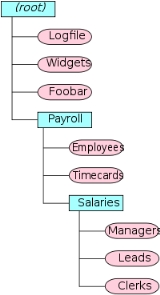
Most computers organize files into hierarchies using folders, directories, or catalogs. The concept is the same irrespective of the terminology used. Each folder can contain an arbitrary number of files, and it can also contain other folders. These other folders are referred to as subfolders. Subfolders can contain still more files and folders and so on, thus building a tree-like structure in which one "master folder" (or "root folder" — the name varies from one operating system to another) can contain any number of levels of other folders and files. Folders can be named just as files can (except for the root folder, which often does not have a name). The use of folders makes it easier to organize files in a logical way.
When a computer allows the use of folders, each file and folder has not only a name of its own, but also a path, which identifies the folder or folders in which a file or folder resides. In the path, some sort of special character—such as a slash—is used to separate the file and folder names. For example, in the illustration shown in this article, the path
/Payroll/Salaries/Managers uniquely identifies a file called
Managers in a folder called
Salaries, which in turn is contained in a folder called
Payroll. The folder and file names are separated by slashes in this example; the topmost or root folder has no name, and so the path begins with a slash (if the root folder had a name, it would precede this first slash).
Many (but not all) computer systems use
extensionsA filename extension is a suffix to the name of a computer file applied to indicate the encoding of its contents or usage....
in file names to help identify what they contain, also known as the file type. On Windows computers, extensions consist of a dot (period) at the end of a file name, followed by a few letters to identify the type of file. An extension of
.txt identifies a text file; a
.doc extension identifies any type of document or documentation, commonly in the
Microsoft WordMicrosoft Word is a word processor designed by Microsoft. It was first released in 1983 under the name Multi-Tool Word for Xenix systems. Subsequent versions were later written for several other platforms including IBM PCs running DOS , the Apple Macintosh , the AT&T Unix PC , Atari ST , SCO UNIX,...
file formatA file format is a particular way that information is encoded for storage in a computer file.Since a disk drive, or indeed any computer storage, can store only bits, the computer must have some way of converting information to 0s and 1s and vice-versa. There are different kinds of formats for...
;
and so on. Even when extensions are used in a computer system, the degree to which the computer system recognizes
and heeds them can vary; in some systems, they are required, while in other systems, they are completely ignored if they are presented.
Protecting files
Many modern computer systems provide methods for protecting files against accidental and deliberate damage. Computers that allow for multiple users implement file permissions to control who may or may not modify, delete, or create files and folders. For example, a given user may be granted only permission to read a file or folder, but not to modify or delete it; or a user may be given permission to read and modify files or folders, but not to execute them. Permissions may also be used to allow only certain users to see the contents of a file or folder. Permissions protect against unauthorized tampering or destruction of information in files, and keep private information confidential from unauthorized users.
Another protection mechanism implemented in many computers is a
read-only flag. When this flag is turned on for a file (which can be accomplished by a computer program or by a human user), the file can be examined, but it cannot be modified. This flag is useful for critical information that must not be modified or erased, such as special files that are used only by internal parts of the computer system. Some systems also include a
hidden flag to make certain files invisible; this flag is used by the computer system to hide essential system files that users should not alter.
Storing files
The discussion above describes a file as a concept presented to a user or a high-level operating system. However, any file that has any useful purpose, outside of a thought experiment, must have some physical manifestation. That is, a file (an abstract concept) in a real computer system must have a real physical analogue if it is to exist at all.
In physical terms, most computer files are stored on some type of data storage device. For example, there is a
hard diskA hard disk drive is a non-volatile, random access digital magnetic data storage device. It features rotating rigid platters on a motor-driven spindle within a protective enclosure. Data is magnetically read from and written to the platter by read/write heads that float on a film of air above the...
, from which most
operating systemAn operating system is a set of programs that manage computer hardware resources and provide common services for application software. The operating system is the most important type of system software in a computer system...
s run and on which most store their files. Hard disks have been the ubiquitous form of non-volatile storage since the early 1960s. Where files contain only temporary information, they may be stored in
RAM-Animals:*Ram, an uncastrated male sheep*Ram cichlid, a species of freshwater fish endemic to Colombia and Venezuela-Military:*Battering ram*Ramming, a military tactic in which one vehicle runs into another...
. Computer files can be also stored on other media in some cases, such as
magnetic tapeMagnetic tape is a medium for magnetic recording, made of a thin magnetizable coating on a long, narrow strip of plastic. It was developed in Germany, based on magnetic wire recording. Devices that record and play back audio and video using magnetic tape are tape recorders and video tape recorders...
s,
compact discThe Compact Disc is an optical disc used to store digital data. It was originally developed to store and playback sound recordings exclusively, but later expanded to encompass data storage , write-once audio and data storage , rewritable media , Video Compact Discs , Super Video Compact Discs ,...
s, Digital Versatile Discs,
Zip driveThe Zip drive is a medium-capacity removable disk storage system that was introduced by Iomega in late 1994. Originally, Zip disks launched with capacities of 100 MB, but later versions increased this to first 250 MB and then 750 MB....
s,
USB flash driveA flash drive is a data storage device that consists of flash memory with an integrated Universal Serial Bus interface. flash drives are typically removable and rewritable, and physically much smaller than a floppy disk. Most weigh less than 30 g...
s, etc.
In Unix-like operating systems, many files have no direct association with a physical storage device:
/dev/nullIn Unix-like operating systems, /dev/null or the null device is a special file that discards all data written to it and provides no data to any process that reads from it ....
is a prime example, as are just about all files under
/dev,
/proc and
/sys. These can be accessed as files in user space. They are really virtual files that exist, in reality, as objects within the operating system kernel.
Backing up files
When computer files contain information that is extremely important, a
back-up process is used to protect against disasters that might destroy the files. Backing up files simply means making copies of the files in a separate location so that they can be restored if something happens to the computer, or if they are deleted accidentally.
There are many ways to back up files. Most computer systems provide utility programs to assist in the back-up process, which can become very time-consuming if there are many files to safeguard. Files are often copied to removable media such as writable CDs or cartridge tapes. Copying files to another hard disk in the same computer protects against failure of one disk, but if it is necessary to protect against failure or destruction of the entire computer, then copies of the files must be made on other media that can be taken away from the computer and stored in a safe, distant location.
The grandfather-father-son backup method automatically makes three back ups, the grandfather file is the oldest copy of the file and the son is the current copy.
File systems and file managers
The way a computer organizes, names, stores and manipulates files is globally referred to as its
file systemA file system is a means to organize data expected to be retained after a program terminates by providing procedures to store, retrieve and update data, as well as manage the available space on the device which contain it. A file system organizes data in an efficient manner and is tuned to the...
. Most computers have at least one file system. Some computers allow the use of several different file systems. For instance, on newer MS Windows computers, the older FAT-type file systems of
MS-DOSMS-DOS is an operating system for x86-based personal computers. It was the most commonly used member of the DOS family of operating systems, and was the main operating system for IBM PC compatible personal computers during the 1980s to the mid 1990s, until it was gradually superseded by operating...
and old versions of Windows are supported, in addition to the
NTFSNTFS is the standard file system of Windows NT, including its later versions Windows 2000, Windows XP, Windows Server 2003, Windows Server 2008, Windows Vista, and Windows 7....
file system that is the normal file system for recent versions of Windows. Each system has its own advantages and disadvantages. Standard FAT allows only eight-character file names (plus a three-character extension) with no spaces, for example, whereas NTFS allows much longer names that can contain spaces. You can call a file "
Payroll records" in NTFS, but in FAT you would be restricted to something like
payroll.dat (unless you were using VFAT, a FAT extension allowing long file names).
File managerA file manager or file browser is a computer program that provides a user interface to work with file systems. The most common operations performed on files or groups of files are: create, open, edit, view, print, play, rename, move, copy, delete, search/find, and modify file attributes, properties...
programs are utility programs that allow users to manipulate files directly. They allow you to move, create, delete and rename files and folders, although they do not actually allow you to read the contents of a file or store information in it. Every computer system provides at least one file-manager program for its native file system. Under Windows, the most commonly used file manager program is Windows Explorer.
See also
- Block (data storage)
In computing , a block is a sequence of bytes or bits, having a nominal length . Data thus structured are said to be blocked. The process of putting data into blocks is called blocking. Blocking is used to facilitate the handling of the data-stream by the computer program receiving the data...
- Computer file management
The term computer file management refers to the manipulation of documents and data in files on a computer.----Specifically, one may create a new file or edit an existing file and save it; open or load a pre-existing file into memory; or close a file without saving it. Additionally, one may group...
- Data hierarchy
Data Hierarchy refers to the systematic organization of data, often in a hierarchical form. Data organization involves fields, records, files and so on....
- File Camouflage
File camouflage or file deception is a computer technique to hide confidential information by inserting it in such redundant part of a file. A camouflaged file works normally in ordinary use....
- File copying
In the realm of computer file management, file copying is the creation of a new file which has the same content as an existing file.All computer operating systems include file copying provisions in the user interface, like the command, "cp" in Unix and "copy" in MS-DOS; operating systems with a...
- File deletion
File deletion is a way of removing a file from a computer's file system.The reasons for deleting files are#Freeing the disk space#Removing duplicate or unnecessary data to avoid confusion#Making sensitive information unavailable to others...
- File directory
- File manager
A file manager or file browser is a computer program that provides a user interface to work with file systems. The most common operations performed on files or groups of files are: create, open, edit, view, print, play, rename, move, copy, delete, search/find, and modify file attributes, properties...
- File name
The filename is metadata about a file; a string used to uniquely identify a file stored on the file system. Different file systems impose different restrictions on length and allowed characters on filenames.A filename includes one or more of these components:...
- File size
File size measures the size of a computer file. Typically it is measured in bytes with a prefix. The actual amount of disk space consumed by the file depends on the file system....
- File system
A file system is a means to organize data expected to be retained after a program terminates by providing procedures to store, retrieve and update data, as well as manage the available space on the device which contain it. A file system organizes data in an efficient manner and is tuned to the...
- Flat file database
A flat file database describes any of various means to encode a database model as a single file .- Overview :...
- Object composition
In computer science, object composition is a way to combine simple objects or data types into more complex ones...
- Soft copy
Soft copy and hard copy are types of output.A soft copy is the unprinted digital document file. This term is often contrasted with hard copy...