

Spatial file manager

Encyclopedia
File manager
A file manager or file browser is a computer program that provides a user interface to work with file systems. The most common operations performed on files or groups of files are: create, open, edit, view, print, play, rename, move, copy, delete, search/find, and modify file attributes, properties...
that uses a spatial metaphor
Metaphor
A metaphor is a literary figure of speech that uses an image, story or tangible thing to represent a less tangible thing or some intangible quality or idea; e.g., "Her eyes were glistening jewels." Metaphor may also be used for any rhetorical figures of speech that achieve their effects via...
to represent files
Computer file
A computer file is a block of arbitrary information, or resource for storing information, which is available to a computer program and is usually based on some kind of durable storage. A file is durable in the sense that it remains available for programs to use after the current program has finished...
and folders as if they are real physical objects.
Concepts
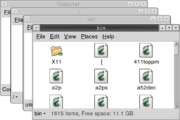
The base requirements of a spatial file manager are:- Each folderFolderFolder may refer:* File folder, a kind of folder that holds loose papers* Folder , a virtual container within a digital file system, in which groups of files and other folders can be kept and organized...
is represented by a single windowWindow (computing)In computing, a window is a visual area containing some kind of user interface. It usually has a rectangular shape that can overlap with the area of other windows...
. - Each windowWindow (computing)In computing, a window is a visual area containing some kind of user interface. It usually has a rectangular shape that can overlap with the area of other windows...
is unambiguously and irrevocably tied to a particular folderFolderFolder may refer:* File folder, a kind of folder that holds loose papers* Folder , a virtual container within a digital file system, in which groups of files and other folders can be kept and organized...
. - Stability: files, folders, and windows go where the user moves them, stay where the user puts them ("preserve their spatial state"), and retain all their other "physical" characteristics (like size, shape, color and location).
- The same item can only be viewed in one window at a time.
Given an arbitrary window in a spatial file manager, it must be possible to determine with complete certainty which folder that window represents. Furthermore, it must not be possible to change that association.
Traditionally, when a folder is opened, the icon
Icon
An icon is a religious work of art, most commonly a painting, from Eastern Christianity and in certain Eastern Catholic churches...
representing the folder changes—perhaps from an image showing a closed drawer to an opened one, perhaps the folder's icon turns into a silhouette filled with a pattern—and a new window is opened. Attempting to open that "already opened" folder will simply reveal the existing window. A new window will not be created because that would violate requirement number one listed above, attempting to reveal an already opened folder's contents using another window will either close the existing folder before opening it or refuse to reveal said contents. The change in the folder icon's state is meant to be a visual reminder of this behavior. It says, "This folder is already open." Similarly, while a document or application is open, their icons also represent this status and re-opening them will just reveal and bring them back to the front.
A common alternative to the spatial file manager is the navigational file manager or "browser-style" file manager. A window in such a system is a device through which the contents of many folders may be viewed. A browser-style window is not tied to any particular folder. The window's spatial state (size, position, etc.) stays the same as the contents of many different folders are viewed through it. More than one browser window may show the contents of a particular folder simultaneously.
Examples
Examples of file managers that use a spatial metaphor by default include:- Apple's Finder 5 to 9 (versions up to Mac OS XMac OS XMac OS X is a series of Unix-based operating systems and graphical user interfaces developed, marketed, and sold by Apple Inc. Since 2002, has been included with all new Macintosh computer systems...
) - the RISC OSRISC OSRISC OS is a computer operating system originally developed by Acorn Computers Ltd in Cambridge, England for their range of desktop computers, based on their own ARM architecture. First released in 1987, under the name Arthur, the subsequent iteration was renamed as in 1988...
Filer - the ROX DesktopROX DesktopThe ROX Desktop is a graphical desktop environment for the X Window System. It is based on the ROX-Filer which is a drag and drop spatial file manager. It is free software released under the GNU General Public License. The environment was inspired by the user interface of RISC OS...
's ROX-Filer - AmigaAmigaThe Amiga is a family of personal computers that was sold by Commodore in the 1980s and 1990s. The first model was launched in 1985 as a high-end home computer and became popular for its graphical, audio and multi-tasking abilities...
's Workbench - the OS/2OS/2OS/2 is a computer operating system, initially created by Microsoft and IBM, then later developed by IBM exclusively. The name stands for "Operating System/2," because it was introduced as part of the same generation change release as IBM's "Personal System/2 " line of second-generation personal...
Workplace ShellWorkplace ShellThe Workplace Shell is a object-oriented desktop shell produced by IBM's Boca Raton development lab for OS/2 2.0. It is based on Common User Access and made a radical shift away from the Program Manager type interface that earlier versions of OS/2 shared with Windows 3.x or the... - GNOMEGNOMEGNOME is a desktop environment and graphical user interface that runs on top of a computer operating system. It is composed entirely of free and open source software...
's NautilusNautilus (file manager)Nautilus is the official file manager for the GNOME desktop. The name is a play on words, evoking the shell of a nautilus to represent an operating system shell. Nautilus replaced Midnight Commander in GNOME 1.4 and was the default from version 2.0 onwards....
from version 2.6 till 2.29 - BeOSBeOSBeOS is an operating system for personal computers which began development by Be Inc. in 1991. It was first written to run on BeBox hardware. BeOS was optimized for digital media work and was written to take advantage of modern hardware facilities such as symmetric multiprocessing by utilizing...
's Tracker - Windows ExplorerWindows ExplorerThis article is about the Windows file system browser. For the similarly named web browser, see Internet ExplorerWindows Explorer is a file manager application that is included with releases of the Microsoft Windows operating system from Windows 95 onwards. It provides a graphical user interface...
in Windows 95Windows 95Windows 95 is a consumer-oriented graphical user interface-based operating system. It was released on August 24, 1995 by Microsoft, and was a significant progression from the company's previous Windows products...
was also a spatial file manager in some respects, but became a navigational file manager in later versions of the operating system (when using the default settings) - Enlightenment 17Enlightenment (window manager)Enlightenment, also known simply as E, is a stacking window manager for the X Window System which can be used alone or in conjunction with a desktop environment such as GNOME or KDE...
's file manager
Other objects
Some file managers represent other objects, such as a trash can for unwanted files, or computerComputer
A computer is a programmable machine designed to sequentially and automatically carry out a sequence of arithmetic or logical operations. The particular sequence of operations can be changed readily, allowing the computer to solve more than one kind of problem...
or floppy disk
Floppy disk
A floppy disk is a disk storage medium composed of a disk of thin and flexible magnetic storage medium, sealed in a rectangular plastic carrier lined with fabric that removes dust particles...
icons to represent storage media. There may also be special folders that contain special items such as user preferences or the user's applications.
Advantages
A spatial file manager is closer to the way the people interact with the physical objects around them, such as desks, chairs and tables. Since spatial properties are reliable indicators of "location" in a spatial file manager, the user may build up a familiar work environment by arranging commonly used windows, secure in the knowledge that this state will be preserved and will always map to the expected locations. This form of "nesting" (in the avian sense, not the hierarchical one) can lead to increased comfort and efficiency.Furthermore, identification based on spatial attributes is a very natural human ability, requiring little or no conscious thought. The ability to recognize and recall locations within the hierarchy based on the appearance and position of folder windows is the primary purpose of the spatial file manager. All of the "rules" and behaviors that define the spatial file manager are designed to ensure that the strengths of the visual/spatial recognition and recall abilities of the human brain are leveraged. The idea is that these abilities are more natural and require "less work" than other forms of recognition based on reading text, maintaining an awareness of "current working directory" (in a command-line environment, for example), relying on the memory of past actions, or any other non-spatial cues.
One more advantage is that it allows the user to keep things arranged a certain way from one session to the next, as with the "workspace" settings in many high-end software packages. For instance, the windows showing the contents of different folders for a complex project could be tiled onscreen in such a fashion that all of them could be seen at the same time. In a browser-style file manager, one would be forced to rearrange these same windows every time they were reopened.
Disadvantages
The spatial metaphor can seem awkward to those accustomed to browser-style file managers. One complaint is that spatial managers use too many windows, leading to clutter. In a Windows 95 usability study by Microsoft, users of varying experience were said to be "confused" by the many windows:- "Users of every type were confused by the Programs folder. We thought that having a folder on the desktop with other folders and links to programs inside it would be a natural transition for Windows 3.1 users accustomed to Program Manager, while being relatively easy to learn for beginners. We were wrong! Beginners quickly got lost in all of the folders (unlike File Cabinet, each folder opened into a different window) and other users had a lot of trouble deciding whether they were looking at the actual file system and its files or just links to actual files."
Proponents claim that this confusion is partially a result of the non-spatial nature of the Windows 95 file manager. When the connection between the spatial state of a window is not unambiguously and irrevocably connected with a particular folder, it becomes impossible to reliably recognize a particular folder based on its spatial qualities. Spatial state often becomes misleading in a non-spatial file manager. Users may incorrectly identify a window based on visual cues that do not actually link it to any particular folder, but are instead properties of the browser-style window itself. In such an environment, each new window adds clutter without recognizable meaning. This leads to the often-cited preference for a single window through which any folder may be viewed: a browser. The proliferation and familiarity of web browsers has strengthened this preference.
Also, maintaining spatial familiarity can be difficult when the file system is accessed from a variety of applications and devices with differing display capabilities. Reproducing a single spatial arrangement on many different display devices is sometimes impractical. Per-device, per-user, or per-display spatial state is one possible solution, at the cost of an increased amount of state information that must be stored.
See also
- File managerFile managerA file manager or file browser is a computer program that provides a user interface to work with file systems. The most common operations performed on files or groups of files are: create, open, edit, view, print, play, rename, move, copy, delete, search/find, and modify file attributes, properties...
- Desktop metaphorDesktop metaphorThe desktop metaphor is an interface metaphor which is a set of unifying concepts used by graphical user interfaces to help users more easily interact with the computer. The desktop metaphor treats the monitor of a computer as if it is the user's desktop, upon which objects such as documents and...
- Navigational file manager
- Spatial navigationSpatial navigationIn computing, spatial navigation is the ability to navigate between focusable elements, such as hyperlinks and form controls, within a structured document or user interface according to the spatial location....