

Color calibration

Encyclopedia
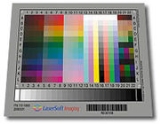
The aim of color calibration is to measure and/or adjust the color response of a device (input or output) to a known state. In ICC terms this is the basis for a additional color characterization of the device and later profiling. In non ICC workflows calibration refers sometimes to establishing a known relationship to a standard color space
. in one go. The device that is to be calibrated is sometimes known as calibration source; the color space that serves as a standard is sometimes known as calibration target.. Color calibration is a requirement for all devices taking an active part of a color managed
workflow.
Color calibration is used by many industries, such as TV production, gaming, photography, engineering, chemistry, medical and more. In order to calibrate a display correctly you need a colorimeter and software to correctly calibrate your monitor or television. There are many different solutions for different types of displays. Due to the differences in technology, one meter may or may not work with another type of screen( i.e. may support LCD, but not CRT). Calibration solutions run from $299-$3000, depending on your specific needs. Most consumers will spend between $300-$500 for a color calibration solution.
s or any other measuring devices. Those inputs can be either monochrome (in which case only the response curve needs to be calibrated, though in a few select cases one must also specify the color or spectral power distribution that that single channel corresponds to) or specified in multidimensional
color - most commonly in the three channel RGB
model. Input data is in most cases calibrated against a profile connection space (PCS).
One of the most important factors to consider when dealing with color calibration is having a valid source. If your color measuring source does not match the displays capabilities, the calibration will be ineffective and give false readings.
The main distorting factors on the input stage stem from the amplitude nonlinearity of the channel response(s), and in the case of a multidimensional datastream the non-ideal wavelength responses of the individual color separation filters (most commonly a color filter array (CFA)
) in combination with the spectral power distribution of the scene illumination.
After this the data is often circulated in the system translated into a working space RGB for viewing and editing.
In the output stage when exporting to a viewing device such as a CRT
or LCD
screen or a digital projector, the computer sends a signal to the computer's graphic card in the form RGB [Red,Green,Blue]. The dataset [255,0,0] signals only a device instruction, not a specific color. This instruction [R,G,B]=[255,0,0] then causes the connected display to show Red at the maximum achievable brightness [255], while the Green and Blue components of the display remain dark [0]. The resultant color being displayed, however, depends on two main factors:
Hence every output device will have its unique color signature, displaying a certain color according to manufacturing tolerances and material deterioration through use and age.
If the output device is a printer, additional distorting factors are the qualities of a particular batch of paper and ink.
The conductive qualities and standards-compliance of connecting cables, circuitry and equipment can also alter the electrical signal at any stage in the signal flow. (A partially inserted VGA connector
can result in a monochrome display, for example, as some pins are not connected.)
; for example, a red object looks black in blue light. It is therefore not possible to achieve calibration that will make a device look correct and consistent in all capture or viewing conditions. The computer display
and calibration target will have to be considered in controlled, predefined lighting conditions.
Spectracal's CalMAN Display Calibration Software
Spectracal's CalPC Monitor Calibration Software
Display Calibrations ChromaPure Video Calibration Software
Datacolor's Spyder3 Studio Spyder Calibration Software
X-Rite i1Match Software i1 Meter Calibration Software
Quato's iColor Display Display Calibration Software
Commercial producers of consumer-level colorimeters include X-Rite, SpectraCal, and Datacolor.
The X-Rite Chroma 5 is a quick-reading colorimeter with greater accuracy and better stability than other contact colorimeters. Built-in temperature compensation eliminates the need for periodic dark calibration.
X-Rite ColorMunki
The ColorMunki is the compact relative to the popular EyeOne Pro. It offers the power of a spectroradiometer in a compact innovatively designed package.
X-Rite EyeOne Pro
The EyeOne Pro is manufactured in Switzerland and calibrated at the factory by X-Rite against a reference system traceable to a National Institute of Standards and Technology (NIST) source. Each ships with a certificate of performance which warrants the accuracy of the meter for a period of a year.
X-Rite EyeOne Pro Enhanced
The EyeOne Pro is manufactured in Switzerland and calibrated at the factory by X-Rite against a reference system traceable to a National Institute of Standards and Technology (NIST) source. Each ships with a certificate of performance which warrants the accuracy of the meter for a period of a year. Modified and available from Spectracal only.
X-Rite EyeOne D2
Eye-One Display 2 is a professional monitor-calibration tool that lets you achieve accurate color on all types of displays--including LCDs, CRTs, and laptops. With its advanced controls, you can achieve the best possible match across multiple monitors, optimize gray balance for more neutral and better-defined grays, and even check ambient light to determine optimal room lighting for color-critical work. Eye-One Display 2 saves time and rework so your creative inspirations can be more easily realized. Designed to meet the needs of creative professionals and discerning digital-imaging enthusiasts, Eye-One Display LT ensures reliable and accurate color onscreen. With the easy-to-use software wizard, you'll achieve consistent, predictable color on all types of monitors--LCD, CRT, and laptops--with a few simple clicks
X-Rite Hubble
The X-Rite Hubble Non-Contact Tristimulus Colorimeter measures and calibrates flat panels, projectors, and CRTs more accurately and conveniently. The Hubble’s low light accuracy, high measurement speed, and low cost make it the perfect color calibrator for professionals.
M2 Meter
Modified custom meter made only by Spectracal. Extremely accurate M2 colorimeter individually optimized in the SpectraCal lab to provide the best results for calibrating PC monitor technologies. Comes Bundled with CalPC.
Colorvision Spyder 2
The ColorVision Spyder2 features the all new Spyder2 colorimeter and monitor calibration for advanced amateurs and prosumers to create precise ICC display profiles for your CRT, LCD or notebook display. Third generation colorimeter comes equipped with new state-of-the-art optical design and photo-centric user interface providing accurate, reliable and consistent color.
These goals can either be realized via direct value translation from source to target, or by using a common known reference color space as middle ground. In the most commonly used color profile system, ICC
, this is known as the PCS or "Profile Connection Space".
When two or more cameras need to be calibrated relatively to each other, to reproduce the same color values, the technique of color mapping
can be used.
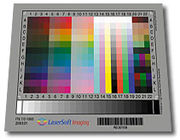 For creating a scanner profile it needs a target source, such as an IT8
-target, an original with many small color fields, which was measured by the developer with a photometer
. The scanner reads this original and compares the scanned color values with the target's reference values. Taking the differences of these values into account an ICC profile
is created, which relates the device specific color space (RGB color space
) to a device independent color space (L*a*b color space
). Thus, the scanner is able to output with color fidelity to what it reads.
is attached flat to the display's surface, shielded from all ambient light. The calibration software sends a series of color signals to the display and compares the values that were actually sent against the readings from the calibration device. This establishes the current offsets in color display. Depending on the calibration software and type of monitor used, the software either creates a correction matrix (i.e. an ICC profile
) for color values before being sent to the display, or gives instructions for altering the display's brightness/contrast and RGB values through the OSD
.
This tunes the display to reproduce fairly accurately the in-gamut
part of a desired color space. The calibration target for this kind of calibration is that of print stock paper illuminated by D65 light at 120 cd/m2.
Color space
A color model is an abstract mathematical model describing the way colors can be represented as tuples of numbers, typically as three or four values or color components...
. in one go. The device that is to be calibrated is sometimes known as calibration source; the color space that serves as a standard is sometimes known as calibration target.. Color calibration is a requirement for all devices taking an active part of a color managed
Color management
In digital imaging systems, color management is the controlled conversion between the color representations of various devices, such as image scanners, digital cameras, monitors, TV screens, film printers, computer printers, offset presses, and corresponding media.The primary goal of color...
workflow.
Color calibration is used by many industries, such as TV production, gaming, photography, engineering, chemistry, medical and more. In order to calibrate a display correctly you need a colorimeter and software to correctly calibrate your monitor or television. There are many different solutions for different types of displays. Due to the differences in technology, one meter may or may not work with another type of screen( i.e. may support LCD, but not CRT). Calibration solutions run from $299-$3000, depending on your specific needs. Most consumers will spend between $300-$500 for a color calibration solution.
Information flow and output distortion
Input data can come from device sources like digital cameras, image scannerImage scanner
In computing, an image scanner—often abbreviated to just scanner—is a device that optically scans images, printed text, handwriting, or an object, and converts it to a digital image. Common examples found in offices are variations of the desktop scanner where the document is placed on a glass...
s or any other measuring devices. Those inputs can be either monochrome (in which case only the response curve needs to be calibrated, though in a few select cases one must also specify the color or spectral power distribution that that single channel corresponds to) or specified in multidimensional
Additive color
An additive color model involves light emitted directly from a source or illuminant of some sort. The additive reproduction process usually uses red, green and blue light to produce the other colors. Combining one of these additive primary colors with another in equal amounts produces the...
color - most commonly in the three channel RGB
RGB color model
The RGB color model is an additive color model in which red, green, and blue light is added together in various ways to reproduce a broad array of colors...
model. Input data is in most cases calibrated against a profile connection space (PCS).
One of the most important factors to consider when dealing with color calibration is having a valid source. If your color measuring source does not match the displays capabilities, the calibration will be ineffective and give false readings.
The main distorting factors on the input stage stem from the amplitude nonlinearity of the channel response(s), and in the case of a multidimensional datastream the non-ideal wavelength responses of the individual color separation filters (most commonly a color filter array (CFA)
Color filter array
In photography, a color filter array , or color filter mosaic , is a mosaic of tiny color filters placed over the pixel sensors of an image sensor to capture color information....
) in combination with the spectral power distribution of the scene illumination.
After this the data is often circulated in the system translated into a working space RGB for viewing and editing.
In the output stage when exporting to a viewing device such as a CRT
Cathode ray tube
The cathode ray tube is a vacuum tube containing an electron gun and a fluorescent screen used to view images. It has a means to accelerate and deflect the electron beam onto the fluorescent screen to create the images. The image may represent electrical waveforms , pictures , radar targets and...
or LCD
Liquid crystal display
A liquid crystal display is a flat panel display, electronic visual display, or video display that uses the light modulating properties of liquid crystals . LCs do not emit light directly....
screen or a digital projector, the computer sends a signal to the computer's graphic card in the form RGB [Red,Green,Blue]. The dataset [255,0,0] signals only a device instruction, not a specific color. This instruction [R,G,B]=[255,0,0] then causes the connected display to show Red at the maximum achievable brightness [255], while the Green and Blue components of the display remain dark [0]. The resultant color being displayed, however, depends on two main factors:
- the phosphorPhosphorA phosphor, most generally, is a substance that exhibits the phenomenon of luminescence. Somewhat confusingly, this includes both phosphorescent materials, which show a slow decay in brightness , and fluorescent materials, where the emission decay takes place over tens of nanoseconds...
s or another system actually producing a light that falls inside the red spectrum; - the overall brightness of the color resulting in the desired color perceptionColor visionColor vision is the capacity of an organism or machine to distinguish objects based on the wavelengths of the light they reflect, emit, or transmit...
: an extremely bright light source will always be seen as white, irrespective of spectral composition.
Hence every output device will have its unique color signature, displaying a certain color according to manufacturing tolerances and material deterioration through use and age.
If the output device is a printer, additional distorting factors are the qualities of a particular batch of paper and ink.
The conductive qualities and standards-compliance of connecting cables, circuitry and equipment can also alter the electrical signal at any stage in the signal flow. (A partially inserted VGA connector
VGA connector
A Video Graphics Array connector is a three-row 15-pin DE-15 connector. The 15-pin VGA connector is found on many video cards, computer monitors, and some high definition television sets...
can result in a monochrome display, for example, as some pins are not connected.)
Color perception
Color perception is subject to ambient light levels, and the ambient white pointWhite point
A white point is a set of tristimulus values or chromaticity coordinates that serve to define the color "white" in image capture, encoding, or reproduction. Depending on the application, different definitions of white are needed to give acceptable results...
; for example, a red object looks black in blue light. It is therefore not possible to achieve calibration that will make a device look correct and consistent in all capture or viewing conditions. The computer display
Computer display
A monitor or display is an electronic visual display for computers. The monitor comprises the display device, circuitry, and an enclosure...
and calibration target will have to be considered in controlled, predefined lighting conditions.
Commercial calibration tools
There are several custom monitor calibration software available on the market. Depending on your need, you may want software that can calibrate monitors, tvs, or both. Some of more popular software products are:Spectracal's CalMAN Display Calibration Software
Spectracal's CalPC Monitor Calibration Software
Display Calibrations ChromaPure Video Calibration Software
Datacolor's Spyder3 Studio Spyder Calibration Software
X-Rite i1Match Software i1 Meter Calibration Software
Quato's iColor Display Display Calibration Software
Commercial producers of consumer-level colorimeters include X-Rite, SpectraCal, and Datacolor.
Consumer-Level Colorimeters
X-Rite Chroma 5The X-Rite Chroma 5 is a quick-reading colorimeter with greater accuracy and better stability than other contact colorimeters. Built-in temperature compensation eliminates the need for periodic dark calibration.
X-Rite ColorMunki
The ColorMunki is the compact relative to the popular EyeOne Pro. It offers the power of a spectroradiometer in a compact innovatively designed package.
X-Rite EyeOne Pro
The EyeOne Pro is manufactured in Switzerland and calibrated at the factory by X-Rite against a reference system traceable to a National Institute of Standards and Technology (NIST) source. Each ships with a certificate of performance which warrants the accuracy of the meter for a period of a year.
X-Rite EyeOne Pro Enhanced
The EyeOne Pro is manufactured in Switzerland and calibrated at the factory by X-Rite against a reference system traceable to a National Institute of Standards and Technology (NIST) source. Each ships with a certificate of performance which warrants the accuracy of the meter for a period of a year. Modified and available from Spectracal only.
X-Rite EyeOne D2
Eye-One Display 2 is a professional monitor-calibration tool that lets you achieve accurate color on all types of displays--including LCDs, CRTs, and laptops. With its advanced controls, you can achieve the best possible match across multiple monitors, optimize gray balance for more neutral and better-defined grays, and even check ambient light to determine optimal room lighting for color-critical work. Eye-One Display 2 saves time and rework so your creative inspirations can be more easily realized. Designed to meet the needs of creative professionals and discerning digital-imaging enthusiasts, Eye-One Display LT ensures reliable and accurate color onscreen. With the easy-to-use software wizard, you'll achieve consistent, predictable color on all types of monitors--LCD, CRT, and laptops--with a few simple clicks
X-Rite Hubble
The X-Rite Hubble Non-Contact Tristimulus Colorimeter measures and calibrates flat panels, projectors, and CRTs more accurately and conveniently. The Hubble’s low light accuracy, high measurement speed, and low cost make it the perfect color calibrator for professionals.
M2 Meter
Modified custom meter made only by Spectracal. Extremely accurate M2 colorimeter individually optimized in the SpectraCal lab to provide the best results for calibrating PC monitor technologies. Comes Bundled with CalPC.
Colorvision Spyder 2
The ColorVision Spyder2 features the all new Spyder2 colorimeter and monitor calibration for advanced amateurs and prosumers to create precise ICC display profiles for your CRT, LCD or notebook display. Third generation colorimeter comes equipped with new state-of-the-art optical design and photo-centric user interface providing accurate, reliable and consistent color.
Calibration techniques and procedures
The most common form of calibration aims at adjusting cameras, scanners, monitors and printers for photographic reproduction. The aim is that a printed copy of a photograph appear identical in saturation and dynamic range to the original or a source file on a computer display. This means that three independent calibrations need to be performed:- The camera or scanner needs a device-specific calibration to represent the original's estimated colors in an unambiguous way.
- The computer display needs a device-specific calibration to reproduce the colors of the image color space.
- The printer needs a device-specific calibration to reproduce the colors of the image color space.
These goals can either be realized via direct value translation from source to target, or by using a common known reference color space as middle ground. In the most commonly used color profile system, ICC
ICC profile
In color management, an ICC profile is a set of data that characterizes a color input or output device, or a color space, according to standards promulgated by the International Color Consortium...
, this is known as the PCS or "Profile Connection Space".
Camera
The camera calibration needs a known calibration target to be photographed and the resulting output from the camera to be converted to color values. A correction profile can then be built using the difference between the camera result values and the known reference values.When two or more cameras need to be calibrated relatively to each other, to reproduce the same color values, the technique of color mapping
Color mapping
Color mapping is a function that maps the colors of one image to the colors of another image. A color mapping may be referred to as the algorithm that results in the mapping function or the algorithm that transforms the image colors...
can be used.
Scanner
IT8
IT8 is a set of American National Standards Institute standards for color communications and control specifications. Formerly governed by the IT8 Committee, IT8 activities were merged with those of the Committee for Graphics Arts Technologies Standards in 1994.-Standards List:The following is a...
-target, an original with many small color fields, which was measured by the developer with a photometer
Photometer
In its widest sense, a photometer is an instrument for measuring light intensity or optical properties of solutions or surfaces. Photometers are used to measure:*Illuminance*Irradiance*Light absorption*Scattering of light*Reflection of light*Fluorescence...
. The scanner reads this original and compares the scanned color values with the target's reference values. Taking the differences of these values into account an ICC profile
ICC profile
In color management, an ICC profile is a set of data that characterizes a color input or output device, or a color space, according to standards promulgated by the International Color Consortium...
is created, which relates the device specific color space (RGB color space
RGB color space
An RGB color space is any additive color space based on the RGB color model. A particular RGB color space is defined by the three chromaticities of the red, green, and blue additive primaries, and can produce any chromaticity that is the triangle defined by those primary colors...
) to a device independent color space (L*a*b color space
Lab color space
A Lab color space is a color-opponent space with dimension L for lightness and a and b for the color-opponent dimensions, based on nonlinearly compressed CIE XYZ color space coordinates....
). Thus, the scanner is able to output with color fidelity to what it reads.
Display
For calibrating the monitor a colorimeterColorimeter
For articles on Colorimeter see:* Colorimeter * Tristimulus colorimeter...
is attached flat to the display's surface, shielded from all ambient light. The calibration software sends a series of color signals to the display and compares the values that were actually sent against the readings from the calibration device. This establishes the current offsets in color display. Depending on the calibration software and type of monitor used, the software either creates a correction matrix (i.e. an ICC profile
ICC profile
In color management, an ICC profile is a set of data that characterizes a color input or output device, or a color space, according to standards promulgated by the International Color Consortium...
) for color values before being sent to the display, or gives instructions for altering the display's brightness/contrast and RGB values through the OSD
On-screen display
An on-screen display is an image superimposed on a screen picture, commonly used by modern television sets, VCRs, and DVD players to display information such as volume, channel, and time.-History:...
.
This tunes the display to reproduce fairly accurately the in-gamut
Gamut
In color reproduction, including computer graphics and photography, the gamut, or color gamut , is a certain complete subset of colors. The most common usage refers to the subset of colors which can be accurately represented in a given circumstance, such as within a given color space or by a...
part of a desired color space. The calibration target for this kind of calibration is that of print stock paper illuminated by D65 light at 120 cd/m2.
Printer
The ICC profile for a printer is created by comparing a test print result using a photometer with the original reference file. The testchart contains known CMYK colors, whose offsets to their actual L*a*b colors scanned by the photometer are resulting in an ICC profile. Another possibility to ICC profile a printer is to use a calibrated scanner as the measuring device for the printed CMYK testchart instead of a photometer. A calibration profile is necessary for each printer/paper/ink combination.External links
- DisplayCalibration.com Free online tools for calibrating monitor brightness, contrast & color depth.
- monitorsetup.com Free website for checking the monitor calibration and the color management capabilities of web browsers
- CoCa - www.dohm.com.au/coca/index.html Color Camera Calibrator - an open source scanner and digital camera color calibration (ICC profiling) software by Andrew Stawowczyk Long
- http://www.drycreekphoto.com/Learn/monitor_calibration_tools.htm DryCreekPhoto - Science and Information of Color calibration.
- SpectraCal Home Page Color calibration software and training