


HTML editor

Encyclopedia
An HTML editor is a software application
for creating web page
s. Although the HTML
markup of a web page can be written with any text editor
, specialized HTML editors can offer convenience and added functionality. For example, many HTML editors work not only with HTML, but also with related technologies such as CSS
, XML
and JavaScript
or ECMAScript
. In some cases they also manage communication with remote web servers via FTP
and WebDAV
, and version management systems such as CVS
or Subversion.
(What You See Is What You Get) editors.
. Templates, toolbar
s and keyboard shortcut
s may quickly insert common HTML element
s and structures. Wizards
, tooltip
prompts and autocompletion
may help with common tasks.
Text HTML editors commonly include either built-in functions or integration with external tools for such tasks as source and version control, link-checking, code checking and validation
, code cleanup and formatting, spell-checking, uploading by FTP or WebDAV, and structuring as a project.
Text editors require user understanding of HTML and any other web technologies the designer wishes to use like CSS, JavaScript and server-side scripting
languages. They were also referred to A Simple HTML Editor (ASHE).
Some regular text editors such as Windows Notepad also provide the method to save as HTML files with .html or .htm extensions.
in more visually organized modes than simple color highlighting, but in modes not considered WYSIWYG. Some WYSIWYG editors include the option of using palette windows that enable editing the text-based parameters of selected objects. These palettes allow either editing parameters in fields for each individual parameter, or text windows to edit the full group of source text for the selected object. They may include widgets
to present and select options when editing parameters. Adobe GoLive
provides an outline editor to expand and collapse HTML objects and properties, edit parameters, and view graphics attached to the expanded objects.
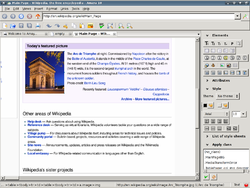 WYSIWYG HTML editors provide an editing interface which resembles how the page will be displayed in a web browser
. Some editors, such as ones in the form of browser extensions allow editing within a web browser. Because using a WYSIWYG editor does not require any HTML knowledge, they are easier for an average computer user to get started with.
The WYSIWYG view is achieved by embedding a layout engine
based upon that used in a web browser. The layout engine will have been considerably enhanced by the editor's developers to allow for typing, pasting, deleting and moving the content. The goal is that, at all times during editing, the rendered
result should represent what will be seen later in a typical web browser.
) is an alternative paradigm to the WYSIWYG editors above. Instead of focusing on the format or presentation of the document, it preserves the intended meaning of each element. For example, page headers, sections, paragraphs, etc. are labeled as such in the editing program, and displayed appropriately in the browser.
. There are certain rules on how HTML must be written if it is to conform to W3C standards for the World Wide Web
. Following these rules means that web sites are accessible on all types and makes of computer, to able-bodied and people with disabilities, and also on wireless
devices like mobile phone
s and PDA
s, with their limited bandwidths and screen sizes. Unfortunately most HTML documents on the web do not meet the requirements of W3C standards. According to one study only about 1 out of 141 complies with the standards. Another study, conducted in 2011 on the 350 most popular web sites in the world (selected by the Alexa index), 94 percent of websites fail the web standards markup and style sheet validation tests, or apply character encoding improperly . Even those syntactically correct documents may be inefficient due to an unnecessary use of repetition, or based upon rules that have been deprecated
for some years.
Current W3C recommendations on the use of CSS with HTML were first formalised by W3C in 1996 and have been revised and refined since then. See CSS
, XHTML
, W3C's current CSS recommendation and W3C's current HTML recommendation.
These guidelines emphasise the separation of content (HTML or XHTML) from style (CSS). This has the benefit of delivering the style information once for a whole site, not repeated in each page, let alone in each HTML element. WYSIWYG editor designers have been struggling ever since with how best to present these concepts to their users without confusing them by exposing the underlying reality. Modern WYSIWYG editors all succeed in this to some extent, but none of them has succeeded entirely.
However a web page was created or edited, WYSIWYG or by hand, in order to be successful among the greatest possible number of readers and viewers, as well as to maintain the 'worldwide' value of the Web itself, first and foremost it should consist of valid markup and code. It should not be considered ready for the World Wide Web, until its HTML and CSS syntax have been successfully validated
using either the free W3C validator services (W3C HTML Validator and W3C CSS Validator) or some other trustworthy alternatives.
Accessibility
of web pages by those with physical, eyesight or other disabilities is not only a good idea considering the ubiquity and importance of the web in modern society, but is also mandated by law. In the U.S., the Americans with Disabilities Act and in the U.K., the Disability Discrimination Act
place requirement on public web sites. In many other countries similar laws either already exist or soon will. Making pages accessible
is more complex than just making them valid; that is a prerequisite but there are many other factors to be considered. Good web design, whether done using a WYSIWYG tool or not needs to take account of these too.
Whatever software tools are used to design, create and maintain web pages, the quality of the underlying HTML is dependent on the skill of the person who works on the page. Some knowledge of HTML, CSS and other scripting languages as well as a familiarity with the current W3C recommendations in these areas will help any designer produce better web pages, with a WYSIWYG HTML editor and without.
Different browsers and applications will render the same markup differently.
Browsers and computer graphics systems have a range of user settings.
Web browsers, like all computer software, have bugs
What you see may be what most visitors get, but it is not guaranteed to be what everyone gets.
Application software
Application software, also known as an application or an "app", is computer software designed to help the user to perform specific tasks. Examples include enterprise software, accounting software, office suites, graphics software and media players. Many application programs deal principally with...
for creating web page
Web page
A web page or webpage is a document or information resource that is suitable for the World Wide Web and can be accessed through a web browser and displayed on a monitor or mobile device. This information is usually in HTML or XHTML format, and may provide navigation to other web pages via hypertext...
s. Although the HTML
HTML
HyperText Markup Language is the predominant markup language for web pages. HTML elements are the basic building-blocks of webpages....
markup of a web page can be written with any text editor
Text editor
A text editor is a type of program used for editing plain text files.Text editors are often provided with operating systems or software development packages, and can be used to change configuration files and programming language source code....
, specialized HTML editors can offer convenience and added functionality. For example, many HTML editors work not only with HTML, but also with related technologies such as CSS
Cascading Style Sheets
Cascading Style Sheets is a style sheet language used to describe the presentation semantics of a document written in a markup language...
, XML
Extensible Markup Language
Extensible Markup Language is a set of rules for encoding documents in machine-readable form. It is defined in the XML 1.0 Specification produced by the W3C, and several other related specifications, all gratis open standards....
and JavaScript
JavaScript
JavaScript is a prototype-based scripting language that is dynamic, weakly typed and has first-class functions. It is a multi-paradigm language, supporting object-oriented, imperative, and functional programming styles....
or ECMAScript
ECMAScript
ECMAScript is the scripting language standardized by Ecma International in the ECMA-262 specification and ISO/IEC 16262. The language is widely used for client-side scripting on the web, in the form of several well-known dialects such as JavaScript, JScript, and ActionScript.- History :JavaScript...
. In some cases they also manage communication with remote web servers via FTP
File Transfer Protocol
File Transfer Protocol is a standard network protocol used to transfer files from one host to another host over a TCP-based network, such as the Internet. FTP is built on a client-server architecture and utilizes separate control and data connections between the client and server...
and WebDAV
WebDAV
Web-based Distributed Authoring and Versioning is a set of methods based on the Hypertext Transfer Protocol that facilitates collaboration between users in editing and managing documents and files stored on World Wide Web servers...
, and version management systems such as CVS
Concurrent Versions System
The Concurrent Versions System , also known as the Concurrent Versioning System, is a client-server free software revision control system in the field of software development. Version control system software keeps track of all work and all changes in a set of files, and allows several developers ...
or Subversion.
Types
There are various forms of HTML editors: text, object and WYSIWYGWYSIWYG
WYSIWYG is an acronym for What You See Is What You Get. The term is used in computing to describe a system in which content displayed onscreen during editing appears in a form closely corresponding to its appearance when printed or displayed as a finished product...
(What You See Is What You Get) editors.
Text editors
Text (source) editors intended for use with HTML usually provide syntax highlightingSyntax highlighting
Syntax highlighting is a feature of some text editors that display text—especially source code—in different colors and fonts according to the category of terms. This feature eases writing in a structured language such as a programming language or a markup language as both structures and...
. Templates, toolbar
Toolbar
In a graphical user interface, on a computer monitor, a toolbar is a GUI widget on which on-screen buttons, icons, menus, or other input or output elements are placed. Toolbars are seen in office suites, graphics editors, and web browsers...
s and keyboard shortcut
Keyboard shortcut
In computing, a keyboard shortcut is a finite set of one or more keys that invoke a software or operating system operation when triggered by the user. A meaning of term "keyboard shortcut" can vary depending on software manufacturer...
s may quickly insert common HTML element
HTML element
An HTML element is an individual component of an HTML document. HTML documents are composed of a tree of HTML elements and other nodes, such as text nodes. Each element can have attributes specified. Elements can also have content, including other elements and text. HTML elements represent...
s and structures. Wizards
Wizard (software)
A software wizard or setup assistant is a user interface type that presents a user with a sequence of dialog boxes that lead the user through a series of well-defined steps. Tasks that are complex, infrequently performed, or unfamiliar may be easier to perform using a wizard...
, tooltip
Tooltip
The tooltip or infotip is a common graphical user interface element. It is used in conjunction with a cursor, usually a mouse pointer. The user hovers the cursor over an item, without clicking it, and a tooltip may appear—a small "hover box" with information about the item being hovered...
prompts and autocompletion
Autocomplete
Autocomplete is a feature provided by many web browsers, e-mail programs, search engine interfaces, source code editors, database query tools, word processors, and command line interpreters. Autocomplete involves the program predicting a word or phrase that the user wants to type in without the...
may help with common tasks.
Text HTML editors commonly include either built-in functions or integration with external tools for such tasks as source and version control, link-checking, code checking and validation
Validator
A validator is a computer program used to check the validity or syntactical correctness of a fragment of code or document. The term is commonly used in the context of validating HTML, CSS and XML documents or RSS feeds though it can be used for any defined format or language.-HTML validator:In the...
, code cleanup and formatting, spell-checking, uploading by FTP or WebDAV, and structuring as a project.
Text editors require user understanding of HTML and any other web technologies the designer wishes to use like CSS, JavaScript and server-side scripting
Server-side scripting
Server-side scripting is a web server technology in which a user's request is verified by running a script directly on the web server to generate dynamic web pages. It is usually used to provide interactive web sites that interface to databases or other data stores. This is different from...
languages. They were also referred to A Simple HTML Editor (ASHE).
Some regular text editors such as Windows Notepad also provide the method to save as HTML files with .html or .htm extensions.
Object editors
Some editors allow alternate editing of the source text of objectsObject (computer science)
In computer science, an object is any entity that can be manipulated by the commands of a programming language, such as a value, variable, function, or data structure...
in more visually organized modes than simple color highlighting, but in modes not considered WYSIWYG. Some WYSIWYG editors include the option of using palette windows that enable editing the text-based parameters of selected objects. These palettes allow either editing parameters in fields for each individual parameter, or text windows to edit the full group of source text for the selected object. They may include widgets
Widget (computing)
In computer programming, a widget is an element of a graphical user interface that displays an information arrangement changeable by the user, such as a window or a text box. The defining characteristic of a widget is to provide a single interaction point for the direct manipulation of a given...
to present and select options when editing parameters. Adobe GoLive
Adobe GoLive
Adobe GoLive was a WYSIWYG HTML editor and web site management application from Adobe Systems. It replaced Adobe PageMill as Adobe's primary HTML editor and was itself discontinued in favour of Dreamweaver...
provides an outline editor to expand and collapse HTML objects and properties, edit parameters, and view graphics attached to the expanded objects.
WYSIWYG HTML editors
Web browser
A web browser is a software application for retrieving, presenting, and traversing information resources on the World Wide Web. An information resource is identified by a Uniform Resource Identifier and may be a web page, image, video, or other piece of content...
. Some editors, such as ones in the form of browser extensions allow editing within a web browser. Because using a WYSIWYG editor does not require any HTML knowledge, they are easier for an average computer user to get started with.
The WYSIWYG view is achieved by embedding a layout engine
Layout engine
A web browser engine, , is a software component that takes marked up content and formatting information and displays the formatted content on the screen. It "paints" on the content area of a window, which is displayed on a monitor or a printer...
based upon that used in a web browser. The layout engine will have been considerably enhanced by the editor's developers to allow for typing, pasting, deleting and moving the content. The goal is that, at all times during editing, the rendered
Rendering (computer graphics)
Rendering is the process of generating an image from a model , by means of computer programs. A scene file contains objects in a strictly defined language or data structure; it would contain geometry, viewpoint, texture, lighting, and shading information as a description of the virtual scene...
result should represent what will be seen later in a typical web browser.
WYSIWYM editors
What You See Is What You Mean (WYSIWYMWYSIWYM
WYSIWYM is an acronym for What You See Is What You Mean, and refers to a paradigm for document editing...
) is an alternative paradigm to the WYSIWYG editors above. Instead of focusing on the format or presentation of the document, it preserves the intended meaning of each element. For example, page headers, sections, paragraphs, etc. are labeled as such in the editing program, and displayed appropriately in the browser.
Online editors
There are many online WYSIWYG HTML editors, some of them are:- CKEditor
- OpenBEXIOpenBEXIOpenBEXI HTML Builder is a WYSIWYG website editor .It makes text, pictures, and all other widgets edited in your browser look like the Web page you are going to publish with the OpenBEXI publisher....
- TinyMCETinyMCETinyMCE, also known as the Tiny Moxiecode Content Editor, is a platform-independent web-based JavaScript/HTML WYSIWYG editor control, released as open source software under the LGPL by Moxiecode Systems AB. It has the ability to convert HTML textarea fields or other HTML elements to editor instances...
- YUI Rich Text EditorYUI Rich Text EditorYUI Rich Text Editor is a project developed by Yahoo! as a part of the YUI Library for an online rich-text editor that replaces a standard HTML textarea. It allows for drag and drop inclusion and sizing of images, text coloring, realignment, fonts, italic and bold text...
- WYMeditor
Valid HTML markup
HTML is a structured markup languageMarkup language
A markup language is a modern system for annotating a text in a way that is syntactically distinguishable from that text. The idea and terminology evolved from the "marking up" of manuscripts, i.e. the revision instructions by editors, traditionally written with a blue pencil on authors' manuscripts...
. There are certain rules on how HTML must be written if it is to conform to W3C standards for the World Wide Web
World Wide Web
The World Wide Web is a system of interlinked hypertext documents accessed via the Internet...
. Following these rules means that web sites are accessible on all types and makes of computer, to able-bodied and people with disabilities, and also on wireless
Wireless
Wireless telecommunications is the transfer of information between two or more points that are not physically connected. Distances can be short, such as a few meters for television remote control, or as far as thousands or even millions of kilometers for deep-space radio communications...
devices like mobile phone
Mobile phone
A mobile phone is a device which can make and receive telephone calls over a radio link whilst moving around a wide geographic area. It does so by connecting to a cellular network provided by a mobile network operator...
s and PDA
Personal digital assistant
A personal digital assistant , also known as a palmtop computer, or personal data assistant, is a mobile device that functions as a personal information manager. Current PDAs often have the ability to connect to the Internet...
s, with their limited bandwidths and screen sizes. Unfortunately most HTML documents on the web do not meet the requirements of W3C standards. According to one study only about 1 out of 141 complies with the standards. Another study, conducted in 2011 on the 350 most popular web sites in the world (selected by the Alexa index), 94 percent of websites fail the web standards markup and style sheet validation tests, or apply character encoding improperly . Even those syntactically correct documents may be inefficient due to an unnecessary use of repetition, or based upon rules that have been deprecated
Deprecation
In the process of authoring computer software, its standards or documentation, deprecation is a status applied to software features to indicate that they should be avoided, typically because they have been superseded...
for some years.
Current W3C recommendations on the use of CSS with HTML were first formalised by W3C in 1996 and have been revised and refined since then. See CSS
Cascading Style Sheets
Cascading Style Sheets is a style sheet language used to describe the presentation semantics of a document written in a markup language...
, XHTML
XHTML
XHTML is a family of XML markup languages that mirror or extend versions of the widely-used Hypertext Markup Language , the language in which web pages are written....
, W3C's current CSS recommendation and W3C's current HTML recommendation.
These guidelines emphasise the separation of content (HTML or XHTML) from style (CSS). This has the benefit of delivering the style information once for a whole site, not repeated in each page, let alone in each HTML element. WYSIWYG editor designers have been struggling ever since with how best to present these concepts to their users without confusing them by exposing the underlying reality. Modern WYSIWYG editors all succeed in this to some extent, but none of them has succeeded entirely.
However a web page was created or edited, WYSIWYG or by hand, in order to be successful among the greatest possible number of readers and viewers, as well as to maintain the 'worldwide' value of the Web itself, first and foremost it should consist of valid markup and code. It should not be considered ready for the World Wide Web, until its HTML and CSS syntax have been successfully validated
Validator
A validator is a computer program used to check the validity or syntactical correctness of a fragment of code or document. The term is commonly used in the context of validating HTML, CSS and XML documents or RSS feeds though it can be used for any defined format or language.-HTML validator:In the...
using either the free W3C validator services (W3C HTML Validator and W3C CSS Validator) or some other trustworthy alternatives.
Accessibility
Accessibility
Accessibility is a general term used to describe the degree to which a product, device, service, or environment is available to as many people as possible. Accessibility can be viewed as the "ability to access" and benefit from some system or entity...
of web pages by those with physical, eyesight or other disabilities is not only a good idea considering the ubiquity and importance of the web in modern society, but is also mandated by law. In the U.S., the Americans with Disabilities Act and in the U.K., the Disability Discrimination Act
Disability discrimination act
In the late 20th and early 21st centuries, a number of countries have passed laws aimed at reducing discrimination against people with disabilities. These laws have begun to appear as the notion of civil rights has become more influential globally, and follow other forms of anti-discrimination and...
place requirement on public web sites. In many other countries similar laws either already exist or soon will. Making pages accessible
Web Content Accessibility Guidelines
Web Content Accessibility Guidelines are part of a series of Web accessibility guidelines published by the W3C's Web Accessibility Initiative. They consist of a set of guidelines for making content accessible, primarily for disabled users, but also for all user agents, including highly limited...
is more complex than just making them valid; that is a prerequisite but there are many other factors to be considered. Good web design, whether done using a WYSIWYG tool or not needs to take account of these too.
Whatever software tools are used to design, create and maintain web pages, the quality of the underlying HTML is dependent on the skill of the person who works on the page. Some knowledge of HTML, CSS and other scripting languages as well as a familiarity with the current W3C recommendations in these areas will help any designer produce better web pages, with a WYSIWYG HTML editor and without.
Difficulties in achieving WYSIWYG
A given HTML document will have an inconsistent appearance on various platforms and computers for several reasons:Different browsers and applications will render the same markup differently.
- The same page may display slightly differently in Internet Explorer and Firefox on a high-resolution screen, but it will look very different in the perfectly valid text-only Lynx browser. It needs to be rendered differently again on a PDA, an internet-enabled television and on a mobile phone. Usability in a speech or braille browser, or via a screen-reader working with a conventional browser, will place demands on entirely different aspects of the underlying HTML. Printing the page, via different browsers and different printers onto various paper sizes, around the world, places other demands. With the correct use of modern HTML and CSS there is no longer any need to provide 'Printable page' links and then have to maintain two versions of the whole site. Nor is there any excuse for pages not fitting the user's preferred paper size and orientation, or wasting ink printing solid background colours unnecessarily, or wasting paper reproducing navigation panels that will be entirely useless once printed out.
Browsers and computer graphics systems have a range of user settings.
- Resolution, font size, colour, contrast etc can all be adjusted at the user's discretion, and many modern browsers allow even more user control over page appearance. All an author can do is suggest an appearance.
Web browsers, like all computer software, have bugs
- They may not conform to current standards. It is hopeless to try to design Web pages around all of the common browsers' current bugs: each time a new version of each browser comes out, a significant proportion of the World Wide Web would need re-coding to suit the new bugs and the new fixes. It is generally considered much wiser to design to standards, staying away from 'bleeding edge' features until they settle down, and then wait for the browser developers to catch up to your pages, rather than the other way round. In this regard, no one can argue that CSS is still 'cutting edge' as there is now widespread support available in common browsers for all the major features, even if many WYSIWYG and other editors have not yet entirely caught up.
What you see may be what most visitors get, but it is not guaranteed to be what everyone gets.
See also
- Comparison of HTML editorsComparison of HTML editorsThe following tables compare general and technical information for a number of HTML editors.This article is not all-inclusive or necessarily up to date...
- List of HTML editors
- Web template systemWeb template systemA Web template system describes the software and methodologies used to produce web pages and for deployment on websites and delivery over the Internet. Such systems process web templates, using a template engine...
- Website builderWebsite builderWebsite builders are tools that allow the construction of websites without manual code editing. They fall into two categories: on-line proprietary tools provided by web hosting companies, typically intended for users to build their private site; and software which runs on a computer, creating pages...
- ValidatorValidatorA validator is a computer program used to check the validity or syntactical correctness of a fragment of code or document. The term is commonly used in the context of validating HTML, CSS and XML documents or RSS feeds though it can be used for any defined format or language.-HTML validator:In the...