


Dialog box

Encyclopedia
Graphical user interface
In computing, a graphical user interface is a type of user interface that allows users to interact with electronic devices with images rather than text commands. GUIs can be used in computers, hand-held devices such as MP3 players, portable media players or gaming devices, household appliances and...
of computers, a dialog box is a type of window
Window (computing)
In computing, a window is a visual area containing some kind of user interface. It usually has a rectangular shape that can overlap with the area of other windows...
used to enable reciprocal communication or "dialog" between a computer and its user. It may communicate information to the user, prompt the user for a response, or both. A dialog box is most often used to provide the user with the means for specifying how to implement a command
Command (computing)
In computing, a command is a directive to a computer program acting as an interpreter of some kind, in order to perform a specific task. Most commonly a command is a directive to some kind of command line interface, such as a shell....
, or to respond to a question or an "alert" (see below).
Dialog boxes are classified as "modal
Modal window
In user interface design, a modal window is a child window that requires users to interact with it before they can return to operating the parent application, thus preventing the workflow on the application main window...
" or "modeless", depending on whether or not they block interaction with the software that initiated the dialog. The type of dialog box displayed is dependent upon the desired user interaction.
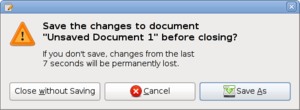
The simplest type of dialog box is the alert
Alert dialog box
An alert dialog is a colloquial term for a particular type of dialog box that occurs in a graphical user interface. It is also known as an alert box, alert window, error dialog, alert popup or plainly alert.The typical alert dialog provides information in a separate box to the user, after which...
, which displays a message and may require an acknowledgment that the message has been read, usually by clicking "OK", or a decision as to whether or not an action should proceed, by clicking "OK" or "Cancel". Alerts are also used to display a "termination notice"—sometimes requesting confirmation that the notice has been read—in the event of either an intentional closing or unintentional closing ("crash
Crash (computing)
A crash in computing is a condition where a computer or a program, either an application or part of the operating system, ceases to function properly, often exiting after encountering errors. Often the offending program may appear to freeze or hang until a crash reporting service documents...
") of an application or the operating system
Operating system
An operating system is a set of programs that manage computer hardware resources and provide common services for application software. The operating system is the most important type of system software in a computer system...
. (E.g., "Gedit
Gedit
gedit is a text editor for the GNOME desktop environment, Mac OS X and Microsoft Windows. Designed as a general purpose text editor, gedit emphasizes simplicity and ease of use...
has encountered an error and must close.") Although this is a frequent interaction pattern
Interaction design pattern
Interaction design patterns are a way to describe solutions to common usability or accessibility problems in a specific context. They document interaction models that make it easier for users to understand an interface and accomplish their tasks.-History:...
for modal dialogs, it is also criticized by usability
Usability
Usability is the ease of use and learnability of a human-made object. The object of use can be a software application, website, book, tool, machine, process, or anything a human interacts with. A usability study may be conducted as a primary job function by a usability analyst or as a secondary job...
experts as being ineffective for its intended use, which is to protect against errors caused by destructive actions, and for which better alternatives exist.
Modeless
Non-modal or modeless dialog boxes are used when the requested information is not essential to continue, and so the window can be left open while work continues elsewhere. A type of modeless dialog box is a toolbarToolbar
In a graphical user interface, on a computer monitor, a toolbar is a GUI widget on which on-screen buttons, icons, menus, or other input or output elements are placed. Toolbars are seen in office suites, graphics editors, and web browsers...
which is either separate from the main application, or may be detached from the main application, and items in the toolbar can be used to select certain features or functions of the application.
In general, good software design calls for dialogs to be of this type where possible, since they do not force the user into a particular mode of operation. An example might be a dialog of settings for the current document, e.g. the background and text colors. The user can continue adding text to the main window whatever color it is, but can change it at any time using the dialog. (This isn't meant to be an example of the best possible interface for this; often the same functionality may be accomplished by toolbar buttons on the application's main window).
Application modal
Modal dialog boxes are those which temporarily halt the program in that the user cannot continue until the dialog has been closed: the program may require some additional information before it can continue, or may simply wish to confirm that the user wants to proceed with a potentially dangerous course of action (confirmation dialog boxConfirmation dialog box
Confirmation dialog is a dialog box that asks user to approve requested operation. Usually this dialog appears before a potentially dangerous operation is performed...
). Modal dialogs are generally regarded as bad design solutions by usability practitioners since they are prone to produce mode errors. Dangerous actions should be undoable wherever possible; a modal alert dialog that appears unexpectedly or which is dismissed automatically (because the user has developed a habit
Habituation
Habituation can be defined as a process or as a procedure. As a process it is defined as a decrease in an elicited behavior resulting from the repeated presentation of an eliciting stimulus...
) will not protect from the dangerous action.
The main workflow
Workflow
A workflow consists of a sequence of connected steps. It is a depiction of a sequence of operations, declared as work of a person, a group of persons, an organization of staff, or one or more simple or complex mechanisms. Workflow may be seen as any abstraction of real work...
is interrupted when a modal dialog is shown. This effect has either been sought because it focuses on the completion of the task at hand or rejected because it prevents the user from changing to a different task when needed.
Document modal
The concept of a document modal dialog has recently been used, most notably in Mac OS XMac OS X
Mac OS X is a series of Unix-based operating systems and graphical user interfaces developed, marketed, and sold by Apple Inc. Since 2002, has been included with all new Macintosh computer systems...
and Opera Browser. In the first case, they are shown as sheets attached to a parent window. These dialogs block only that window until the user dismisses the dialog, permitting work in other windows to continue, even within the same application.
In OS X, dialogs appear to emanate from a slot in their parent window, and are shown with a reinforcing animation. This helps to let the user understand that the dialog is attached to the parent window, not just shown in front of it. No work can be done in the underlying document itself while the dialog is displayed, but the parent window can still be moved, re-sized, and minimized, and other windows can be brought in front so the user can work with them:
The same type of dialog box can be compared with the "standard" modal dialog boxes used in Windows and other operating systems.
Similarities include:
- the parent window is frozen when the dialog box opens, and one cannot continue to work with the underlying document in that window
- no work can be done with the underlying document in that window.
The differences are that
- the dialog box may open anywhere in the parent window
- depending on where the parent window is located, the dialog box may open virtually anywhere on screen
- the dialog box may be moved (in almost all cases), in some cases may be resizable, but usually cannot be minimized, and
- no changes to the parent window (cannot be resized, moved or minimized) are possible while the dialog box is open.
Both mechanisms have shortcomings:
- The Windows dialog box locks the parent window which can hide other windows the user may need to refer to while interacting with the dialog, though this may be mitigated since other windows are available through the task bar.
- The OS X dialog box blocks the parent window, preventing the user from referring to it while interacting with the dialog. This may require the user to close the dialog to access the necessary information, then re-open the dialog box to continue.