


KWin

Encyclopedia
KWin is a window manager
for the X Window System
. It is an integral part of the KDE Software Compilation
, although it can be used on its own or with other desktop environment
s.
s for KWin, including the default Oxygen, Microsoft Windows
-like Redmond, and Keramik. IceWM
themes can also be used with it, provided the kdeartwork package is installed.
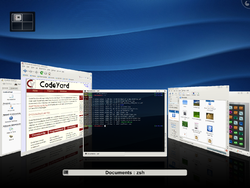 As of KDE 4.3 the following effects are built-in:
X window manager
An X window manager is a window manager which runs on top of the X Window System, a windowing system mainly used on Unix-like systems.Unlike the Mac OS and Microsoft Windows platforms which have historically provided a vendor-controlled, fixed set of ways to control how windows and panes display...
for the X Window System
X Window System
The X window system is a computer software system and network protocol that provides a basis for graphical user interfaces and rich input device capability for networked computers...
. It is an integral part of the KDE Software Compilation
KDE Software Compilation
The KDE Software Compilation is a desktop environment and an associated range of KDE Applications produced by KDE. Prior to version 4.4, released in February 2010, the Software Compilation was known as KDE, which used to stand for K Desktop Environment until November 2009...
, although it can be used on its own or with other desktop environment
Desktop environment
In graphical computing, a desktop environment commonly refers to a style of graphical user interface derived from the desktop metaphor that is seen on most modern personal computers. These GUIs help the user in easily accessing, configuring, and modifying many important and frequently accessed...
s.
History
| Name | Version | KDE Version | Details |
|---|---|---|---|
| KWM | 1.0 | 1.0 | |
| KWin | 2.0 | 2.0 | Extended support for themes and window effects. |
| KWin | 3.0 | 3.2 | Improved support for the extended ICCCM Inter-Client Communication Conventions Manual In computing, the Inter-Client Communication Conventions Manual is a standard for interoperability between X Window System clients of the same X server. It is primarily used for communication between normal clients and the window manager. It was designed by David S. H. Rosenthal of the MIT X... standards from freedesktop.org |
| KWin | 4.0 | 4.0 | Compositing Compositing window manager A compositing window manager is a type of window manager. A window manager is software that draws a graphical user interface on a computer display – it positions windows, draws additional elements on windows , and controls how windows interact with each other, and with the rest of the desktop... support and Compiz Compiz Compiz is one of the first compositing window managers for the X Window System that uses 3D graphics hardware to create fast compositing desktop effects for window management. The effects, such as a minimization effect and a cube workspace are implemented as loadable plugins... -like effects. |
| KWin | 4.4 | 4.4 | Maximizing and tiling by snapping to the screen-edges, grouping and tabbing. |
| KWin | 4.5 | 4.5 | Tiling Tiling window manager In computing, a tiling window manager is a window manager with an organization of the screen into mutually non-overlapping frames, as opposed to the more popular approach of coordinate-based stacking of overlapping objects that tries to fully emulate the desktop metaphor.-Xerox PARC:Although the... |
Look and feel
There are many window decorationWindow decoration
In graphical computing, window decorations are provided by window managers to improve the usability of a multi-windowed desktop. They typically consist of a title bar along the top of each window and a minimal border around the other three sides, although this can often be varied upon if the user...
s for KWin, including the default Oxygen, Microsoft Windows
Microsoft Windows
Microsoft Windows is a series of operating systems produced by Microsoft.Microsoft introduced an operating environment named Windows on November 20, 1985 as an add-on to MS-DOS in response to the growing interest in graphical user interfaces . Microsoft Windows came to dominate the world's personal...
-like Redmond, and Keramik. IceWM
IceWM
IceWM is a stacking window manager for the X Window System graphical infrastructure, written by Marko Maček. It was coded from scratch in C++ and is released under the terms of the GNU Lesser General Public License...
themes can also be used with it, provided the kdeartwork package is installed.
Compositing
Currently available compositing backends include XRender, OpenGL 1.x, OpenGL 2.x, and OpenGL ES 2.0.Included effects
Accessibility
| Name | Description |
|---|---|
| Invert | Inverts the color of the desktop and windows |
| Looking glass | A screen magnifier that looks like a fish eye lens |
| Magnifier | Magnify the section of the screen that is near the mouse cursor |
| Sharpen | Makes the entire desktop look sharper |
| Snap Helper | Helps locate the centre of the screen when moving a window |
| Track mouse | Display a mouse cursor locating effect when activated |
| Zoom | Magnify the entire desktop |
Appearance
| Name | Description |
|---|---|
| Explosion | Make windows explode when they are closed |
| Fade | Make windows smoothly fade in and out when they are shown or hidden |
| Fade Desktop | Fade between virtual desktops when switching between them |
| Fall apart | Close windows fall into pieces |
| Highlight Windows | Highlight the appropriate window when hovering over taskbar entries |
| Login | Smoothly fade to the desktop when logging in |
| Logout | Desaturate the desktop when displaying the logout dialog |
| Magic Lamp | Simulate a magic lamp when minimizing windows |
| Minimize animation | Animate the minimizing of windows |
| Mouse mark | Allows you to draw lines over your desktop |
| Scale In | Animate the appearance of windows |
| Sheet | Make modal dialogues smoothly fly in and out when shown or hidden |
| Slide | Slide windows across the screen when switching virtual desktops |
| Sliding popups | Sliding animation for Plasma Popups |
| Taskbar Thumbnails | Display window thumbnails when hovering over taskbar entries |
| Thumbnail aside | Display window thumbnails on the edge of the screen |
| Translucency | Make windows translucent under different conditions |
| Wobbly windows | Deform windows while they are moving |
Candy
| Name | Description |
|---|---|
| Snow | Simulate snow falling on the desktop |
Focus
| Name | Description |
|---|---|
| Dialog parent | Darkens the parent windows of the currently active dialogue |
| Dim Inactive | Darken inactive windows |
| Dim screen for administrator mode | Darkens the entire screen when requesting root privileges |
| Slide Back | Slide back windows losing focus |
Tools
| Name | Description |
|---|---|
| Show FPS | Show kwins performance in the corner of the screen |
| Show Paint | Highlight areas of the desktop that have been recently updated |
Window management
| Name | Description |
|---|---|
| Box switch | Display thumbnails of windows in the alt+tab window switcher |
| Cover switch | Display a Cover Flow effect for the alt+tab window switcher |
| Desktop cube | Display each of the desktops on a slice of a cube |
| Desktop Cube Animation | Animate desktop switching with a cube |
| Desktop grid | Zoom out so all desktops are displayed side-by-side in a grid |
| Flip switch | Flip through windows that are in a stack for the alt+tab window switcher |
| Present windows | Zoom out until open windows can be displayed side by side |
| Resize Window | Effect to outline geometry while resizeing a window |