

Virtual keyboard

Encyclopedia
A virtual keyboard is a software component that allows a user to enter characters. A virtual keyboard can usually be operated with multiple input devices, which may include a touchscreen
, an actual keyboard
and a computer mouse.
s (for example Cyrillic/Latin letters in various national layouts), the on-screen keyboard provides a handy substitute while working at different stations or on laptops, which seldom come with dual layouts.
The standard on-screen keyboard utility on most windowing system
s allows hot key switching between layouts from the physical keyboard (typically alt-shift but this is user configurable), simultaneously changing both the hardware and the software keyboard layout. In addition, a symbol in the systray alerts the user to the currently active layout.
Although Linux
supports this fast manual keyboard-layout switching function, many popular Linux on-screen keyboards such as gtkeyboard, Matchbox-keyboard or Kvkbd do not react correctly. Kvkbd for example defines its visible layout according to the first defined layout in Keyboard Preferences rather than the default layout, causing the application to output incorrect characters if the first layout on the list is not the default. Activating a hot-key layout switch will cause the application to change its output according to another keyboard layout, but the visible on-screen layout doesn't change, leaving the user blind as to which keyboard layout he is using. Multi-lingual, multi-alphabet users should choose a linux on-screen keyboard that support this feature instead, like Florence.
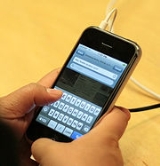
Virtual keyboards are commonly used as an on-screen input method in devices with no physical keyboard, where there is no room for one, such as a pocket computer
, personal digital assistant
(PDA), tablet computer
or touchscreen
equipped mobile phone
. It is common for the user to input text by tapping a virtual keyboard built into the operating system
of the device. Virtual keyboards are also used as features of emulation software
for systems that have fewer buttons than a computer keyboard would have.
Virtual keyboards can be categorized by the following aspects:
An optical virtual keyboard was invented and patented by IBM
engineers in 2008. It optically detects and analyses human hand and finger motions and interprets them as operations on a physically non-existent input device like a surface having painted keys. In that way it allows to emulate unlimited types of manually operated input devices such as a mouse or keyboard. All mechanical input units can be replaced by such virtual devices, optimized for the current application and for the user's physiology maintaining speed, simplicity and unambiguity of manual data input.
On the Internet, various JavaScript
virtual keyboards have been created, allowing users to type their own languages on foreign keyboards, particularly in Internet cafes.
. For example, Westpac
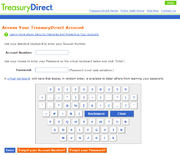
’s online banking service uses a virtual keyboard for the password entry, as does TreasuryDirect
(see picture). It is more difficult for malware to monitor the display and mouse to obtain the data entered via the virtual keyboard, than it is to monitor real keystrokes. However it is possible, for example by recording screenshots at regular intervals or upon each mouse click.
To be of any use, these virtual keyboards must be an integral part of an application or web page. A generic virtual keyboard—which will work with any program, including those that are not explicitly written for it—will not defeat a key logging program because the virtual keyboard will generate the same keyboard events as a real keyboard, and those events can be trapped and logged just as real keyboard inputs can.
 The use of an on-screen keyboard on which the user "types" with mouse clicks can increase the risk of password disclosure by shoulder surfing
, because:
Touchscreen
A touchscreen is an electronic visual display that can detect the presence and location of a touch within the display area. The term generally refers to touching the display of the device with a finger or hand. Touchscreens can also sense other passive objects, such as a stylus...
, an actual keyboard
Computer keyboard
In computing, a keyboard is a typewriter-style keyboard, which uses an arrangement of buttons or keys, to act as mechanical levers or electronic switches...
and a computer mouse.
Types
On a desktop PC, one purpose of a virtual keyboard is to provide an alternative input mechanism for users with disabilities who cannot use a physical keyboard. Another major use for an on-screen keyboard is for bi- or multi-lingual users who switch frequently between different character sets or alphabets. Although hardware keyboards are available with dual keyboard layoutKeyboard layout
A keyboard layout is any specific mechanical, visual, or functional arrangement of the keys, legends, or key–meaning associations of a computer, typewriter, or other typographic keyboard....
s (for example Cyrillic/Latin letters in various national layouts), the on-screen keyboard provides a handy substitute while working at different stations or on laptops, which seldom come with dual layouts.
The standard on-screen keyboard utility on most windowing system
Windowing system
A windowing system is a component of a graphical user interface , and more specifically of a desktop environment, which supports the implementation of window managers, and provides basic support for graphics hardware, pointing devices such as mice, and keyboards...
s allows hot key switching between layouts from the physical keyboard (typically alt-shift but this is user configurable), simultaneously changing both the hardware and the software keyboard layout. In addition, a symbol in the systray alerts the user to the currently active layout.
Although Linux
Linux
Linux is a Unix-like computer operating system assembled under the model of free and open source software development and distribution. The defining component of any Linux system is the Linux kernel, an operating system kernel first released October 5, 1991 by Linus Torvalds...
supports this fast manual keyboard-layout switching function, many popular Linux on-screen keyboards such as gtkeyboard, Matchbox-keyboard or Kvkbd do not react correctly. Kvkbd for example defines its visible layout according to the first defined layout in Keyboard Preferences rather than the default layout, causing the application to output incorrect characters if the first layout on the list is not the default. Activating a hot-key layout switch will cause the application to change its output according to another keyboard layout, but the visible on-screen layout doesn't change, leaving the user blind as to which keyboard layout he is using. Multi-lingual, multi-alphabet users should choose a linux on-screen keyboard that support this feature instead, like Florence.
Virtual keyboards are commonly used as an on-screen input method in devices with no physical keyboard, where there is no room for one, such as a pocket computer
Pocket computer
A pocket computer is a small calculator-sized handheld programmable computer.This specific category of computers existed primarily in the 1980s. Manufacturers included Casio, Hewlett-Packard, Sharp, Tandy/Radio Shack and many more.The programming language was usually BASIC, but some devices...
, personal digital assistant
Personal digital assistant
A personal digital assistant , also known as a palmtop computer, or personal data assistant, is a mobile device that functions as a personal information manager. Current PDAs often have the ability to connect to the Internet...
(PDA), tablet computer
Tablet computer
A tablet computer, or simply tablet, is a complete mobile computer, larger than a mobile phone or personal digital assistant, integrated into a flat touch screen and primarily operated by touching the screen...
or touchscreen
Touchscreen
A touchscreen is an electronic visual display that can detect the presence and location of a touch within the display area. The term generally refers to touching the display of the device with a finger or hand. Touchscreens can also sense other passive objects, such as a stylus...
equipped mobile phone
Mobile phone
A mobile phone is a device which can make and receive telephone calls over a radio link whilst moving around a wide geographic area. It does so by connecting to a cellular network provided by a mobile network operator...
. It is common for the user to input text by tapping a virtual keyboard built into the operating system
Operating system
An operating system is a set of programs that manage computer hardware resources and provide common services for application software. The operating system is the most important type of system software in a computer system...
of the device. Virtual keyboards are also used as features of emulation software
Virtual machine
A virtual machine is a "completely isolated guest operating system installation within a normal host operating system". Modern virtual machines are implemented with either software emulation or hardware virtualization or both together.-VM Definitions:A virtual machine is a software...
for systems that have fewer buttons than a computer keyboard would have.
Virtual keyboards can be categorized by the following aspects:
- physical keyboards with distinct keys comprising electronically changeable displays integrated in the keypads
- virtual keyboards with touchscreen keyboard layouts or sensing areas
- optically projected keyboardProjection keyboardA projection keyboard is a form of computer input device whereby the image of a virtual keyboard is projected onto surface: when a user's fingers are placed on the projected "keys", the device translates them into keystrokes.- History :...
layouts or similar arrangements of "keys" or sensing areas - optically detected human hand and finger motions
- virtual keyboards to allow input from a variety of input devices, such as a computer mouseMouse (computing)In computing, a mouse is a pointing device that functions by detecting two-dimensional motion relative to its supporting surface. Physically, a mouse consists of an object held under one of the user's hands, with one or more buttons...
, switchSwitch AccessMany people with severe physical or cognitive impairment use one or more switches to access computers. A switch is an assistive technology device that replaces the need to use a computer keyboard or a mouse.-Types of switch:...
or other assistive technologyAssistive technologyAssistive technology or adaptive technology is an umbrella term that includes assistive, adaptive, and rehabilitative devices for people with disabilities and also includes the process used in selecting, locating, and using them...
device.
An optical virtual keyboard was invented and patented by IBM
IBM
International Business Machines Corporation or IBM is an American multinational technology and consulting corporation headquartered in Armonk, New York, United States. IBM manufactures and sells computer hardware and software, and it offers infrastructure, hosting and consulting services in areas...
engineers in 2008. It optically detects and analyses human hand and finger motions and interprets them as operations on a physically non-existent input device like a surface having painted keys. In that way it allows to emulate unlimited types of manually operated input devices such as a mouse or keyboard. All mechanical input units can be replaced by such virtual devices, optimized for the current application and for the user's physiology maintaining speed, simplicity and unambiguity of manual data input.
On the Internet, various JavaScript
JavaScript
JavaScript is a prototype-based scripting language that is dynamic, weakly typed and has first-class functions. It is a multi-paradigm language, supporting object-oriented, imperative, and functional programming styles....
virtual keyboards have been created, allowing users to type their own languages on foreign keyboards, particularly in Internet cafes.
Security considerations
Virtual keyboards may be used in some cases to reduce the risk of keystroke loggingKeystroke logging
Keystroke logging is the action of tracking the keys struck on a keyboard, typically in a covert manner so that the person using the keyboard is unaware that their actions are being monitored...
. For example, Westpac
Westpac
Westpac , is a multinational financial services, one of the Australian "big four" banks and the second-largest bank in New Zealand....
’s online banking service uses a virtual keyboard for the password entry, as does TreasuryDirect
TreasuryDirect
TreasuryDirect is a website run by the United States Treasury that allows US individual investors to purchase Treasury securities such as T-Bills and others directly from the U.S. government...
(see picture). It is more difficult for malware to monitor the display and mouse to obtain the data entered via the virtual keyboard, than it is to monitor real keystrokes. However it is possible, for example by recording screenshots at regular intervals or upon each mouse click.
To be of any use, these virtual keyboards must be an integral part of an application or web page. A generic virtual keyboard—which will work with any program, including those that are not explicitly written for it—will not defeat a key logging program because the virtual keyboard will generate the same keyboard events as a real keyboard, and those events can be trapped and logged just as real keyboard inputs can.
Shoulder surfing (computer security)
In computer security, shoulder surfing refers to using direct observation techniques, such as looking over someone's shoulder, to get information...
, because:
- An observer can typically watch the screen more easily (and less suspiciously) than the keyboard, and see which characters the mouse moves to.
- Some implementations of the on-screen keyboard may give visual feedback of the "key" clicked, e.g. by changing its colour briefly. This makes it much easier for an observer to read the data from the screen. In the worst case, the implementation may leave the focusFocus (computing)In computing, the focus indicates the component of the graphical user interface which is currently selected to receive input. Text entered at the keyboard or pasted from a clipboard is sent to the component which currently has the focus. Moving the focus away from a specific user interface element...
on the most recently clicked "key" until the next virtual key is clicked, thus allowing the observer time to read each character even after the mouse starts moving to the next character. - A user may not be able to "point and click" as fast as they could type on a keyboard, thus making it easier for the observer.
External links
- The CALL Centre (Communication Aids for Language and Learning): Introducing On-screen Keyboards.
- Global Assistive Technology Wiki: On Screen Keyboards
- Adaptive Technology Resource Centre (University of Toronto): On-Screen Keyboards.
- GNOME On-Screen Keyboard (gok).
- The GNOME Project: Caribou (an alternative for gok, with word prediction).
- Florence (another open-source alternative for gok).
- Kalpanik (a virtual keyboard for Indian languages).
- Microsoft: Using On–Screen Keyboard
- Button Board (an online keyboard for surfing with a mouse).