


Virtual Network Computing

Encyclopedia
In computing, Virtual Network Computing (VNC) is a graphical desktop sharing
system that uses the RFB protocol
to remotely control another computer
. It transmits the keyboard
and mouse events from one computer to another, relaying the graphical screen updates back in the other direction, over a network
.
VNC is platform-independent – a VNC viewer on one operating system
may connect to a VNC server on the same or any other operating system. There are clients and servers for many GUI-based operating systems and for Java
. Multiple clients may connect to a VNC server at the same time. Popular uses for this technology include remote technical support and accessing files on one's work computer from one's home computer, or vice versa.
VNC was originally developed at the Olivetti Research Laboratory
in Cambridge, United Kingdom. The original VNC source code
and many modern derivatives are open source
under the GNU General Public License
.
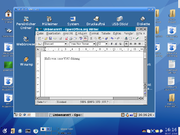 There are a number of variants of VNC which offer their own particular functionality; e.g., some optimised for Microsoft Windows
, or offering file transfer (not part of VNC proper), etc. Many are compatible (without their added features) with VNC proper in the sense that a viewer of one flavour can connect with a server of another; others are based on VNC code but not compatible with standard VNC.
VNC and RFB
are registered trademarks of RealVNC
Ltd. in the U.S. and in other countries.
and Oracle Corporation
. In 1999 AT&T acquired the lab, and in 2002 closed down the lab's research efforts.
Developers who worked on VNC while still at the AT&T Research Lab are:
Following the closure of ORL in 2002, several members of the development team (including Richardson, Harter, Weatherall and Hopper) formed RealVNC
in order to continue working on open source
and commercial VNC software under that name.
Several other versions of VNC have been developed from the original GPL
ed source code. Such forking
has not led to compatibility problems because the RFB protocol is designed to be extensible. VNC clients and servers negotiate their capabilities with handshaking
in order to use the most appropriate options supported at both ends.
The term "VNC" is now a registered trademark of RealVNC Ltd. in the United States and other countries.
called the Videotile which also used the RFB protocol
. This was essentially an LCD with a pen input and a fast ATM
connection to the network. At the time, network computer
was commonly used as a synonym for 'thin client'. VNC is essentially a software-only (i.e. virtual) version of this network computer.
In the normal method of operation a viewer connects to a port on the server (default port 5900). Alternatively a browser can connect to the server (depending on the implementation) (default port 5800). And a server can connect to a viewer in "listening mode" on port 5500. One advantage of listening mode is that the server site does not have to configure its firewall to allow access on port 5900 (or 5800); the onus is on the viewer, which is useful if the server site has no computer expertise, while the viewer user would be expected to be more knowledgeable.
The server sends small rectangles of the framebuffer
to the client. In its simplest form, the VNC protocol can use a lot of bandwidth
, so various methods have been devised to reduce the communication overhead. For example, there are various encodings (methods to determine the most efficient way to transfer these rectangles). The VNC protocol allows the client and server to negotiate which encoding will be used. The simplest encoding, which is supported by all clients and servers, is the raw encoding where pixel data is sent in left-to-right scanline order, and after the original full screen has been transmitted, only transfers rectangles that change. This encoding works very well if only a small portion of the screen changes from one frame to the next (like a mouse pointer moving across a desktop, or text being written at the cursor), but bandwidth demands get very high if a lot of pixels change at the same time, such as when scrolling a window or viewing full-screen video.
VNC by default uses TCP port
5900+N, where N is the display number (usually :0 for a physical display). Several implementations also start a basic HTTP
server
on port 5800+N to provide a VNC viewer as a Java applet
, allowing easy connection through any Java-enabled web browser. Different port assignments can be used as long as both client and server are configured accordingly.
Using VNC over the Internet works well if the user has a broadband
connection at both ends. However, it may require advanced NAT
, firewall
and router configuration such as port forwarding in order for the connection to go through. Some users may choose to use instant private networking applications such as Virtual Private Network
(VPN) applications such as Hamachi to make usage over the Internet much easier. Alternatively, a VNC connection can be established as a LAN connection if VPN is utilized as a proxy.
Note that the machine the VNC server is running on does not need to have a physical display. Xvnc is the Unix VNC server, which is based on a standard X server
. To applications Xvnc is an X "server" (ie displays client windows), and to remote VNC users it is a VNC server. Applications can display themselves on Xvnc as if it were a normal X display, but they will appear on any connected VNC viewers rather than on a physical screen. Alternatively a machine (which may be a workstation or a network server) with screen, keyboard, and mouse can be set up to boot and run the VNC server as a service or daemon, then the screen, keyboard, and mouse can be removed and the machine stored in an out-of-the way location.
In addition, the display that is served by VNC is not necessarily the same display seen by a user on the server. On Unix/Linux computers that support multiple simultaneous X11 sessions, VNC may be set to serve a particular existing X11 session, or to start one of its own. It is also possible to run multiple VNC sessions from the same computer. On Microsoft Windows
the VNC session served is always the current user session.
VNC is commonly used as a cross-platform remote desktop system. For example, Apple Remote Desktop
for Mac OS X
(and more recently, "Back to My Mac
" in 'Leopard' - Mac OS X 10.5) interoperates with VNC and will connect to a Linux user's current desktop if it is served with x11vnc
, or to a separate X11 session if one is served with TightVNC
. From Linux, TightVNC will connect to a Mac OS X session served by Apple Remote Desktop if the VNC option is enabled, or to a VNC server running on Microsoft Windows
.
s are not sent in plain-text (as in telnet
), cracking could prove successful if both the encryption
key and encoded password are sniffed from a network. For this reason it is recommended that a password of at least 8 characters be used. On the other hand, there is also an 8-character limit on some versions of VNC; if a password is sent exceeding 8 characters, the excess characters are removed and the truncated string is compared to the password.
However, VNC may be tunnelled over an SSH
or VPN
connection which would add an extra security layer with stronger encryption. SSH clients are available for all major platforms (and many smaller platforms as well); SSH tunnels can be created from UNIX
clients, Microsoft Windows
clients, Macintosh
clients (including Mac OS X
and System 7
and up) – and many others. There are freeware
applications that create instant VPN
tunnels between computers.
UltraVNC
supports the use of an open-source encryption plugin which encrypts the entire VNC session including password authentication and data transfer. It also allows authentication to be performed based on NTLM
and Active Directory
user accounts. However, use of such encryption plugins make it incompatible with other VNC programs. RealVNC
offers high-strength encryption as part of its commercial package. Workspot
released AES encryption
patches for VNC.
The VNC protocol is pixel based. Although this leads to great flexibility (i.e.- any type of desktop can be displayed), it is often less efficient than solutions that have a better understanding of the underlying graphic layout like X11 or Windows Remote Desktop Protocol
. Those protocols send graphic primitives or high level commands in a simpler form (e.g., "open window"), whereas RFB just sends the raw pixel data.
Desktop sharing
Desktop sharing is a common name for technologies and products that allow remote access and remote collaboration on a person's computer desktop through a graphical Terminal emulator.The most common two scenarios for desktop sharing are:* Remote log-in...
system that uses the RFB protocol
RFB Protocol
RFB is a simple protocol for remote access to graphical user interfaces. Because it works at the framebuffer level it is applicable to all windowing systems and applications, including X11, Windows and Macintosh...
to remotely control another computer
Computer
A computer is a programmable machine designed to sequentially and automatically carry out a sequence of arithmetic or logical operations. The particular sequence of operations can be changed readily, allowing the computer to solve more than one kind of problem...
. It transmits the keyboard
Computer keyboard
In computing, a keyboard is a typewriter-style keyboard, which uses an arrangement of buttons or keys, to act as mechanical levers or electronic switches...
and mouse events from one computer to another, relaying the graphical screen updates back in the other direction, over a network
Computer network
A computer network, often simply referred to as a network, is a collection of hardware components and computers interconnected by communication channels that allow sharing of resources and information....
.
VNC is platform-independent – a VNC viewer on one operating system
Operating system
An operating system is a set of programs that manage computer hardware resources and provide common services for application software. The operating system is the most important type of system software in a computer system...
may connect to a VNC server on the same or any other operating system. There are clients and servers for many GUI-based operating systems and for Java
Java Virtual Machine
A Java virtual machine is a virtual machine capable of executing Java bytecode. It is the code execution component of the Java software platform. Sun Microsystems stated that there are over 4.5 billion JVM-enabled devices.-Overview:...
. Multiple clients may connect to a VNC server at the same time. Popular uses for this technology include remote technical support and accessing files on one's work computer from one's home computer, or vice versa.
VNC was originally developed at the Olivetti Research Laboratory
Olivetti Research Laboratory
The Olivetti Research Laboratory was a research institute in the field of computing and telecommunications founded in 1986 by Hermann Hauser and Andy Hopper.-History:...
in Cambridge, United Kingdom. The original VNC source code
Source code
In computer science, source code is text written using the format and syntax of the programming language that it is being written in. Such a language is specially designed to facilitate the work of computer programmers, who specify the actions to be performed by a computer mostly by writing source...
and many modern derivatives are open source
Open source
The term open source describes practices in production and development that promote access to the end product's source materials. Some consider open source a philosophy, others consider it a pragmatic methodology...
under the GNU General Public License
GNU General Public License
The GNU General Public License is the most widely used free software license, originally written by Richard Stallman for the GNU Project....
.
Microsoft Windows
Microsoft Windows is a series of operating systems produced by Microsoft.Microsoft introduced an operating environment named Windows on November 20, 1985 as an add-on to MS-DOS in response to the growing interest in graphical user interfaces . Microsoft Windows came to dominate the world's personal...
, or offering file transfer (not part of VNC proper), etc. Many are compatible (without their added features) with VNC proper in the sense that a viewer of one flavour can connect with a server of another; others are based on VNC code but not compatible with standard VNC.
VNC and RFB
RFB Protocol
RFB is a simple protocol for remote access to graphical user interfaces. Because it works at the framebuffer level it is applicable to all windowing systems and applications, including X11, Windows and Macintosh...
are registered trademarks of RealVNC
RealVNC
RealVNC is a company that provides remote access software. The software consists of a server and client application for the Virtual Network Computing protocol to control another computer's screen remotely.-History:...
Ltd. in the U.S. and in other countries.
History
VNC was created at the Cambridge, UK Olivetti & Oracle Research Lab (ORL ), which was then owned by OlivettiOlivetti
Olivetti S.p.A. is an Italian manufacturer of computers, printers and other business machines.- Founding :The company was founded as a typewriter manufacturer in 1908 in Ivrea, near Turin, by Camillo Olivetti. The firm was mainly developed by his son Adriano Olivetti...
and Oracle Corporation
Oracle Corporation
Oracle Corporation is an American multinational computer technology corporation that specializes in developing and marketing hardware systems and enterprise software products – particularly database management systems...
. In 1999 AT&T acquired the lab, and in 2002 closed down the lab's research efforts.
Developers who worked on VNC while still at the AT&T Research Lab are:
- Tristan Richardson (inventor)
- Andy HarterAndy HarterAndy Harter FREng CEng FIET FBCS CITP is the CEO of RealVNC.Harter was born in Yorkshire in 1961, and attended the Queen Elizabeth Grammar School, Wakefield. He went on to the University of Cambridge, where he studied Mathematics and Computer Science at Fitzwilliam College and Corpus Christi College...
(project leader) - Quentin Stafford-FraserQuentin Stafford-FraserJames Quentin Stafford-Fraser was instrumental in the creation of the Trojan room coffee pot: the first webcam. He wrote the XCoffee client program which allowed the state of the coffee pot to be displayed on a screen....
- James Weatherall
Following the closure of ORL in 2002, several members of the development team (including Richardson, Harter, Weatherall and Hopper) formed RealVNC
RealVNC
RealVNC is a company that provides remote access software. The software consists of a server and client application for the Virtual Network Computing protocol to control another computer's screen remotely.-History:...
in order to continue working on open source
Open source
The term open source describes practices in production and development that promote access to the end product's source materials. Some consider open source a philosophy, others consider it a pragmatic methodology...
and commercial VNC software under that name.
Several other versions of VNC have been developed from the original GPL
GNU General Public License
The GNU General Public License is the most widely used free software license, originally written by Richard Stallman for the GNU Project....
ed source code. Such forking
Fork (software development)
In software engineering, a project fork happens when developers take a legal copy of source code from one software package and start independent development on it, creating a distinct piece of software...
has not led to compatibility problems because the RFB protocol is designed to be extensible. VNC clients and servers negotiate their capabilities with handshaking
Handshaking
In information technology, telecommunications, and related fields, handshaking is an automated process of negotiation that dynamically sets parameters of a communications channel established between two entities before normal communication over the channel begins...
in order to use the most appropriate options supported at both ends.
The term "VNC" is now a registered trademark of RealVNC Ltd. in the United States and other countries.
Etymology
The name 'Virtual Network Computer/Computing' originates from ORL's work on a thin clientThin client
A thin client is a computer or a computer program which depends heavily on some other computer to fulfill its traditional computational roles. This stands in contrast to the traditional fat client, a computer designed to take on these roles by itself...
called the Videotile which also used the RFB protocol
RFB Protocol
RFB is a simple protocol for remote access to graphical user interfaces. Because it works at the framebuffer level it is applicable to all windowing systems and applications, including X11, Windows and Macintosh...
. This was essentially an LCD with a pen input and a fast ATM
Asynchronous Transfer Mode
Asynchronous Transfer Mode is a standard switching technique designed to unify telecommunication and computer networks. It uses asynchronous time-division multiplexing, and it encodes data into small, fixed-sized cells. This differs from approaches such as the Internet Protocol or Ethernet that...
connection to the network. At the time, network computer
Network computer
Network Computer is a trademark of Oracle Corporation that was used, from approximately 1996 to 2000, to market a range of diskless desktop computer devices. The devices were designed and manufactured by an alliance, which included Sun Microsystems, IBM, and others...
was commonly used as a synonym for 'thin client'. VNC is essentially a software-only (i.e. virtual) version of this network computer.
Operation
A VNC system consists of a client, a server , and a communication protocol- The VNC serverServer (computing)In the context of client-server architecture, a server is a computer program running to serve the requests of other programs, the "clients". Thus, the "server" performs some computational task on behalf of "clients"...
is the program on the machine that shares its screen. The server passively allows the client to take control of it. - The VNC clientClient (computing)A client is an application or system that accesses a service made available by a server. The server is often on another computer system, in which case the client accesses the service by way of a network....
(or viewer) is the program that watches, controls, and interacts with the server. The client controls the server. - The VNC protocolCommunications protocolA communications protocol is a system of digital message formats and rules for exchanging those messages in or between computing systems and in telecommunications...
(RFBRFB ProtocolRFB is a simple protocol for remote access to graphical user interfaces. Because it works at the framebuffer level it is applicable to all windowing systems and applications, including X11, Windows and Macintosh...
) is very simple, based on one graphic primitive from server to client ("Put a rectangle of pixelPixelIn digital imaging, a pixel, or pel, is a single point in a raster image, or the smallest addressable screen element in a display device; it is the smallest unit of picture that can be represented or controlled....
data at the specified X,Y position") and event messagesEvent-driven programmingIn computer programming, event-driven programming or event-based programming is a programming paradigm in which the flow of the program is determined by events—i.e., sensor outputs or user actions or messages from other programs or threads.Event-driven programming can also be defined as an...
from client to server.
In the normal method of operation a viewer connects to a port on the server (default port 5900). Alternatively a browser can connect to the server (depending on the implementation) (default port 5800). And a server can connect to a viewer in "listening mode" on port 5500. One advantage of listening mode is that the server site does not have to configure its firewall to allow access on port 5900 (or 5800); the onus is on the viewer, which is useful if the server site has no computer expertise, while the viewer user would be expected to be more knowledgeable.
The server sends small rectangles of the framebuffer
Framebuffer
A framebuffer is a video output device that drives a video display from a memory buffer containing a complete frame of data.The information in the memory buffer typically consists of color values for every pixel on the screen...
to the client. In its simplest form, the VNC protocol can use a lot of bandwidth
Bandwidth (computing)
In computer networking and computer science, bandwidth, network bandwidth, data bandwidth, or digital bandwidth is a measure of available or consumed data communication resources expressed in bits/second or multiples of it .Note that in textbooks on wireless communications, modem data transmission,...
, so various methods have been devised to reduce the communication overhead. For example, there are various encodings (methods to determine the most efficient way to transfer these rectangles). The VNC protocol allows the client and server to negotiate which encoding will be used. The simplest encoding, which is supported by all clients and servers, is the raw encoding where pixel data is sent in left-to-right scanline order, and after the original full screen has been transmitted, only transfers rectangles that change. This encoding works very well if only a small portion of the screen changes from one frame to the next (like a mouse pointer moving across a desktop, or text being written at the cursor), but bandwidth demands get very high if a lot of pixels change at the same time, such as when scrolling a window or viewing full-screen video.
VNC by default uses TCP port
TCP and UDP port
In computer networking, a port is an application-specific or process-specific software construct serving as a communications endpoint in a computer's host operating system. A port is associated with an IP address of the host, as well as the type of protocol used for communication...
5900+N, where N is the display number (usually :0 for a physical display). Several implementations also start a basic HTTP
Hypertext Transfer Protocol
The Hypertext Transfer Protocol is a networking protocol for distributed, collaborative, hypermedia information systems. HTTP is the foundation of data communication for the World Wide Web....
server
Web server
Web server can refer to either the hardware or the software that helps to deliver content that can be accessed through the Internet....
on port 5800+N to provide a VNC viewer as a Java applet
Java applet
A Java applet is an applet delivered to users in the form of Java bytecode. Java applets can run in a Web browser using a Java Virtual Machine , or in Sun's AppletViewer, a stand-alone tool for testing applets...
, allowing easy connection through any Java-enabled web browser. Different port assignments can be used as long as both client and server are configured accordingly.
Using VNC over the Internet works well if the user has a broadband
Broadband
The term broadband refers to a telecommunications signal or device of greater bandwidth, in some sense, than another standard or usual signal or device . Different criteria for "broad" have been applied in different contexts and at different times...
connection at both ends. However, it may require advanced NAT
Network address translation
In computer networking, network address translation is the process of modifying IP address information in IP packet headers while in transit across a traffic routing device....
, firewall
Firewall (computing)
A firewall is a device or set of devices designed to permit or deny network transmissions based upon a set of rules and is frequently used to protect networks from unauthorized access while permitting legitimate communications to pass....
and router configuration such as port forwarding in order for the connection to go through. Some users may choose to use instant private networking applications such as Virtual Private Network
Virtual private network
A virtual private network is a network that uses primarily public telecommunication infrastructure, such as the Internet, to provide remote offices or traveling users access to a central organizational network....
(VPN) applications such as Hamachi to make usage over the Internet much easier. Alternatively, a VNC connection can be established as a LAN connection if VPN is utilized as a proxy.
Note that the machine the VNC server is running on does not need to have a physical display. Xvnc is the Unix VNC server, which is based on a standard X server
X Window System
The X window system is a computer software system and network protocol that provides a basis for graphical user interfaces and rich input device capability for networked computers...
. To applications Xvnc is an X "server" (ie displays client windows), and to remote VNC users it is a VNC server. Applications can display themselves on Xvnc as if it were a normal X display, but they will appear on any connected VNC viewers rather than on a physical screen. Alternatively a machine (which may be a workstation or a network server) with screen, keyboard, and mouse can be set up to boot and run the VNC server as a service or daemon, then the screen, keyboard, and mouse can be removed and the machine stored in an out-of-the way location.
In addition, the display that is served by VNC is not necessarily the same display seen by a user on the server. On Unix/Linux computers that support multiple simultaneous X11 sessions, VNC may be set to serve a particular existing X11 session, or to start one of its own. It is also possible to run multiple VNC sessions from the same computer. On Microsoft Windows
Microsoft Windows
Microsoft Windows is a series of operating systems produced by Microsoft.Microsoft introduced an operating environment named Windows on November 20, 1985 as an add-on to MS-DOS in response to the growing interest in graphical user interfaces . Microsoft Windows came to dominate the world's personal...
the VNC session served is always the current user session.
VNC is commonly used as a cross-platform remote desktop system. For example, Apple Remote Desktop
Apple Remote Desktop
Apple Remote Desktop is a Macintosh application produced by Apple Inc., first released on March 14, 2002, that replaced a similar product called Apple Network Assistant...
for Mac OS X
Mac OS X
Mac OS X is a series of Unix-based operating systems and graphical user interfaces developed, marketed, and sold by Apple Inc. Since 2002, has been included with all new Macintosh computer systems...
(and more recently, "Back to My Mac
Back to My Mac
Back to My Mac is a feature introduced with Mac OS X 10.5 Leopard that uses Wide-Area Bonjour to securely discover services across the Internet and automatically configure ad hoc, on-demand, point-to-point encrypted connections between computers using IPSec...
" in 'Leopard' - Mac OS X 10.5) interoperates with VNC and will connect to a Linux user's current desktop if it is served with x11vnc
X11vnc
In computing, x11vnc is a Virtual Network Computing server program. It allows remote access from a remote client to a computer hosting an X Window session and the x11vnc software, continuously polling the X server's frame buffer for changes...
, or to a separate X11 session if one is served with TightVNC
TightVNC
TightVNC is a cross-platform open source remote desktop software application that uses and extends VNC's RFB protocol to control another computer's screen remotely. It was created by Constantin Kaplinsky...
. From Linux, TightVNC will connect to a Mac OS X session served by Apple Remote Desktop if the VNC option is enabled, or to a VNC server running on Microsoft Windows
Microsoft Windows
Microsoft Windows is a series of operating systems produced by Microsoft.Microsoft introduced an operating environment named Windows on November 20, 1985 as an add-on to MS-DOS in response to the growing interest in graphical user interfaces . Microsoft Windows came to dominate the world's personal...
.
Security
By default, RFB is not a secure protocol. While passwordPassword
A password is a secret word or string of characters that is used for authentication, to prove identity or gain access to a resource . The password should be kept secret from those not allowed access....
s are not sent in plain-text (as in telnet
TELNET
Telnet is a network protocol used on the Internet or local area networks to provide a bidirectional interactive text-oriented communications facility using a virtual terminal connection...
), cracking could prove successful if both the encryption
Encryption
In cryptography, encryption is the process of transforming information using an algorithm to make it unreadable to anyone except those possessing special knowledge, usually referred to as a key. The result of the process is encrypted information...
key and encoded password are sniffed from a network. For this reason it is recommended that a password of at least 8 characters be used. On the other hand, there is also an 8-character limit on some versions of VNC; if a password is sent exceeding 8 characters, the excess characters are removed and the truncated string is compared to the password.
However, VNC may be tunnelled over an SSH
Secure Shell
Secure Shell is a network protocol for secure data communication, remote shell services or command execution and other secure network services between two networked computers that it connects via a secure channel over an insecure network: a server and a client...
or VPN
Virtual private network
A virtual private network is a network that uses primarily public telecommunication infrastructure, such as the Internet, to provide remote offices or traveling users access to a central organizational network....
connection which would add an extra security layer with stronger encryption. SSH clients are available for all major platforms (and many smaller platforms as well); SSH tunnels can be created from UNIX
Unix
Unix is a multitasking, multi-user computer operating system originally developed in 1969 by a group of AT&T employees at Bell Labs, including Ken Thompson, Dennis Ritchie, Brian Kernighan, Douglas McIlroy, and Joe Ossanna...
clients, Microsoft Windows
Microsoft Windows
Microsoft Windows is a series of operating systems produced by Microsoft.Microsoft introduced an operating environment named Windows on November 20, 1985 as an add-on to MS-DOS in response to the growing interest in graphical user interfaces . Microsoft Windows came to dominate the world's personal...
clients, Macintosh
Macintosh
The Macintosh , or Mac, is a series of several lines of personal computers designed, developed, and marketed by Apple Inc. The first Macintosh was introduced by Apple's then-chairman Steve Jobs on January 24, 1984; it was the first commercially successful personal computer to feature a mouse and a...
clients (including Mac OS X
Mac OS X
Mac OS X is a series of Unix-based operating systems and graphical user interfaces developed, marketed, and sold by Apple Inc. Since 2002, has been included with all new Macintosh computer systems...
and System 7
System 7
System 7 is the name of a Macintosh operating system introduced in 1991.System 7 may also refer to:* System 7 , a British dance/ambient band* System 7 , 1991 album* IBM System/7, a 1970s computer system...
and up) – and many others. There are freeware
Freeware
Freeware is computer software that is available for use at no cost or for an optional fee, but usually with one or more restricted usage rights. Freeware is in contrast to commercial software, which is typically sold for profit, but might be distributed for a business or commercial purpose in the...
applications that create instant VPN
Virtual private network
A virtual private network is a network that uses primarily public telecommunication infrastructure, such as the Internet, to provide remote offices or traveling users access to a central organizational network....
tunnels between computers.
UltraVNC
UltraVNC
UltraVNC is an open source application for the Microsoft Windows operating system that uses the VNC protocol to control another computer's screen remotely.-Features:...
supports the use of an open-source encryption plugin which encrypts the entire VNC session including password authentication and data transfer. It also allows authentication to be performed based on NTLM
NTLM
In a Windows network, NTLM is a suite of Microsoft security protocols that provides authentication, integrity, and confidentiality to users....
and Active Directory
Active Directory
Active Directory is a directory service created by Microsoft for Windows domain networks. It is included in most Windows Server operating systems. Server computers on which Active Directory is running are called domain controllers....
user accounts. However, use of such encryption plugins make it incompatible with other VNC programs. RealVNC
RealVNC
RealVNC is a company that provides remote access software. The software consists of a server and client application for the Virtual Network Computing protocol to control another computer's screen remotely.-History:...
offers high-strength encryption as part of its commercial package. Workspot
Workspot
Workspot was the first GNU/Linux desktop Web Service, i.e. it provided Open Source personal computing without computer ownership. Launched in 1999, it was the first application service to make use of Virtual Network Computing. Workspot also hosted a free Linux Desktop demo using VNC: 'one-click to...
released AES encryption
Advanced Encryption Standard
Advanced Encryption Standard is a specification for the encryption of electronic data. It has been adopted by the U.S. government and is now used worldwide. It supersedes DES...
patches for VNC.
Limitations
Unicode is not supported in VNC versions 3.x and lower so it is impossible to transfer clipboard text outside the Latin-1 character set.The VNC protocol is pixel based. Although this leads to great flexibility (i.e.- any type of desktop can be displayed), it is often less efficient than solutions that have a better understanding of the underlying graphic layout like X11 or Windows Remote Desktop Protocol
Remote Desktop Protocol
Remote Desktop Protocol is a proprietary protocol developed by Microsoft, which provides a user with a graphical interface to another computer. The protocol is an extension of the ITU-T T.128 application sharing protocol. Clients exist for most versions of Microsoft Windows , Linux, Unix, Mac OS...
. Those protocols send graphic primitives or high level commands in a simpler form (e.g., "open window"), whereas RFB just sends the raw pixel data.
See also
- Remote Desktop ProtocolRemote Desktop ProtocolRemote Desktop Protocol is a proprietary protocol developed by Microsoft, which provides a user with a graphical interface to another computer. The protocol is an extension of the ITU-T T.128 application sharing protocol. Clients exist for most versions of Microsoft Windows , Linux, Unix, Mac OS...
- Comparison of remote desktop software
- RealVNCRealVNCRealVNC is a company that provides remote access software. The software consists of a server and client application for the Virtual Network Computing protocol to control another computer's screen remotely.-History:...
- VinagreVinagreVinagre is a VNC client for the GNOME desktop environment. It was included in GNOME 2.22. It has several features, like the ability to connect to multiple servers simultaneously and switch between them by tabs, VNC servers browsing and bookmarking. In version 2.29 Vinagre added controlling frame...
- Chicken of the VNCChicken of the VNCChicken of the VNC is a Virtual Network Computing client for Mac OS X licensed under the GNU General Public License. Development has been stalled since 2005...
- LibVNCServerLibvncserverLibVNCServer and LibVNCClient are cross-platform C libraries that allow to easily implement VNC server or client functionality in an application. Both libraries support version 3.8 of the Remote Framebuffer Protocol and can handle most known VNC encodings. LibVNCClient furthermore supports IPv6 and...
- UltraVNC ServerUltraVNCUltraVNC is an open source application for the Microsoft Windows operating system that uses the VNC protocol to control another computer's screen remotely.-Features:...
- SPICESPICE (protocol)In computing, SPICE is a remote-display system built for virtual environments which allows users to view a computing "desktop" environment - not only on its compute-server machine, but also from anywhere on the Internet and using a wide variety of machine architectures.Qumranet originally...
External links
- RFB 3.8 Protocol Standard
- AT&T VNC - Original AT&T-Cambridge VNC website
- Remote Login using VNC/SSH – An easy to follow video showing how to install and configure a VNC server. lists available VNC viewers and servers.
- winswitch a tool for more easily starting/stopping VNC sessions and cloning desktop sessions