

Secure Shell

Encyclopedia
Secure Shell is a network protocol for secure data communication, remote shell services or command execution and other secure network services between two networked computers that it connects via a secure channel
over an insecure network: a server and a client (running SSH server and SSH client programs, respectively). The protocol specification distinguishes two major versions that are referred to as SSH-1 and SSH-2.
The best-known application of the protocol is for access to shell account
s on Unix-like
operating systems. It was designed as a replacement for Telnet
and other insecure
remote shell
protocols such as the Berkeley rsh
and rexec
protocols, which send information, notably password
s, in plaintext
, rendering them susceptible to interception and disclosure using packet analysis. The encryption
used by SSH is intended to provide confidentiality and integrity of data over an unsecured network, such as the Internet
.
to authenticate
the remote computer and allow it to authenticate the user, if necessary. Anyone can produce a matching pair of different keys (public and private). The public key is placed on all computers that must allow access to the owner of the matching private key (the owner keeps the private key secret). While authentication is based on the private key, the key itself is never transferred through the network during authentication.
SSH only verifies if the same person offering the public key also owns the matching private key. Hence, in all versions of SSH it is important to verify unknown public keys before accepting them as valid. Accepting an attacker's public key without validation would simply authorize an unauthorized attacker as a valid user.
systems, the list of authorized keys is stored in the home folder of the user that is allowed to log in remotely, in the file ~/.ssh/authorized_keys. This file is only respected by ssh if it is not writable by anything apart from the owner and root. When the public key is present on one side and the matching private key is present on another side, typing in the password is no longer required (some software like MPI
stack may need this password-less access to run properly). However, for additional security the private key itself can be locked with a passphrase.
The private key can also be looked for in standard places, but its full path can also be specified as a command line setting (the switch -i for ssh). The ssh-keygen
utility produces the public and private keys, always in pairs.
SSH also supports password-based authentication that is encrypted by automatically generated keys. In this case the attacker could imitate the legitimate side, ask for the password and obtain it (man-in-the-middle attack
). However this is only possible if the two sides have never authenticated before, as SSH remembers the key that the remote side once used. Password authentication can be disabled.
, forwarding
TCP ports
and X11 connections; it can transfer files using the associated SSH file transfer
(SFTP) or secure copy
(SCP) protocols. SSH uses the client-server
model.
The standard TCP port 22 has been assigned for contacting SSH servers, though administrators frequently change it to a non-standard port as an additional security measure.
An SSH client
program is typically used for establishing connections to an SSH daemon
accepting remote connections. Both are commonly present on most modern operating systems, including Mac OS X
, most distributions of GNU/Linux, OpenBSD
, FreeBSD
, Solaris and OpenVMS
. Proprietary
, freeware
and open source
versions of various levels of complexity and completeness exist.
, Finland, designed the first version of the protocol (now called SSH-1) prompted by a password-sniffing attack at his university network. The goal of SSH was to replace the earlier rlogin
, TELNET
and rsh
protocols, which did not provide strong authentication nor guarantee confidentiality. Ylönen released his implementation as freeware
in July 1995, and the tool quickly gained in popularity. Towards the end of 1995, the SSH user base had grown to 20,000 users in fifty countries.
In December 1995, Ylönen founded SSH Communications Security
to market and develop SSH. The original version of the SSH software used various pieces of free software
, such as GNU libgmp
, but later versions released by SSH Secure Communications evolved into increasingly proprietary software
.
It is estimated that, , there were 2 million users of SSH.
In January 2001 a vulnerability was discovered that allows attackers to modify the last block of an IDEA-encrypted session. The same month, another vulnerability was discovered that allowed a malicious server to forward a client authentication to another server.
Since SSH-1 has inherent design flaws which make it vulnerable, it is now generally considered obsolete and should be avoided by explicitly disabling fallback to SSH-1. Most modern servers and clients support SSH-2.
.
license. Björn Grönvall's OSSH was subsequently developed from this codebase. Shortly thereafter, OpenBSD
developers fork
ed Grönvall's code and did extensive work on it, creating OpenSSH
, which shipped with the 2.6 release of OpenBSD. From this version, a "portability" branch was formed to port OpenSSH to other operating systems. , OpenSSH
was the single most popular SSH implementation, coming by default in a large number of operating systems. OSSH meanwhile has become obsolete. OpenSSH continued to be maintained and now supports both 1.x and 2.0 versions.
(IETF) name for the IETF working group responsible for version 2 of the SSH protocol. In 2006, a revised version of the protocol, SSH-2, was adopted as a standard. This version is incompatible with SSH-1. SSH-2 features both security and feature improvements over SSH-1. Better security, for example, comes through Diffie-Hellman key exchange
and strong integrity
checking via message authentication code
s. New features of SSH-2 include the ability to run any number of shell
sessions over a single SSH connection.
publications by the IETF "secsh" working group
document SSH-2 as a proposed Internet standard
.
It was later modified and expanded by the following publications.
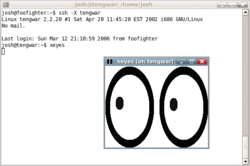
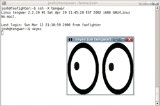
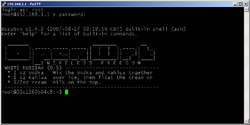 SSH is a protocol that can be used for many applications across many platforms including Unix
, Microsoft Windows
, Apple's Mac OS X
, and Linux
. Some of the applications below may require features that are only available or compatible with specific SSH clients or servers. For example, using the SSH protocol to implement a VPN is possible, but presently only with the OpenSSH
server and client implementation.
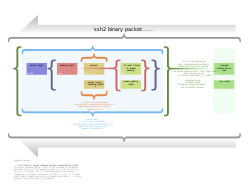 The SSH-2 protocol has an internal architecture (defined in RFC 4251) with well-separated layers. These are:
This open architecture provides considerable flexibility, allowing SSH to be used for a variety of purposes beyond a secure shell. The functionality of the transport layer alone is comparable to Transport Layer Security
(TLS); the user authentication layer is highly extensible with custom authentication methods; and the connection layer provides the ability to multiplex many secondary sessions into a single SSH connection, a feature comparable to BEEP
and not available in TLS.
Secure channel
In cryptography, a secure channel is a way of transferring data that is resistant to interception and tampering.A confidential channel is a way of transferring data that is resistant to interception, but not necessarily resistant to tampering....
over an insecure network: a server and a client (running SSH server and SSH client programs, respectively). The protocol specification distinguishes two major versions that are referred to as SSH-1 and SSH-2.
The best-known application of the protocol is for access to shell account
Shell account
A shell account is a user account on a remote server which gives access to a shell via a command-line interface protocol such as telnet or ssh....
s on Unix-like
Unix-like
A Unix-like operating system is one that behaves in a manner similar to a Unix system, while not necessarily conforming to or being certified to any version of the Single UNIX Specification....
operating systems. It was designed as a replacement for Telnet
TELNET
Telnet is a network protocol used on the Internet or local area networks to provide a bidirectional interactive text-oriented communications facility using a virtual terminal connection...
and other insecure
Computer security
Computer security is a branch of computer technology known as information security as applied to computers and networks. The objective of computer security includes protection of information and property from theft, corruption, or natural disaster, while allowing the information and property to...
remote shell
Shell (computing)
A shell is a piece of software that provides an interface for users of an operating system which provides access to the services of a kernel. However, the term is also applied very loosely to applications and may include any software that is "built around" a particular component, such as web...
protocols such as the Berkeley rsh
Remote Shell
The remote shell is a command line computer program that can execute shell commands as another user, and on another computer across a computer network.The remote system to which rsh connects runs the rshd daemon...
and rexec
Remote Process Execution
rexec has the same kind of functionality that rsh has : you can execute shell commands on a remote computer.The main difference is that rexecd authenticates by reading the username and password from the socket.- Limitations :...
protocols, which send information, notably password
Password
A password is a secret word or string of characters that is used for authentication, to prove identity or gain access to a resource . The password should be kept secret from those not allowed access....
s, in plaintext
Plaintext
In cryptography, plaintext is information a sender wishes to transmit to a receiver. Cleartext is often used as a synonym. Before the computer era, plaintext most commonly meant message text in the language of the communicating parties....
, rendering them susceptible to interception and disclosure using packet analysis. The encryption
Encryption
In cryptography, encryption is the process of transforming information using an algorithm to make it unreadable to anyone except those possessing special knowledge, usually referred to as a key. The result of the process is encrypted information...
used by SSH is intended to provide confidentiality and integrity of data over an unsecured network, such as the Internet
Internet
The Internet is a global system of interconnected computer networks that use the standard Internet protocol suite to serve billions of users worldwide...
.
Definition
SSH uses public-key cryptographyPublic-key cryptography
Public-key cryptography refers to a cryptographic system requiring two separate keys, one to lock or encrypt the plaintext, and one to unlock or decrypt the cyphertext. Neither key will do both functions. One of these keys is published or public and the other is kept private...
to authenticate
Authentication
Authentication is the act of confirming the truth of an attribute of a datum or entity...
the remote computer and allow it to authenticate the user, if necessary. Anyone can produce a matching pair of different keys (public and private). The public key is placed on all computers that must allow access to the owner of the matching private key (the owner keeps the private key secret). While authentication is based on the private key, the key itself is never transferred through the network during authentication.
SSH only verifies if the same person offering the public key also owns the matching private key. Hence, in all versions of SSH it is important to verify unknown public keys before accepting them as valid. Accepting an attacker's public key without validation would simply authorize an unauthorized attacker as a valid user.
Key management
On Unix-likeUnix-like
A Unix-like operating system is one that behaves in a manner similar to a Unix system, while not necessarily conforming to or being certified to any version of the Single UNIX Specification....
systems, the list of authorized keys is stored in the home folder of the user that is allowed to log in remotely, in the file ~/.ssh/authorized_keys. This file is only respected by ssh if it is not writable by anything apart from the owner and root. When the public key is present on one side and the matching private key is present on another side, typing in the password is no longer required (some software like MPI
Message Passing Interface
Message Passing Interface is a standardized and portable message-passing system designed by a group of researchers from academia and industry to function on a wide variety of parallel computers...
stack may need this password-less access to run properly). However, for additional security the private key itself can be locked with a passphrase.
The private key can also be looked for in standard places, but its full path can also be specified as a command line setting (the switch -i for ssh). The ssh-keygen
Ssh-keygen
SSH-Keygen is a Unix utility that is used to generate, manage, and convert authentication keys for ssh authentication. With the help of the SSH-Keygen tool, a user can create passphrase keys for both SSH protocol version 1 and version 2...
utility produces the public and private keys, always in pairs.
SSH also supports password-based authentication that is encrypted by automatically generated keys. In this case the attacker could imitate the legitimate side, ask for the password and obtain it (man-in-the-middle attack
Man-in-the-middle attack
In cryptography, the man-in-the-middle attack , bucket-brigade attack, or sometimes Janus attack, is a form of active eavesdropping in which the attacker makes independent connections with the victims and relays messages between them, making them believe that they are talking directly to each other...
). However this is only possible if the two sides have never authenticated before, as SSH remembers the key that the remote side once used. Password authentication can be disabled.
Usage
SSH is typically used to log into a remote machine and execute commands, but it also supports tunnelingTunneling protocol
Computer networks use a tunneling protocol when one network protocol encapsulates a different payload protocol...
, forwarding
Port forwarding
Port forwarding or port mapping is a name given to the combined technique of# translating the address and/or port number of a packet to a new destination# possibly accepting such packet in a packet filter...
TCP ports
TCP and UDP port
In computer networking, a port is an application-specific or process-specific software construct serving as a communications endpoint in a computer's host operating system. A port is associated with an IP address of the host, as well as the type of protocol used for communication...
and X11 connections; it can transfer files using the associated SSH file transfer
SSH file transfer protocol
In computing, the SSH File Transfer Protocol is a network protocol that provides file access, file transfer, and file management functionality over any reliable data stream...
(SFTP) or secure copy
Secure copy
Secure Copy or SCP is a means of securely transferring computer files between a local and a remote host or between two remote hosts. It is based on the Secure Shell protocol....
(SCP) protocols. SSH uses the client-server
Client-server
The client–server model of computing is a distributed application that partitions tasks or workloads between the providers of a resource or service, called servers, and service requesters, called clients. Often clients and servers communicate over a computer network on separate hardware, but both...
model.
The standard TCP port 22 has been assigned for contacting SSH servers, though administrators frequently change it to a non-standard port as an additional security measure.
An SSH client
Client (computing)
A client is an application or system that accesses a service made available by a server. The server is often on another computer system, in which case the client accesses the service by way of a network....
program is typically used for establishing connections to an SSH daemon
Daemon (computer software)
In Unix and other multitasking computer operating systems, a daemon is a computer program that runs as a background process, rather than being under the direct control of an interactive user...
accepting remote connections. Both are commonly present on most modern operating systems, including Mac OS X
Mac OS X
Mac OS X is a series of Unix-based operating systems and graphical user interfaces developed, marketed, and sold by Apple Inc. Since 2002, has been included with all new Macintosh computer systems...
, most distributions of GNU/Linux, OpenBSD
OpenBSD
OpenBSD is a Unix-like computer operating system descended from Berkeley Software Distribution , a Unix derivative developed at the University of California, Berkeley. It was forked from NetBSD by project leader Theo de Raadt in late 1995...
, FreeBSD
FreeBSD
FreeBSD is a free Unix-like operating system descended from AT&T UNIX via BSD UNIX. Although for legal reasons FreeBSD cannot be called “UNIX”, as the direct descendant of BSD UNIX , FreeBSD’s internals and system APIs are UNIX-compliant...
, Solaris and OpenVMS
OpenVMS
OpenVMS , previously known as VAX-11/VMS, VAX/VMS or VMS, is a computer server operating system that runs on VAX, Alpha and Itanium-based families of computers. Contrary to what its name suggests, OpenVMS is not open source software; however, the source listings are available for purchase...
. Proprietary
Proprietary software
Proprietary software is computer software licensed under exclusive legal right of the copyright holder. The licensee is given the right to use the software under certain conditions, while restricted from other uses, such as modification, further distribution, or reverse engineering.Complementary...
, freeware
Freeware
Freeware is computer software that is available for use at no cost or for an optional fee, but usually with one or more restricted usage rights. Freeware is in contrast to commercial software, which is typically sold for profit, but might be distributed for a business or commercial purpose in the...
and open source
Open-source software
Open-source software is computer software that is available in source code form: the source code and certain other rights normally reserved for copyright holders are provided under a software license that permits users to study, change, improve and at times also to distribute the software.Open...
versions of various levels of complexity and completeness exist.
Version 1.x
In 1995, Tatu Ylönen, a researcher at Helsinki University of TechnologyHelsinki University of Technology
Aalto University School of Science and Technology , was the temporary name for Helsinki University of Technology during the process of forming the Aalto University...
, Finland, designed the first version of the protocol (now called SSH-1) prompted by a password-sniffing attack at his university network. The goal of SSH was to replace the earlier rlogin
Rlogin
rlogin is a software utility for Unix-like computer operating systems that allows users to log in on another host via a network, communicating via TCP port 513.It was first distributed as part of the 4.2BSD release....
, TELNET
TELNET
Telnet is a network protocol used on the Internet or local area networks to provide a bidirectional interactive text-oriented communications facility using a virtual terminal connection...
and rsh
Remote Shell
The remote shell is a command line computer program that can execute shell commands as another user, and on another computer across a computer network.The remote system to which rsh connects runs the rshd daemon...
protocols, which did not provide strong authentication nor guarantee confidentiality. Ylönen released his implementation as freeware
Freeware
Freeware is computer software that is available for use at no cost or for an optional fee, but usually with one or more restricted usage rights. Freeware is in contrast to commercial software, which is typically sold for profit, but might be distributed for a business or commercial purpose in the...
in July 1995, and the tool quickly gained in popularity. Towards the end of 1995, the SSH user base had grown to 20,000 users in fifty countries.
In December 1995, Ylönen founded SSH Communications Security
SSH Communications Security
SSH Communications Security' is a Finnish company that is based in Helsinki and was founded by Tatu Ylönen in 1995. It is known as the original developer of the Secure Shell protocol and it currently has about 55 employees. The company's current CEO is Tatu Ylönen...
to market and develop SSH. The original version of the SSH software used various pieces of free software
Free software
Free software, software libre or libre software is software that can be used, studied, and modified without restriction, and which can be copied and redistributed in modified or unmodified form either without restriction, or with restrictions that only ensure that further recipients can also do...
, such as GNU libgmp
GNU Multi-Precision Library
The GNU Multiple Precision Arithmetic Library, also known as GMP, is a free library for arbitrary-precision arithmetic, operating on signed integers, rational numbers, and floating point numbers...
, but later versions released by SSH Secure Communications evolved into increasingly proprietary software
Proprietary software
Proprietary software is computer software licensed under exclusive legal right of the copyright holder. The licensee is given the right to use the software under certain conditions, while restricted from other uses, such as modification, further distribution, or reverse engineering.Complementary...
.
It is estimated that, , there were 2 million users of SSH.
Notable vulnerabilities
In 1998 a vulnerability was described in SSH 1.5 which allowed the unauthorized insertion of content into an encrypted SSH stream due to insufficient data integrity protection from CRC-32 used in this version of the protocol. A fix known as SSH Compensation Attack Detector was introduced into most implementations. Many of these updated implementations contained a new integer overflow vulnerability that allowed attackers to execute arbitrary code with the privileges of the SSH daemon, typically root.In January 2001 a vulnerability was discovered that allows attackers to modify the last block of an IDEA-encrypted session. The same month, another vulnerability was discovered that allowed a malicious server to forward a client authentication to another server.
Since SSH-1 has inherent design flaws which make it vulnerable, it is now generally considered obsolete and should be avoided by explicitly disabling fallback to SSH-1. Most modern servers and clients support SSH-2.
Version 1.99
In January 2006, well after version 2.1 was established, RFC 4253 specified that an SSH server which supports both 2.0 and prior versions of SSH should identify its protoversion as 1.99. This is not an actual version but a method to identify backward compatibilityBackward compatibility
In the context of telecommunications and computing, a device or technology is said to be backward or downward compatible if it can work with input generated by an older device...
.
OpenSSH and OSSH
In 1999, developers wanting a free software version to be available went back to the older 1.2.12 release of the original SSH program, which was the last released under an open sourceOpen source
The term open source describes practices in production and development that promote access to the end product's source materials. Some consider open source a philosophy, others consider it a pragmatic methodology...
license. Björn Grönvall's OSSH was subsequently developed from this codebase. Shortly thereafter, OpenBSD
OpenBSD
OpenBSD is a Unix-like computer operating system descended from Berkeley Software Distribution , a Unix derivative developed at the University of California, Berkeley. It was forked from NetBSD by project leader Theo de Raadt in late 1995...
developers fork
Fork (software development)
In software engineering, a project fork happens when developers take a legal copy of source code from one software package and start independent development on it, creating a distinct piece of software...
ed Grönvall's code and did extensive work on it, creating OpenSSH
OpenSSH
OpenSSH is a set of computer programs providing encrypted communication sessions over a computer network using the SSH protocol...
, which shipped with the 2.6 release of OpenBSD. From this version, a "portability" branch was formed to port OpenSSH to other operating systems. , OpenSSH
OpenSSH
OpenSSH is a set of computer programs providing encrypted communication sessions over a computer network using the SSH protocol...
was the single most popular SSH implementation, coming by default in a large number of operating systems. OSSH meanwhile has become obsolete. OpenSSH continued to be maintained and now supports both 1.x and 2.0 versions.
Version 2.x
"Secsh" was the official Internet Engineering Task Force'sInternet Engineering Task Force
The Internet Engineering Task Force develops and promotes Internet standards, cooperating closely with the W3C and ISO/IEC standards bodies and dealing in particular with standards of the TCP/IP and Internet protocol suite...
(IETF) name for the IETF working group responsible for version 2 of the SSH protocol. In 2006, a revised version of the protocol, SSH-2, was adopted as a standard. This version is incompatible with SSH-1. SSH-2 features both security and feature improvements over SSH-1. Better security, for example, comes through Diffie-Hellman key exchange
Diffie-Hellman key exchange
Diffie–Hellman key exchange Synonyms of Diffie–Hellman key exchange include:*Diffie–Hellman key agreement*Diffie–Hellman key establishment*Diffie–Hellman key negotiation...
and strong integrity
Integrity
Integrity is a concept of consistency of actions, values, methods, measures, principles, expectations, and outcomes. In ethics, integrity is regarded as the honesty and truthfulness or accuracy of one's actions...
checking via message authentication code
Message authentication code
In cryptography, a message authentication code is a short piece of information used to authenticate a message.A MAC algorithm, sometimes called a keyed hash function, accepts as input a secret key and an arbitrary-length message to be authenticated, and outputs a MAC...
s. New features of SSH-2 include the ability to run any number of shell
Shell (computing)
A shell is a piece of software that provides an interface for users of an operating system which provides access to the services of a kernel. However, the term is also applied very loosely to applications and may include any software that is "built around" a particular component, such as web...
sessions over a single SSH connection.
Vulnerabilities
In November 2008, a vulnerability was discovered for all versions of SSH which allowed recovery of up to 32 bits of plaintext from a block of ciphertext that was encrypted using what was then the standard default encryption mode, CBC.Internet standard documentation
The following RFCRequest for Comments
In computer network engineering, a Request for Comments is a memorandum published by the Internet Engineering Task Force describing methods, behaviors, research, or innovations applicable to the working of the Internet and Internet-connected systems.Through the Internet Society, engineers and...
publications by the IETF "secsh" working group
Working group
A working group is an interdisciplinary collaboration of researchers working on new research activities that would be difficult to develop under traditional funding mechanisms . The lifespan of the WG can last anywhere between a few months and several years...
document SSH-2 as a proposed Internet standard
Internet standard
In computer network engineering, an Internet Standard is a normative specification of a technology or methodology applicable to the Internet. Internet Standards are created and published by the Internet Engineering Task Force .-Overview:...
.
- RFC 4250, The Secure Shell (SSH) Protocol Assigned Numbers
- RFC 4251, The Secure Shell (SSH) Protocol Architecture
- RFC 4252, The Secure Shell (SSH) Authentication Protocol
- RFC 4253, The Secure Shell (SSH) Transport Layer Protocol
- RFC 4254, The Secure Shell (SSH) Connection Protocol
- RFC 4255, Using DNS to Securely Publish Secure Shell (SSH) Key Fingerprints
- RFC 4256, Generic Message Exchange Authentication for the Secure Shell Protocol (SSH)
- RFC 4335, The Secure Shell (SSH) Session Channel Break Extension
- RFC 4344, The Secure Shell (SSH) Transport Layer Encryption Modes
- RFC 4345, Improved Arcfour Modes for the Secure Shell (SSH) Transport Layer Protocol
It was later modified and expanded by the following publications.
- RFC 4419, Diffie-Hellman Group Exchange for the Secure Shell (SSH) Transport Layer Protocol (March 2006)
- RFC 4432, RSA Key Exchange for the Secure Shell (SSH) Transport Layer Protocol (March 2006)
- RFC 4462, Generic Security Service Application Program Interface (GSS-API) Authentication and Key Exchange for the Secure Shell (SSH) Protocol (May 2006)
- RFC 4716, The Secure Shell (SSH) Public Key File Format (November 2006)
- RFC 5656, Elliptic Curve Algorithm Integration in the Secure Shell Transport Layer (December 2009)
Uses
Unix
Unix is a multitasking, multi-user computer operating system originally developed in 1969 by a group of AT&T employees at Bell Labs, including Ken Thompson, Dennis Ritchie, Brian Kernighan, Douglas McIlroy, and Joe Ossanna...
, Microsoft Windows
Microsoft Windows
Microsoft Windows is a series of operating systems produced by Microsoft.Microsoft introduced an operating environment named Windows on November 20, 1985 as an add-on to MS-DOS in response to the growing interest in graphical user interfaces . Microsoft Windows came to dominate the world's personal...
, Apple's Mac OS X
Mac OS X
Mac OS X is a series of Unix-based operating systems and graphical user interfaces developed, marketed, and sold by Apple Inc. Since 2002, has been included with all new Macintosh computer systems...
, and Linux
Linux
Linux is a Unix-like computer operating system assembled under the model of free and open source software development and distribution. The defining component of any Linux system is the Linux kernel, an operating system kernel first released October 5, 1991 by Linus Torvalds...
. Some of the applications below may require features that are only available or compatible with specific SSH clients or servers. For example, using the SSH protocol to implement a VPN is possible, but presently only with the OpenSSH
OpenSSH
OpenSSH is a set of computer programs providing encrypted communication sessions over a computer network using the SSH protocol...
server and client implementation.
- For login to a shell on a remote host (replacing TelnetTELNETTelnet is a network protocol used on the Internet or local area networks to provide a bidirectional interactive text-oriented communications facility using a virtual terminal connection...
and rloginRloginrlogin is a software utility for Unix-like computer operating systems that allows users to log in on another host via a network, communicating via TCP port 513.It was first distributed as part of the 4.2BSD release....
) - For executing a single command on a remote host (replacing rshRemote ShellThe remote shell is a command line computer program that can execute shell commands as another user, and on another computer across a computer network.The remote system to which rsh connects runs the rshd daemon...
) - Secure file transfer
- In combination with rsyncRsyncrsync is a software application and network protocol for Unix-like and Windows systems which synchronizes files and directories from one location to another while minimizing data transfer using delta encoding when appropriate. An important feature of rsync not found in most similar...
to back up, copy and mirror files efficiently and securely - For forwardingPort forwardingPort forwarding or port mapping is a name given to the combined technique of# translating the address and/or port number of a packet to a new destination# possibly accepting such packet in a packet filter...
or tunnelingTunneling protocolComputer networks use a tunneling protocol when one network protocol encapsulates a different payload protocol...
a port (not to be confused with a VPN which routes packets between different networks or bridges two broadcast domainBroadcast domainA broadcast domain is a logical division of a computer network, in which all nodes can reach each other by broadcast at the data link layer. A broadcast domain can be within the same LAN segment or it can be bridged to other LAN segments....
s into one). - For using as a full-fledged encrypted VPN. Note that only OpenSSHOpenSSHOpenSSH is a set of computer programs providing encrypted communication sessions over a computer network using the SSH protocol...
server and client supports this feature. - For forwarding XX Window SystemThe X window system is a computer software system and network protocol that provides a basis for graphical user interfaces and rich input device capability for networked computers...
from a remote hostHost (network)A network host is a computer connected to a computer network. A network host may offer information resources, services, and applications to users or other nodes on the network. A network host is a network node that is assigned a network layer host address....
(possible through multiple intermediate hosts) - For browsing the web through an encrypted proxy connection with SSH clients that support the SOCKS protocolSOCKSSOCKS is an Internet protocol that routes network packets between a client and server through a proxy server. SOCKS5 additionally provides authentication so only authorized users may access a server...
. - For securely mounting a directory on a remote server as a filesystemFile systemA file system is a means to organize data expected to be retained after a program terminates by providing procedures to store, retrieve and update data, as well as manage the available space on the device which contain it. A file system organizes data in an efficient manner and is tuned to the...
on a local computer using SSHFSSSHFSIn computing, SSHFS is a filesystem client to mount and interact with directories and files located on a remote server or workstation...
. - For automated remote monitoring and management of servers through one or more of the mechanisms discussed above.
- For development on a mobile or embedded device that supports SSH.
File transfer protocols using SSH
There are multiple mechanisms for transferring files using the Secure Shell protocols.- Secure copySecure copySecure Copy or SCP is a means of securely transferring computer files between a local and a remote host or between two remote hosts. It is based on the Secure Shell protocol....
(SCP), which evolved from RCPRcp (Unix)rcp stands for the Unix 'remote copy' command. It is a command on the Unix operating systems that is used to remotely copy—to copy one or more files from one computer system to another...
protocol over SSH - SSH File Transfer ProtocolSSH file transfer protocolIn computing, the SSH File Transfer Protocol is a network protocol that provides file access, file transfer, and file management functionality over any reliable data stream...
(SFTP), a secure alternative to FTPFile Transfer ProtocolFile Transfer Protocol is a standard network protocol used to transfer files from one host to another host over a TCP-based network, such as the Internet. FTP is built on a client-server architecture and utilizes separate control and data connections between the client and server...
(not to be confused with FTP over SSH) - Files transferred over shell protocol (a.k.a. FISH), released in 1998, which evolved from Unix shellUnix shellA Unix shell is a command-line interpreter or shell that provides a traditional user interface for the Unix operating system and for Unix-like systems...
commands over SSH
Architecture
- The transport layer (RFC 4253). This layer handles initial key exchange as well as server authentication, and sets up encryption, compression and integrity verification. It exposes to the upper layer an interface for sending and receiving plaintext packets with sizes of up to 32,768 bytes each (more can be allowed by the implementation). The transport layer also arranges for key re-exchange, usually after 1 GB of data has been transferred or after 1 hour has passed, whichever is sooner.
- The user authentication layer (RFC 4252). This layer handles client authentication and provides a number of authentication methods. Authentication is client-driven: when one is prompted for a password, it may be the SSH client prompting, not the server. The server merely responds to the client's authentication requests. Widely used user authentication methods include the following:
- password: a method for straightforward password authentication, including a facility allowing a password to be changed. This method is not implemented by all programs.
- publickey: a method for public key-based authenticationPublic-key cryptographyPublic-key cryptography refers to a cryptographic system requiring two separate keys, one to lock or encrypt the plaintext, and one to unlock or decrypt the cyphertext. Neither key will do both functions. One of these keys is published or public and the other is kept private...
, usually supporting at least DSADigital Signature AlgorithmThe Digital Signature Algorithm is a United States Federal Government standard or FIPS for digital signatures. It was proposed by the National Institute of Standards and Technology in August 1991 for use in their Digital Signature Standard , specified in FIPS 186, adopted in 1993. A minor...
or RSA keypairs, with other implementations also supporting X.509X.509In cryptography, X.509 is an ITU-T standard for a public key infrastructure and Privilege Management Infrastructure . X.509 specifies, amongst other things, standard formats for public key certificates, certificate revocation lists, attribute certificates, and a certification path validation...
certificates. - keyboard-interactive (RFC 4256): a versatile method where the server sends one or more prompts to enter information and the client displays them and sends back responses keyed-in by the user. Used to provide one-time passwordOne-time passwordA one-time password is a password that is valid for only one login session or transaction. OTPs avoid a number of shortcomings that are associated with traditional passwords. The most important shortcoming that is addressed by OTPs is that, in contrast to static passwords, they are not vulnerable...
authentication such as S/KeyS/KEYS/KEY is a one-time password system developed for authentication to Unix-like operating systems, especially from dumb terminals or untrusted public computers on which one does not want to type a long-term password. A user's real password is combined in an offline device with a short set of...
or SecurIDSecurIDSecurID, now known as RSA SecurID, is a mechanism developed by Security Dynamics for performing two-factor authentication for a user to a network resource.- Description :...
. Used by some OpenSSH configurations when PAMPluggable Authentication ModulesPluggable authentication modules are a mechanism to integrate multiple low-level authentication schemes into a high-level application programming interface . It allows programs that rely on authentication to be written independent of the underlying authentication scheme...
is the underlying host authentication provider to effectively provide password authentication, sometimes leading to inability to log in with a client that supports just the plain password authentication method. - GSSAPIGeneric Security Services Application Program InterfaceThe Generic Security Services Application Program Interface is an application programming interface for programs to access security services....
authentication methods which provide an extensible scheme to perform SSH authentication using external mechanisms such as Kerberos 5 or NTLMNTLMIn a Windows network, NTLM is a suite of Microsoft security protocols that provides authentication, integrity, and confidentiality to users....
, providing single sign on capability to SSH sessions. These methods are usually implemented by commercial SSH implementations for use in organizations, though OpenSSH does have a working GSSAPI implementation.
- The connection layer (RFC 4254). This layer defines the concept of channels, channel requests and global requests using which SSH services are provided. A single SSH connection can host multiple channels simultaneously, each transferring data in both directions. Channel requests are used to relay out-of-band channel specific data, such as the changed size of a terminal window or the exit code of a server-side process. The SSH client requests a server-side port to be forwarded using a global request. Standard channel types include:
- shell for terminal shells, SFTP and exec requests (including SCP transfers)
- direct-tcpip for client-to-server forwarded connections
- forwarded-tcpip for server-to-client forwarded connections
- The SSHFP DNS record (RFC 4255) provides the public host key fingerprints in order to aid in verifying the authenticity of the host.
This open architecture provides considerable flexibility, allowing SSH to be used for a variety of purposes beyond a secure shell. The functionality of the transport layer alone is comparable to Transport Layer Security
Transport Layer Security
Transport Layer Security and its predecessor, Secure Sockets Layer , are cryptographic protocols that provide communication security over the Internet...
(TLS); the user authentication layer is highly extensible with custom authentication methods; and the connection layer provides the ability to multiplex many secondary sessions into a single SSH connection, a feature comparable to BEEP
BEEP
In computer networking, BEEP is a framework for creating network application protocols. It includes an application protocol kernel for connection-oriented asynchronous interactions, and can be used both for binary and text messages within the context of a single application user identity.BEEP is...
and not available in TLS.
New enhancements to SSH
These are geared towards performance enhancements of SSH products:- SCTP: an enhancement over TCP for connection oriented transport layer protocol.
- ECDSA: an enhancement over DSA or RSA for signing.
- ECDH: an enhancement over DH (Plain Diffie Hellman KEX) for encryption key exchange.
- UMAC: an enhancement over HMAC for MAC/integrity.
See also
- IdentIdentThe Ident Protocol, specified in RFC 1413, is an Internet protocol that helps identify the user of a particular TCP connection. One popular daemon program for providing the ident service is identd.-How ident works:...
- Web-based SSHWeb-based SSHWeb-based SSH makes it possible to access Secure Shell servers through standard web browsers. Respective clients are based on JavaScript/Ajax and can be used to anonymously access SSH servers from behind any firewall or proxy.-Technology:...
– Access to SSH servers through standard web browsers - AutosshAutosshAutossh is a program to start a copy of SSH and monitor it, restarting it as necessary should it die or stop passing traffic. The original idea and the mechanism were inspired by RSTunnel...
- a tool to maintain a constant SSH connection, restarting it as necessary - Comparison of SSH clientsComparison of SSH clientsAn SSH client is a software program which uses the secure shell protocol to connect to a remote computer. This article compares a selection of popular clients.-General:-Platform:...
- Comparison of SSH serversComparison of SSH serversAn SSH server is a software program which uses the secure shell protocol to accept connections from remote computers. This article compares a selection of popular servers.-General:-Platform:...
- CorkscrewCorkscrew (program)Corkscrew is a program enables the user to tunnel arbitrary TCP connections through most HTTP and HTTPS proxy servers. Combined with features of SSH such as port forwarding, this can allow many types of services to be run securely over the SSH via HTTP connections.Supported proxy servers:*...
– a tool that enables a user to run SSH over HTTPSHttpsHypertext Transfer Protocol Secure is a combination of the Hypertext Transfer Protocol with SSL/TLS protocol to provide encrypted communication and secure identification of a network web server...
proxy serverProxy serverIn computer networks, a proxy server is a server that acts as an intermediary for requests from clients seeking resources from other servers. A client connects to the proxy server, requesting some service, such as a file, connection, web page, or other resource available from a different server...
s
Further reading
- Daniel J. BarrettDaniel J. BarrettDaniel J. Barrett is a writer, software engineer, and musician. He is best known for his technology books, his work with progressive rock band Gentle Giant, and the imaginary computer game BLAZEMONGER.-Writing:...
, Richard E. Silverman, and Robert G. Byrnes, SSH: The Secure Shell (The Definitive Guide), O'Reilly 2005 (2nd edition). ISBN 0-596-00895-3 - Michael Stahnke, Pro OpenSSH, Apress 2005 ISBN 1-59059-476-2 Original announcement of Ssh
- Himanshu Dwivedi; Implementing SSH, Wiley 2003. ISBN 978-0-471-45880-7